
Custom Entity Attributes (CEA)
Change entity attributes globally, per dimension, biome, difficulty, or time. With % chances too!
Über diese Mod
What's CEA?
Custom Entity Attributes allows you to add attribute modifiers to entities, either globally or based on various conditions, such as the dimension the entity is in, the biome, world's difficulty, time, and more. It even includes a percentile chance of the attribute applying, making randomness possible.
Want this but for items? Check out Custom Item Attributes (CIA)
With this mod, you can:
- Make any mob or boss stronger, or weaker.
- Make entities have different attributes in a specific dimension or biome.
- Make entities have a small chance of having extra attributes, giving some variation to all entities.
- Make baby versions of mobs be faster and stronger but have less health.
...and more! It's all up to your creativity, as attributes are really powerful!
Requires Necronomicon 1.6.0+
Also requires Connector in Forge
⭐ Features ⭐
Basic & Advanced Config.
You can either use the basic config, or go all in with the advanced features!Regex Support.
Want to edit the attributes of multiple entities at once, or even ALL entities? You can!Apply Chances.
Apply each attribute modifier with a chance, for example, add 20% chance of mobs having 10% more max HP!Time Based Config.
Want to make mobs stronger at night? Slower during the day? It’s up to you!Per Dimension Config.
With CEA, you can make all mobs from a specific dimension stronger or weaker.Per Biome Config.
Feel like a specific biome needs something extra? Why not make monsters stronger there?Per Difficulty Config.
Spice things up further by adding attributes depending on the difficulty, allowing you to nerf or buff and adjust stats to your liking!Default Health entity spawns with.
Some entities might spawn with less health than their max, but CEA can change that!
🧾 Configs 🧾
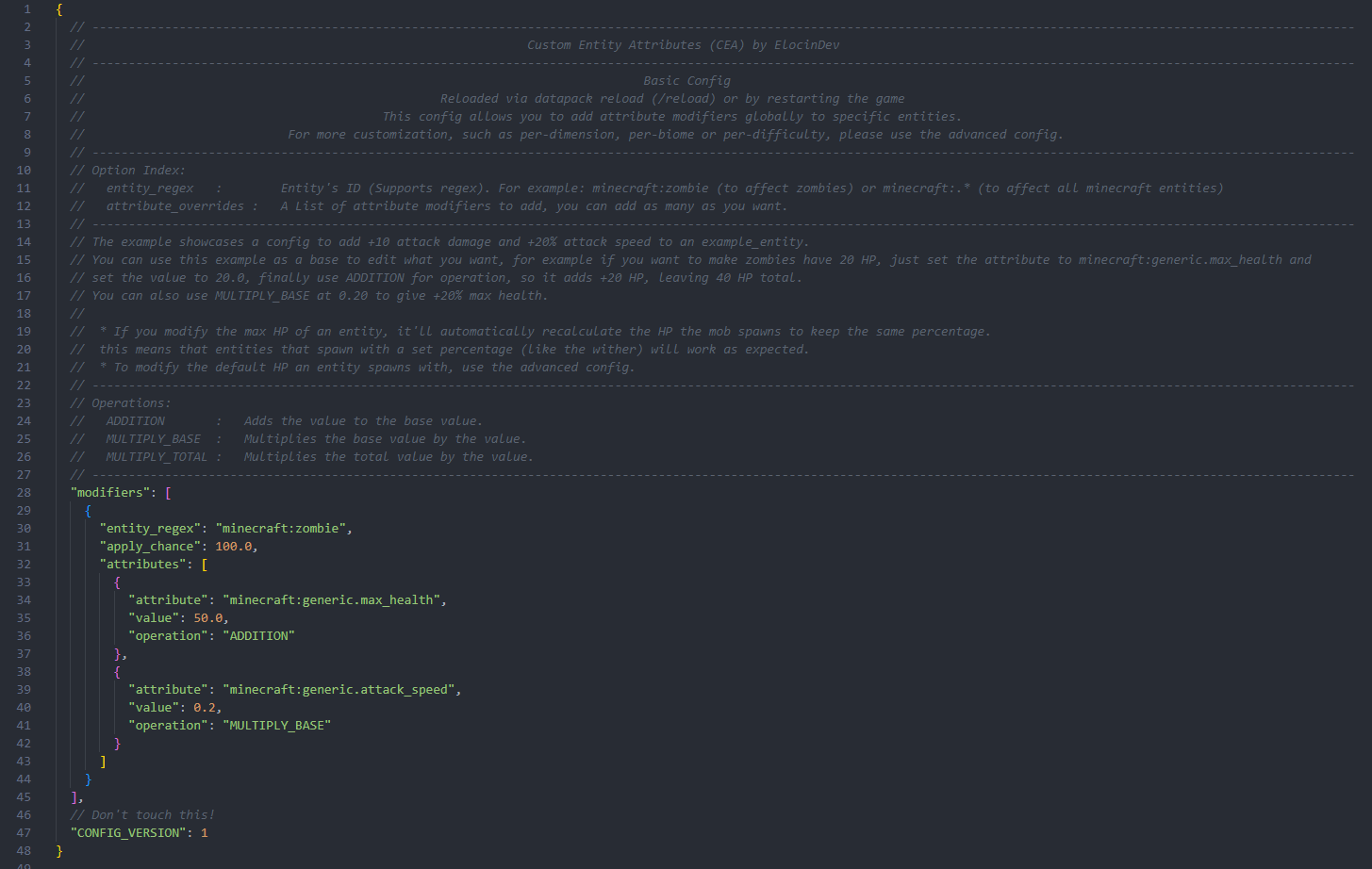
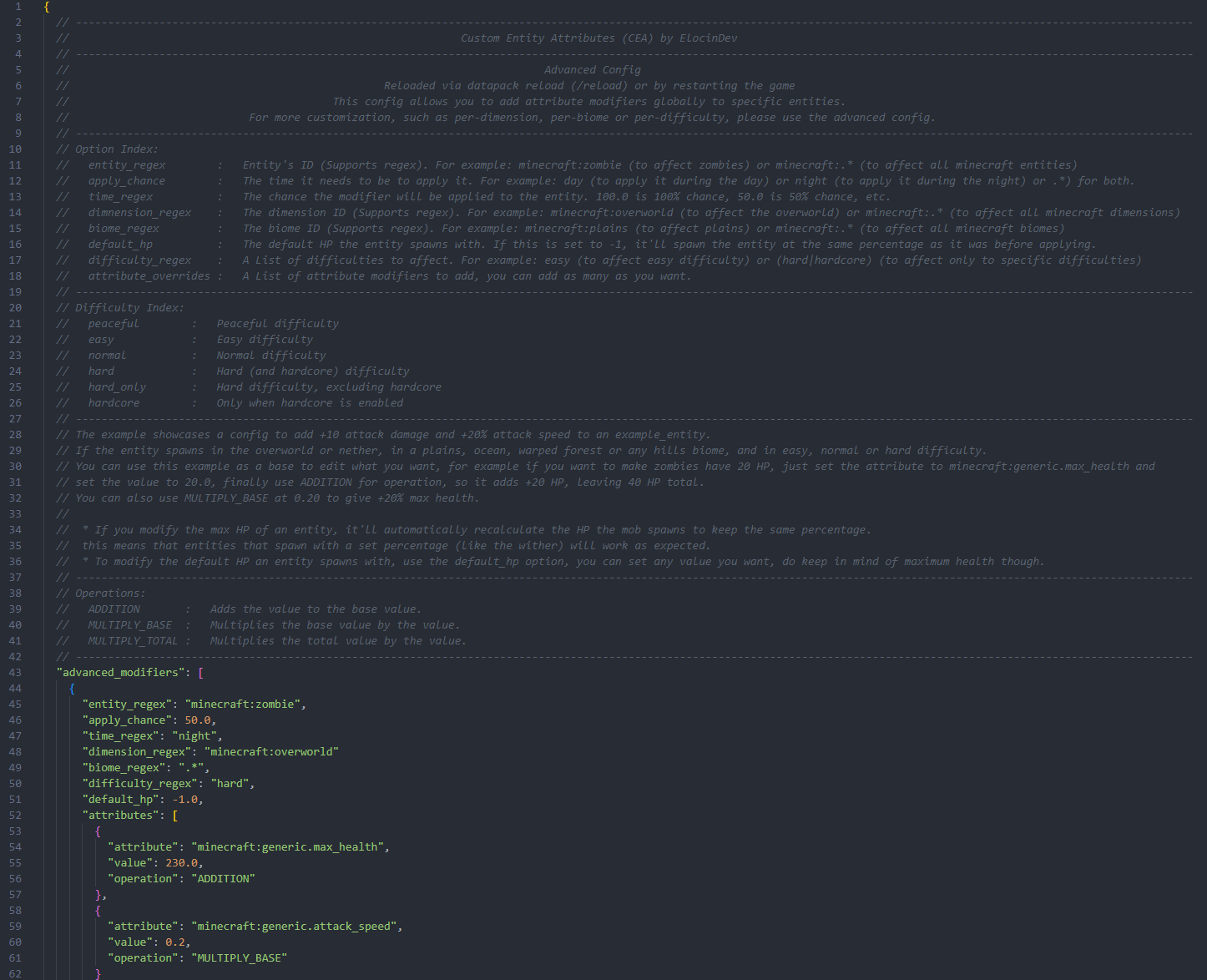
Both configs are fully documented and provide examples for you to base them on!
Basic
Advanced
Verfügbare Versionen
Custom Entity Attributes (CEA) auf dem Server installieren
Server bestellen
Bestelle einen Minecraft Java Server mit mindestens 3 GB RAM (4 GB empfohlen).
fabric Loader setzen
Wähle im Panel unter "Egg" den fabric-Loader und die passende Minecraft-Version (1.20.5).
Mod installieren
Öffne den Mod-Browser im Dashboard und suche nach "Custom Entity Attributes (CEA)". Klicke "Installieren" – fertig! Alternativ: Lade die .jar via SFTP in den /mods Ordner.
Kompatibilität
Mod-Loader
Minecraft-Versionen
1.20.5, 1.20.4, 1.20.3 (+2 weitere)
Server-seitig
✓ ErforderlichEmpfohlener RAM
4 GB(min. 3 GB)Häufige Fragen
Custom Entity Attributes (CEA) Server crasht beim Start – was tun?
Häufigste Ursache: falsche fabric-Version oder zu wenig RAM. Prüfe im Server-Log (latest.log), ob ein "OutOfMemoryError" oder "Mixin"-Fehler auftritt. Bei Mado Hosting: Stelle sicher, dass mindestens 3 GB RAM zugewiesen sind und der Loader zur Mod-Version passt (1.20.5). Über das Panel kannst du den Loader mit einem Klick wechseln.
Ist Custom Entity Attributes (CEA) mit fabric und forge kompatibel?
Custom Entity Attributes (CEA) unterstützt offiziell fabric, forge für Minecraft 1.20.5, 1.20.4, 1.20.3. Achtung: Forge- und Fabric-Mods sind NICHT untereinander kompatibel – wähle einen Loader und bleibe dabei. Im Mado Dashboard werden inkompatible Loader-Kombinationen automatisch erkannt.
Server laggt mit Custom Entity Attributes (CEA) – wie optimiere ich die Performance?
Empfohlener RAM: 4 GB (+1 GB pro 8 Spieler). Prüfe mit /spark profiler, ob Custom Entity Attributes (CEA) den meisten Tick-Time verbraucht. Häufige Fixes: Server-View-Distance auf 8-10 reduzieren, bei Forge "performant" oder "starlight" als Zusatz-Mod installieren. Bei Mado Hosting läuft dein Server auf NVMe-SSDs mit dedizierten CPU-Kernen für minimale Latenz.
Ähnliche Mods






Modded Server mieten
Installiere Custom Entity Attributes (CEA) mit nur einem Klick auf deinem Server.