
Coastal Waves
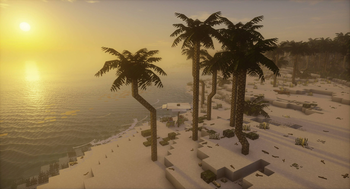
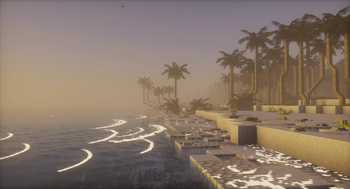
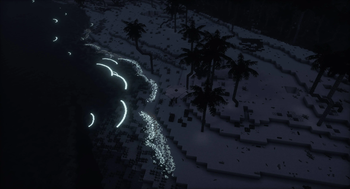
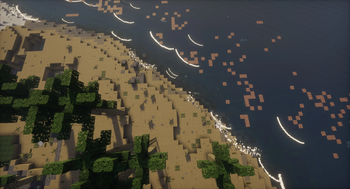
Adding breaking waves to the beaches!
Screenshots

Über diese Mod
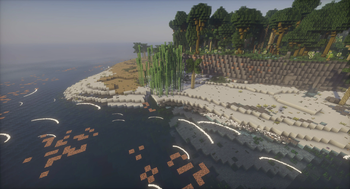
Ever thought to yourself "why has nobody ever added beach waves to Minecraft? What does it take?" Well, here it finally is! Transform your world with the new waves, which brings atmospheric and serene sounds of breaking waves to the beaches with the all new scenic waves. These waves aren't just for show — they have a chance to deposit useful materials on the beach and can interact with entities in their path, adding exciting new elements to your gameplay and a reason to visit them again. Whether you're exploring, building, or just enjoying the view, this enhances your game experience with the beauty and bounty of the ocean. Jump into the waves and discover what treasures they might bring!
The mod adds and uses the following tags, which can all be edited to your liking;
- for blocks:
waves:wave_blocks, list of blocks waves can deposit on the shore at random - for fluids:
waves:has_waves, list of fluids on which waves can spawn - for biomes:
waves:has_waves, list of biomes in which waves can spawn - for entities:
waves:wave_interaction_blacklist, list of entities blacklisted from wave interaction - for entities:
waves:wave_interaction_whitelist, list of entities whitelisted for wave interaction
The y-level at which waves spawn at, can be configured through json. Said json is found at ./config/waves/waves.json, and contains a default config for the vanilla dimensions.
For those that use minimap mods with entity radars and would like to hide the wave entities; the id of the wave entity is waves:waves.
Verfügbare Versionen
Coastal Waves auf dem Server installieren
Server bestellen
Bestelle einen Minecraft Java Server mit mindestens 3 GB RAM (4 GB empfohlen).
forge Loader setzen
Wähle im Panel unter "Egg" den forge-Loader und die passende Minecraft-Version (1.21.4).
Mod installieren
Öffne den Mod-Browser im Dashboard und suche nach "Coastal Waves". Klicke "Installieren" – fertig! Alternativ: Lade die .jar via SFTP in den /mods Ordner.
Kompatibilität
Mod-Loader
Minecraft-Versionen
1.21.4, 1.21.1, 1.21 (+1 weitere)
Server-seitig
✓ ErforderlichEmpfohlener RAM
4 GB(min. 3 GB)Häufige Fragen
Coastal Waves Server crasht beim Start – was tun?
Häufigste Ursache: falsche forge-Version oder zu wenig RAM. Prüfe im Server-Log (latest.log), ob ein "OutOfMemoryError" oder "Mixin"-Fehler auftritt. Bei Mado Hosting: Stelle sicher, dass mindestens 3 GB RAM zugewiesen sind und der Loader zur Mod-Version passt (1.21.4). Über das Panel kannst du den Loader mit einem Klick wechseln.
Ist Coastal Waves mit forge und neoforge kompatibel?
Coastal Waves unterstützt offiziell forge, neoforge für Minecraft 1.21.4, 1.21.1, 1.21. Im Mado Dashboard werden inkompatible Loader-Kombinationen automatisch erkannt.
Server laggt mit Coastal Waves – wie optimiere ich die Performance?
Empfohlener RAM: 4 GB (+1 GB pro 8 Spieler). Prüfe mit /spark profiler, ob Coastal Waves den meisten Tick-Time verbraucht. Häufige Fixes: Server-View-Distance auf 8-10 reduzieren, bei Forge "performant" oder "starlight" als Zusatz-Mod installieren. Bei Mado Hosting läuft dein Server auf NVMe-SSDs mit dedizierten CPU-Kernen für minimale Latenz.
Ähnliche Mods

![[ETF] Entity Texture Features](https://cdn.modrinth.com/data/BVzZfTc1/af683d206d50b05258d865b0d6e4aa2f2cee12f2_96.webp)
![[EMF] Entity Model Features](https://cdn.modrinth.com/data/4I1XuqiY/6e5bbd0d06b1741bfdab6c0cfab6de8fdaf0064c_96.webp)



Modded Server mieten
Installiere Coastal Waves mit nur einem Klick auf deinem Server.