
Coastal Waves
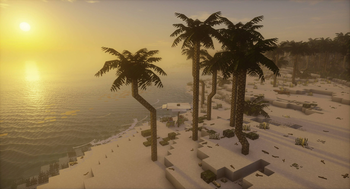
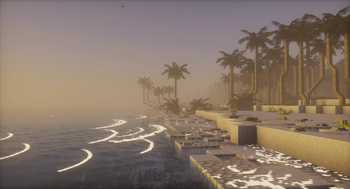
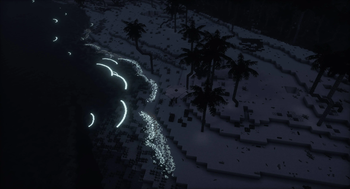
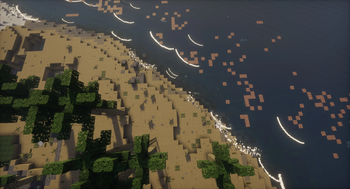
Adding breaking waves to the beaches!
Screenshots

About this Mod
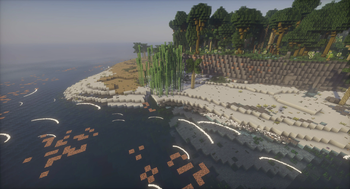
Ever thought to yourself "why has nobody ever added beach waves to Minecraft? What does it take?" Well, here it finally is! Transform your world with the new waves, which brings atmospheric and serene sounds of breaking waves to the beaches with the all new scenic waves. These waves aren't just for show — they have a chance to deposit useful materials on the beach and can interact with entities in their path, adding exciting new elements to your gameplay and a reason to visit them again. Whether you're exploring, building, or just enjoying the view, this enhances your game experience with the beauty and bounty of the ocean. Jump into the waves and discover what treasures they might bring!
The mod adds and uses the following tags, which can all be edited to your liking;
- for blocks:
waves:wave_blocks, list of blocks waves can deposit on the shore at random - for fluids:
waves:has_waves, list of fluids on which waves can spawn - for biomes:
waves:has_waves, list of biomes in which waves can spawn - for entities:
waves:wave_interaction_blacklist, list of entities blacklisted from wave interaction - for entities:
waves:wave_interaction_whitelist, list of entities whitelisted for wave interaction
The y-level at which waves spawn at, can be configured through json. Said json is found at ./config/waves/waves.json, and contains a default config for the vanilla dimensions.
For those that use minimap mods with entity radars and would like to hide the wave entities; the id of the wave entity is waves:waves.
Available Versions
How to Install Coastal Waves on Your Server
Order Server
Order a Minecraft Java server with at least 3 GB RAM (4 GB recommended).
Set forge Loader
In the panel under "Egg", select the forge loader and matching Minecraft version (1.21.4).
Install Mod
Open the mod browser in the dashboard and search for "Coastal Waves". Click "Install" – done! Alternatively, upload the .jar via SFTP to the /mods folder.
Compatibility
Mod Loaders
Minecraft Versions
1.21.4, 1.21.1, 1.21 (+1 more)
Server-side
✓ RequiredRecommended RAM
4 GB(min. 3 GB)Frequently Asked Questions
Coastal Waves server crashes on startup – what to do?
Most common cause: wrong forge version or insufficient RAM. Check the server log (latest.log) for "OutOfMemoryError" or "Mixin" errors. With Mado Hosting: ensure at least 3 GB RAM is allocated and the loader matches the mod version (1.21.4). You can switch loaders with one click in the panel.
Is Coastal Waves compatible with forge and neoforge?
Coastal Waves officially supports forge, neoforge for Minecraft 1.21.4, 1.21.1, 1.21. The Mado dashboard automatically detects incompatible loader combinations.
Server lagging with Coastal Waves – how to optimize performance?
Recommended RAM: 4 GB (per 8 players). Use /spark profiler to check if Coastal Waves consumes the most tick time. Common fixes: reduce server view-distance to 8-10, install "performant" or "starlight" as supplementary mods on Forge. With Mado Hosting, your server runs on NVMe SSDs with dedicated CPU cores for minimal latency.
Similar Mods

![[ETF] Entity Texture Features](https://cdn.modrinth.com/data/BVzZfTc1/af683d206d50b05258d865b0d6e4aa2f2cee12f2_96.webp)
![[EMF] Entity Model Features](https://cdn.modrinth.com/data/4I1XuqiY/6e5bbd0d06b1741bfdab6c0cfab6de8fdaf0064c_96.webp)



Rent Modded Server
Install Coastal Waves with just one click on your server.