![Connectible Chains [Fabric]](https://cdn.modrinth.com/data/ykSfIgTw/9a9673e5bff66ddfcd415587d8cabb47f11813c3_96.webp)
Connectible Chains [Fabric]
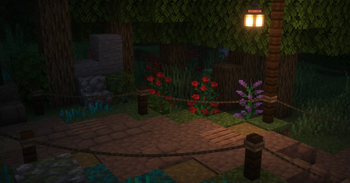
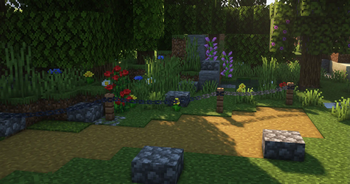
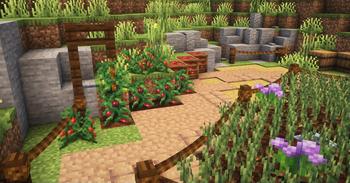
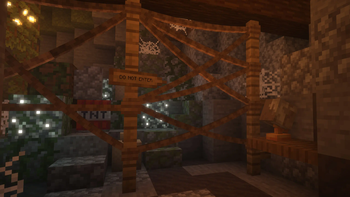
Connect your fences with a decorative chain!
Screenshots
Über diese Mod

Connect your fences and walls with a decorative chain!




Description
Connect your fences/walls with a decorative chain!
Use the normal vanilla chain item on fences, walls, or iron bars!
These chains have collision and can be broken when attacking it with a shear.
Sneak on fences if you want to place them normally.
Discontinued
After five years of updates, I’ve decided to stop maintaining the mod. I no longer enjoy working on it and rarely play Minecraft these days, so I will no longer update Connectible Chains. The source code remains open for anyone to fork and continue.
Maintained fork: evanbones/Reconnectible-Chains — The fork is independently maintained and is not affiliated with or endorsed by the original project.
Issues
If you have encountered any bugs or have some feedback, go to the GitHub issues page.
Version Support
I will not be supporting versions lower than 1.21.11
Compatibility with other mods
See the wiki on how to add support for other mods yourself with just a datapack and a resource pack.
Forge?
There is a forge port however I do not maintain it.
https://www.curseforge.com/minecraft/mc-mods/connectible-chains-forgeSinytra Connector might also work.
Other information
If there are invisible collisions for some reason, hold a shear while
having entity hitboxes on (F3+B) to see the collisions and then attack them to remove them.
Verfügbare Versionen
Connectible Chains [Fabric] auf dem Server installieren
Server bestellen
Bestelle einen Minecraft Java Server mit mindestens 3 GB RAM (4 GB empfohlen).
fabric Loader setzen
Wähle im Panel unter "Egg" den fabric-Loader und die passende Minecraft-Version (1.21.11).
Mod installieren
Öffne den Mod-Browser im Dashboard und suche nach "Connectible Chains [Fabric]". Klicke "Installieren" – fertig! Alternativ: Lade die .jar via SFTP in den /mods Ordner.
Kompatibilität
Mod-Loader
Minecraft-Versionen
1.21.11, 1.21.10, 1.21.9 (+24 weitere)
Server-seitig
✓ ErforderlichEmpfohlener RAM
4 GB(min. 3 GB)Häufige Fragen
Connectible Chains [Fabric] Server crasht beim Start – was tun?
Häufigste Ursache: falsche fabric-Version oder zu wenig RAM. Prüfe im Server-Log (latest.log), ob ein "OutOfMemoryError" oder "Mixin"-Fehler auftritt. Bei Mado Hosting: Stelle sicher, dass mindestens 3 GB RAM zugewiesen sind und der Loader zur Mod-Version passt (1.21.11). Über das Panel kannst du den Loader mit einem Klick wechseln.
Ist Connectible Chains [Fabric] mit fabric kompatibel?
Connectible Chains [Fabric] unterstützt offiziell fabric für Minecraft 1.21.11, 1.21.10, 1.21.9. Im Mado Dashboard werden inkompatible Loader-Kombinationen automatisch erkannt.
Server laggt mit Connectible Chains [Fabric] – wie optimiere ich die Performance?
Empfohlener RAM: 4 GB (+1 GB pro 8 Spieler). Prüfe mit /spark profiler, ob Connectible Chains [Fabric] den meisten Tick-Time verbraucht. Häufige Fixes: Server-View-Distance auf 8-10 reduzieren, bei Forge "performant" oder "starlight" als Zusatz-Mod installieren. Bei Mado Hosting läuft dein Server auf NVMe-SSDs mit dedizierten CPU-Kernen für minimale Latenz.
Ähnliche Mods

![[ETF] Entity Texture Features](https://cdn.modrinth.com/data/BVzZfTc1/af683d206d50b05258d865b0d6e4aa2f2cee12f2_96.webp)
![[EMF] Entity Model Features](https://cdn.modrinth.com/data/4I1XuqiY/6e5bbd0d06b1741bfdab6c0cfab6de8fdaf0064c_96.webp)



Modded Server mieten
Installiere Connectible Chains [Fabric] mit nur einem Klick auf deinem Server.
Details
- Lizenz
- GNU Lesser General Public License v3.0 only
- Server-seitig
- Erforderlich