![Connectible Chains [Fabric]](https://cdn.modrinth.com/data/ykSfIgTw/9a9673e5bff66ddfcd415587d8cabb47f11813c3_96.webp)
Connectible Chains [Fabric]
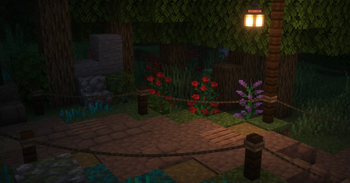
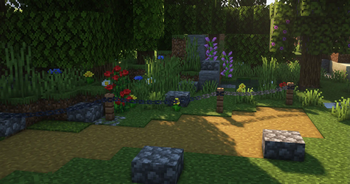
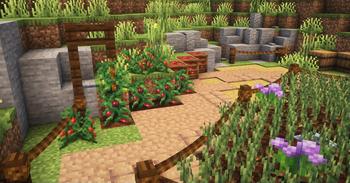
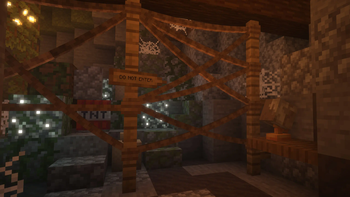
Connect your fences with a decorative chain!
Screenshots
About this Mod

Connect your fences and walls with a decorative chain!




Description
Connect your fences/walls with a decorative chain!
Use the normal vanilla chain item on fences, walls, or iron bars!
These chains have collision and can be broken when attacking it with a shear.
Sneak on fences if you want to place them normally.
Discontinued
After five years of updates, I’ve decided to stop maintaining the mod. I no longer enjoy working on it and rarely play Minecraft these days, so I will no longer update Connectible Chains. The source code remains open for anyone to fork and continue.
Maintained fork: evanbones/Reconnectible-Chains — The fork is independently maintained and is not affiliated with or endorsed by the original project.
Issues
If you have encountered any bugs or have some feedback, go to the GitHub issues page.
Version Support
I will not be supporting versions lower than 1.21.11
Compatibility with other mods
See the wiki on how to add support for other mods yourself with just a datapack and a resource pack.
Forge?
There is a forge port however I do not maintain it.
https://www.curseforge.com/minecraft/mc-mods/connectible-chains-forgeSinytra Connector might also work.
Other information
If there are invisible collisions for some reason, hold a shear while
having entity hitboxes on (F3+B) to see the collisions and then attack them to remove them.
Available Versions
How to Install Connectible Chains [Fabric] on Your Server
Order Server
Order a Minecraft Java server with at least 3 GB RAM (4 GB recommended).
Set fabric Loader
In the panel under "Egg", select the fabric loader and matching Minecraft version (1.21.11).
Install Mod
Open the mod browser in the dashboard and search for "Connectible Chains [Fabric]". Click "Install" – done! Alternatively, upload the .jar via SFTP to the /mods folder.
Compatibility
Mod Loaders
Minecraft Versions
1.21.11, 1.21.10, 1.21.9 (+24 more)
Server-side
✓ RequiredRecommended RAM
4 GB(min. 3 GB)Frequently Asked Questions
Connectible Chains [Fabric] server crashes on startup – what to do?
Most common cause: wrong fabric version or insufficient RAM. Check the server log (latest.log) for "OutOfMemoryError" or "Mixin" errors. With Mado Hosting: ensure at least 3 GB RAM is allocated and the loader matches the mod version (1.21.11). You can switch loaders with one click in the panel.
Is Connectible Chains [Fabric] compatible with fabric?
Connectible Chains [Fabric] officially supports fabric for Minecraft 1.21.11, 1.21.10, 1.21.9. The Mado dashboard automatically detects incompatible loader combinations.
Server lagging with Connectible Chains [Fabric] – how to optimize performance?
Recommended RAM: 4 GB (per 8 players). Use /spark profiler to check if Connectible Chains [Fabric] consumes the most tick time. Common fixes: reduce server view-distance to 8-10, install "performant" or "starlight" as supplementary mods on Forge. With Mado Hosting, your server runs on NVMe SSDs with dedicated CPU cores for minimal latency.
Similar Mods

![[ETF] Entity Texture Features](https://cdn.modrinth.com/data/BVzZfTc1/af683d206d50b05258d865b0d6e4aa2f2cee12f2_96.webp)
![[EMF] Entity Model Features](https://cdn.modrinth.com/data/4I1XuqiY/6e5bbd0d06b1741bfdab6c0cfab6de8fdaf0064c_96.webp)



Rent Modded Server
Install Connectible Chains [Fabric] with just one click on your server.