
Create Crafts & Additions
Create Crafts & Additions extends Create and acts as a bridge between electricity and kinetic energy
Screenshots
Über diese Mod
Create Crafts & Additions
For Minecraft Forge 1.15.2, 1.16.4/5, 1.17.1, 1.18.1/2, 1.19.2, 1.20.1, and 1.21.1
Thanks to community contributions, now also for Fabric 1.18.2, 1.19.2, and 1.20.1
Warning! Please note that the Fabric build is currently not actively maintained!
Also, check out:
- Builders Crafts & Additions!
- Beekeeping!
Community Discord for CC&A:
About:
Create Crafts & Additions extends Create and acts as a bridge between electricity and kinetic energy from Create by adding an Electric Motor which generates kinetic energy from Forge energy and an Alternator which does the opposite at 75% efficiency. To craft these items you need to make a Rolling Mill which is a kinetic machine that is used to make rods and wires. All the recipes are available through JEI.
Content:
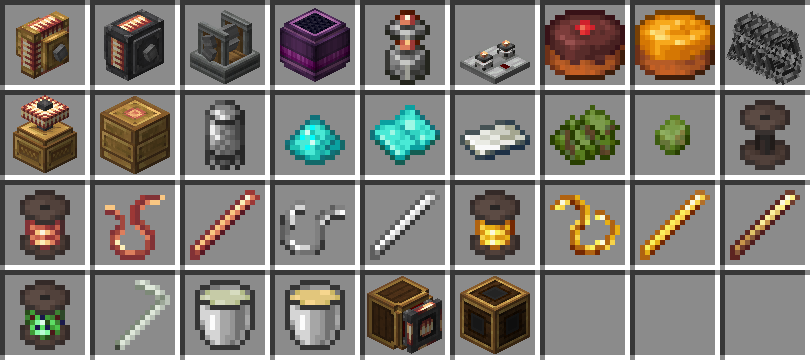
- Electric Motor: Generates kinetic energy from Forge Energy, provides a ComputerCraft peripheral.
- Alternator: Generates Forge Energy from kinetic energy.
- Rolling Mill: Used to craft Wires and Rods.
- Creative Generator: Generates a limitless supply of Forge Energy.
- Connector & Wires: Wires for energy transfer.
- Redstone Relay: Controls energy flow with Redstone.
- Accumulator: Multiblock energy storage.
- Portable Energy Interface: Transfer energy to and from contraptions.
- Tesla Coil: Charges electric items, and can also be used to inflict damage to Players and Mobs.
- Digital Adapter: Allows Computercraft computers to talk to various Create blocks (See API).
- Biomass: Pellet, Fuel.
- Chocolate and Honey Cake.
- Diamond Grit Sandpaper.
- Straw: Applied to a Blaze Burner will give it the ability to burn liquid fuels.
- Barbed Wire block.
- Biomass, Biomass Pellet, Sead Oil, and Bioethanol.
- Various wires, rods, spools, and other crafting components.
Legacy Features:
- Induction Heater (Removed in 20220710a): Heats furnaces using Forge Energy (Replaces External Heater from Immersive Engineering).
- Charging Station (Removed in 20211122a): Charges electric items.
- Furnace Burner (Removed in 20220709a): Furnace which doesn't require a smelting recipe to run.
- Crude Burner (Removed in 20220709a): A Furnace Burner that is fueled by liquids such as Seed, Plant, Crude, and Creosote Oil.
- Accumulator (Replaced with multiblock): Energy storage.
- Overcharged Hammer: A powerful throwable melee weapon (only in 1.16).
- Multimeter (only in 1.16).
Added Compatibility & Integration:
- Recipe compatibility with Simple Jetpacks 2 (Electric Jetpacks).
- Recipe compatibility with Immersive Engineering (External Heater, Lapis Sheet pressing, Sphalerite mineral deposit, Alloys, Treated Wood).
- Recipe compatibility with Mekanism (Rose Quartz Enriching & Metallurgic Infusing). - Recipe compatibility with Tinkers Construct (Alloys).
- Recipe compatibility with Applied Energistics 2, the Tesla Coil can be used to charge Certus Quartz.
- Integration with ComputerCraft, the Electric Motor, and more can be used as a peripheral (See API).
FAQ:
- What is the recipe for X? - Use JEI to see the current recipes.
- Can I use this in a modpack? - Yes, distributed with credits to the source on GitHub (Which an unmodified release has), and in accordance with the MIT license.
- I found a bug, what do I do? - Create an issue on my GitHub page by clicking the Issues tab above or leave a comment below, please always provide, the Forge version, Create version, and Create Crafts & Additions version and a log in the event of a crash.
- I have a suggestion, where can I be heard? - Create an issue on my GitHub page by clicking the Issues tab above or put it on Discord.
- Can I create a language translation? - Yes, get the current translation on my Github and then create a pull request to submit your translation.
Translations:
- en_us, sv_se
- ko_kr thanks to KyleHeren
- es_es thanks to FrannDzs, Authoralbertosaurio65
- pt_br thanks to Mikeliro (outdated)
- zh_cn thanks to liuseniubi - ru_ru thanks to sashafiesta, Cheeese
- de_de thanks to Knalli65 HD
- ja_jp thanks to CkenJa
Credits:
Fabric port thanks to thatguynamedalpha, Fluffy Bumblebee.
1.15 Backport thanks to LobsterJonn (outdated)
New item sprites by THEREDSTONEBRO.
Logo by Facunditto
Verfügbare Versionen
Create Crafts & Additions auf dem Server installieren
Server bestellen
Bestelle einen Minecraft Java Server mit mindestens 4 GB RAM (6 GB empfohlen).
fabric Loader setzen
Wähle im Panel unter "Egg" den fabric-Loader und die passende Minecraft-Version (1.21.1).
Mod installieren
Öffne den Mod-Browser im Dashboard und suche nach "Create Crafts & Additions". Klicke "Installieren" – fertig! Alternativ: Lade die .jar via SFTP in den /mods Ordner.
Kompatibilität
Mod-Loader
Minecraft-Versionen
1.21.1, 1.20.1, 1.19.2 (+1 weitere)
Server-seitig
✓ ErforderlichEmpfohlener RAM
6 GB(min. 4 GB)Häufige Fragen
Create Crafts & Additions Server crasht beim Start – was tun?
Häufigste Ursache: falsche fabric-Version oder zu wenig RAM. Prüfe im Server-Log (latest.log), ob ein "OutOfMemoryError" oder "Mixin"-Fehler auftritt. Bei Mado Hosting: Stelle sicher, dass mindestens 4 GB RAM zugewiesen sind und der Loader zur Mod-Version passt (1.21.1). Über das Panel kannst du den Loader mit einem Klick wechseln.
Ist Create Crafts & Additions mit fabric und forge und neoforge und quilt kompatibel?
Create Crafts & Additions unterstützt offiziell fabric, forge, neoforge, quilt für Minecraft 1.21.1, 1.20.1, 1.19.2. Achtung: Forge- und Fabric-Mods sind NICHT untereinander kompatibel – wähle einen Loader und bleibe dabei. Im Mado Dashboard werden inkompatible Loader-Kombinationen automatisch erkannt.
Server laggt mit Create Crafts & Additions – wie optimiere ich die Performance?
Empfohlener RAM: 6 GB (+1 GB pro 5 Spieler). Prüfe mit /spark profiler, ob Create Crafts & Additions den meisten Tick-Time verbraucht. Häufige Fixes: Server-View-Distance auf 8-10 reduzieren, bei Forge "performant" oder "starlight" als Zusatz-Mod installieren. Bei Mado Hosting läuft dein Server auf NVMe-SSDs mit dedizierten CPU-Kernen für minimale Latenz.
Ähnliche Mods


Modded Server mieten
Installiere Create Crafts & Additions mit nur einem Klick auf deinem Server.