
Create Crafts & Additions
Create Crafts & Additions extends Create and acts as a bridge between electricity and kinetic energy
Screenshots
About this Mod
Create Crafts & Additions
For Minecraft Forge 1.15.2, 1.16.4/5, 1.17.1, 1.18.1/2, 1.19.2, 1.20.1, and 1.21.1
Thanks to community contributions, now also for Fabric 1.18.2, 1.19.2, and 1.20.1
Warning! Please note that the Fabric build is currently not actively maintained!
Also, check out:
- Builders Crafts & Additions!
- Beekeeping!
Community Discord for CC&A:
About:
Create Crafts & Additions extends Create and acts as a bridge between electricity and kinetic energy from Create by adding an Electric Motor which generates kinetic energy from Forge energy and an Alternator which does the opposite at 75% efficiency. To craft these items you need to make a Rolling Mill which is a kinetic machine that is used to make rods and wires. All the recipes are available through JEI.
Content:
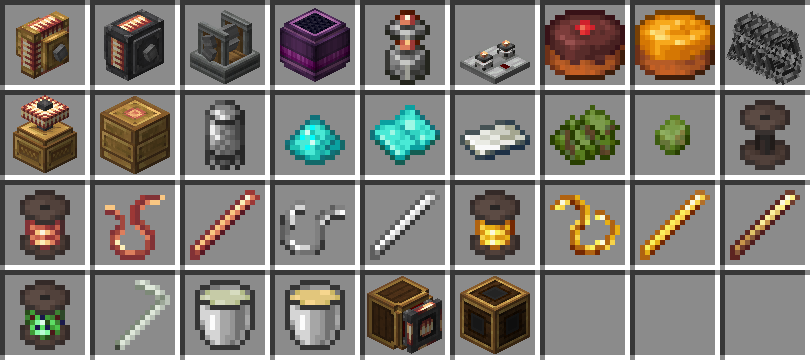
- Electric Motor: Generates kinetic energy from Forge Energy, provides a ComputerCraft peripheral.
- Alternator: Generates Forge Energy from kinetic energy.
- Rolling Mill: Used to craft Wires and Rods.
- Creative Generator: Generates a limitless supply of Forge Energy.
- Connector & Wires: Wires for energy transfer.
- Redstone Relay: Controls energy flow with Redstone.
- Accumulator: Multiblock energy storage.
- Portable Energy Interface: Transfer energy to and from contraptions.
- Tesla Coil: Charges electric items, and can also be used to inflict damage to Players and Mobs.
- Digital Adapter: Allows Computercraft computers to talk to various Create blocks (See API).
- Biomass: Pellet, Fuel.
- Chocolate and Honey Cake.
- Diamond Grit Sandpaper.
- Straw: Applied to a Blaze Burner will give it the ability to burn liquid fuels.
- Barbed Wire block.
- Biomass, Biomass Pellet, Sead Oil, and Bioethanol.
- Various wires, rods, spools, and other crafting components.
Legacy Features:
- Induction Heater (Removed in 20220710a): Heats furnaces using Forge Energy (Replaces External Heater from Immersive Engineering).
- Charging Station (Removed in 20211122a): Charges electric items.
- Furnace Burner (Removed in 20220709a): Furnace which doesn't require a smelting recipe to run.
- Crude Burner (Removed in 20220709a): A Furnace Burner that is fueled by liquids such as Seed, Plant, Crude, and Creosote Oil.
- Accumulator (Replaced with multiblock): Energy storage.
- Overcharged Hammer: A powerful throwable melee weapon (only in 1.16).
- Multimeter (only in 1.16).
Added Compatibility & Integration:
- Recipe compatibility with Simple Jetpacks 2 (Electric Jetpacks).
- Recipe compatibility with Immersive Engineering (External Heater, Lapis Sheet pressing, Sphalerite mineral deposit, Alloys, Treated Wood).
- Recipe compatibility with Mekanism (Rose Quartz Enriching & Metallurgic Infusing). - Recipe compatibility with Tinkers Construct (Alloys).
- Recipe compatibility with Applied Energistics 2, the Tesla Coil can be used to charge Certus Quartz.
- Integration with ComputerCraft, the Electric Motor, and more can be used as a peripheral (See API).
FAQ:
- What is the recipe for X? - Use JEI to see the current recipes.
- Can I use this in a modpack? - Yes, distributed with credits to the source on GitHub (Which an unmodified release has), and in accordance with the MIT license.
- I found a bug, what do I do? - Create an issue on my GitHub page by clicking the Issues tab above or leave a comment below, please always provide, the Forge version, Create version, and Create Crafts & Additions version and a log in the event of a crash.
- I have a suggestion, where can I be heard? - Create an issue on my GitHub page by clicking the Issues tab above or put it on Discord.
- Can I create a language translation? - Yes, get the current translation on my Github and then create a pull request to submit your translation.
Translations:
- en_us, sv_se
- ko_kr thanks to KyleHeren
- es_es thanks to FrannDzs, Authoralbertosaurio65
- pt_br thanks to Mikeliro (outdated)
- zh_cn thanks to liuseniubi - ru_ru thanks to sashafiesta, Cheeese
- de_de thanks to Knalli65 HD
- ja_jp thanks to CkenJa
Credits:
Fabric port thanks to thatguynamedalpha, Fluffy Bumblebee.
1.15 Backport thanks to LobsterJonn (outdated)
New item sprites by THEREDSTONEBRO.
Logo by Facunditto
Available Versions
How to Install Create Crafts & Additions on Your Server
Order Server
Order a Minecraft Java server with at least 4 GB RAM (6 GB recommended).
Set fabric Loader
In the panel under "Egg", select the fabric loader and matching Minecraft version (1.21.1).
Install Mod
Open the mod browser in the dashboard and search for "Create Crafts & Additions". Click "Install" – done! Alternatively, upload the .jar via SFTP to the /mods folder.
Compatibility
Mod Loaders
Minecraft Versions
1.21.1, 1.20.1, 1.19.2 (+1 more)
Server-side
✓ RequiredRecommended RAM
6 GB(min. 4 GB)Frequently Asked Questions
Create Crafts & Additions server crashes on startup – what to do?
Most common cause: wrong fabric version or insufficient RAM. Check the server log (latest.log) for "OutOfMemoryError" or "Mixin" errors. With Mado Hosting: ensure at least 4 GB RAM is allocated and the loader matches the mod version (1.21.1). You can switch loaders with one click in the panel.
Is Create Crafts & Additions compatible with fabric and forge and neoforge and quilt?
Create Crafts & Additions officially supports fabric, forge, neoforge, quilt for Minecraft 1.21.1, 1.20.1, 1.19.2. Note: Forge and Fabric mods are NOT cross-compatible – pick one loader and stick with it. The Mado dashboard automatically detects incompatible loader combinations.
Server lagging with Create Crafts & Additions – how to optimize performance?
Recommended RAM: 6 GB (per 5 players). Use /spark profiler to check if Create Crafts & Additions consumes the most tick time. Common fixes: reduce server view-distance to 8-10, install "performant" or "starlight" as supplementary mods on Forge. With Mado Hosting, your server runs on NVMe SSDs with dedicated CPU cores for minimal latency.
Similar Mods


Rent Modded Server
Install Create Crafts & Additions with just one click on your server.