
Modrinth · Fabric, Forge · Client-Mod
Creative in hardcore
Creative in hardcore ist eine clientseitige Mod. Du installierst sie auf deinem Rechner, auf dem Server ist sie nicht nötig.
Owner-controlled creative access for singleplayer, LAN, and dedicated Fabric servers.
- Downloads
- 10.4K
- Autor
- zihan.wang20122020
- Loader
- Fabric, Forge
- Minecraft
- 26.1.1 – 26.3
- Aktualisiert
- –
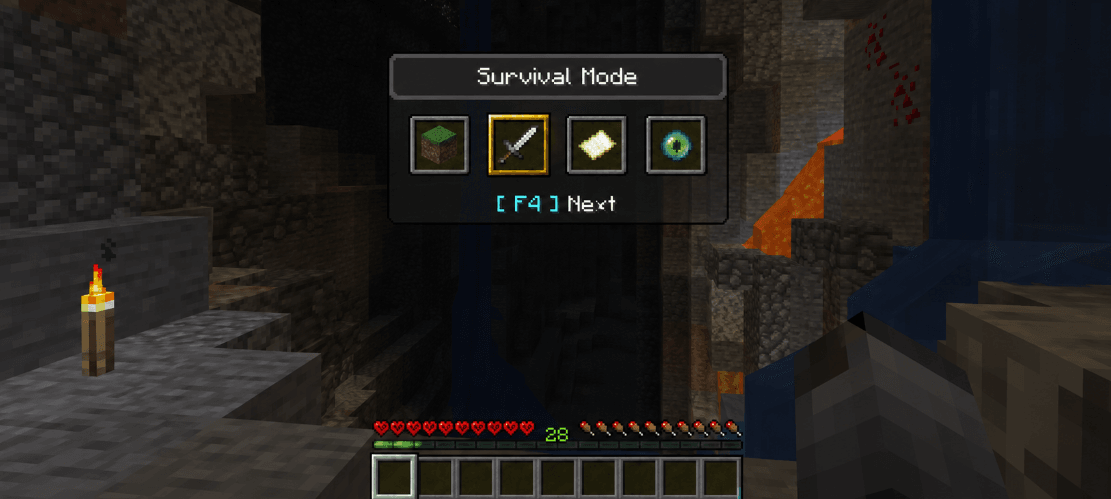
Screenshots
So sieht Creative in hardcore aus

Bilder: Creative in hardcore auf Modrinth, vom Projektteam veröffentlicht.
Einrichtung
Creative in hardcore auf deinem Client installieren
Clientseitige Mods laufen nur auf deinem Rechner. Mehr Server-RAM ändert an ihrer Leistung nichts.
- 01
Loader lokal installieren
Installiere Fabric oder Forge für deine Minecraft-Version in deinem Launcher.
- 02
Datei herunterladen
Lade die Creative in hardcore-Datei für deinen Loader und exakt deine Minecraft-Version herunter, zum Beispiel 26.3.
- 03
In den Mods-Ordner legen
Lege die .jar-Datei in den lokalen Ordner .minecraft/mods und entferne ältere Duplikate.
- 04
Starten
Starte Minecraft mit dem Loader-Profil. Auf dem Server musst du nichts ändern.
- Auf dem Server
- Nicht nötig
- Auf dem Client
- Erforderlich
- Loader
- Fabric, Forge
- Minecraft
- 26.3, 26.2, 26.1.2 +1 weitere
- Lizenz
- MIT License
Versionen
Veröffentlichte Versionen
Nimm die Datei, die zu Loader und Minecraft-Version deines Servers passt. Server und Spieler brauchen dieselbe Version.
Creative in hardcore · Modrinth- Creative in hardcore 4.9.229. Oktober 2026Minecraft 26.3 · Fabric
- Creative in hardcore 4.3.025. August 2026Minecraft 26.2 · Fabric
- Creative in hardcore 1.0.09. April 2026Minecraft 26.1.2 · Fabric
- Creative in hardcore 1.0.08. April 2026Minecraft 26.1.1 · Forge
- Creative in hardcore 1.0.08. April 2026Minecraft 26.1.1 · Fabric
Originalbeschreibung des Projektautors
Hardcore Creative is a Fabric server-side mod that gives the recorded world owner controlled creative access without making every operator, LAN guest, command block, console source, or server player a mod
administrator.
It is designed for singleplayer worlds, LAN worlds, and dedicated Fabric servers. The same jar works in all supported environments. On dedicated servers, vanilla clients can connect without installing the mod.
What It Does
Hardcore Creative records a per-world owner UUID and uses that player as the trusted administrator for creative access. The owner can grant, revoke, enable, or disable creative access for selected players.
Authorized players can use their own creative access, but they cannot grant access to other players unless they are the recorded world owner.
Features
- Works in singleplayer, LAN worlds, and dedicated Fabric servers.
- Server-side only for multiplayer servers.
- Compatible with vanilla clients on dedicated servers.
- Works in survival, creative, adventure, and hardcore worlds.
- Uses one jar for all supported environments.
- Gives the recorded world owner real server-side permissions through the mod.
- Allows authorized players to use creative mode.
- Supports the vanilla F3+F4 game mode switcher for authorized players.
- Stores owner, authorization, and creative restore state per world/server.
- Prevents non-owner players from granting creative access to others.
- Prevents command blocks from administering the mod.
- Keeps console and RCON from becoming implicit mod administrators.
Ownership System
In singleplayer and LAN, the Minecraft singleplayer owner becomes the mod owner.
On a dedicated server, if the world has no saved owner yet, the first player who initializes the world becomes the recorded owner. After that, administration is locked to that UUID.
This means operators do not automatically become mod administrators. Only the recorded owner controls who gets creative access.
Commands
Use /hccreative or /hardcorecreative.
/hccreative status [player]/hccreative grant <player>/hccreative revoke <player>/hccreative enable <player>/hccreative disable <player>/hccreative setmode creative/hccreative setmode survival/hccreative list/hccreative reload
Installation
Singleplayer
Install the jar in your client mods folder.
LAN
Install the jar in the LAN host’s mods folder.
Dedicated Server
Install the jar in the server mods folder.
Players joining the dedicated server do not need to install the mod.
Requirements
- Minecraft
26+ - Fabric Loader
0.19+ - Fabric API
0.154.0+26+ - Java
25+
Configuration
The config file is created at:
config/hardcorecreative.properties

Main options:

- allowCreativeAccess=true
- autoAuthorizeSingleplayerOwner=true
- autoRestoreCreativeOnLogin=true
- forceSurvivalOnRevoke=true
- verboseLogging=false

## Compatibility

Hardcore Creative is made for Fabric and Minecraft 26.2.

It is intended for:

- singleplayer
- LAN worlds
- dedicated Fabric servers

For dedicated servers, mark the mod as server-side only.
Muss Creative in hardcore auf dem Minecraft Server installiert werden?
Nein. Modrinth kennzeichnet Creative in hardcore serverseitig als nicht unterstützt. Installiere die Mod nur im lokalen Mods-Ordner. Dein Server kann unverändert bleiben, sofern die Projektseite keine zusätzliche Abhängigkeit nennt.
Welche Version und welchen Loader braucht Creative in hardcore?
Nutze eine Datei für Fabric, Forge und exakt deine Minecraft-Version. Unterstützt werden unter anderem 26.3, 26.2, 26.1.2. Dateien für verschiedene Loader sind nicht austauschbar.
Creative in hardcore funktioniert nicht – was kann ich prüfen?
Prüfe zuerst Minecraft-Version, Loader-Version und erforderliche Abhängigkeiten. Da die Mod clientseitig ist, löst mehr Server-RAM das Problem nicht.
Ähnliche Mods
Beliebte Mods aus derselben Kategorie
 Server-fähig

YetAnotherConfigLib (YACL)
von isxander
A builder-based configuration library for Minecraft!
 Server-fähig

Text Placeholder API
von Patbox
Placeholder and Text manipulation library for your Minecraft mods.
 Nur Client

Dynamic FPS
von juliand665
Reduce resource usage while Minecraft is in the background, idle, or on battery.
 Server-fähig

No Chat Reports
von Aizistral
Makes chat unreportable (where possible)
Mods für deinen eigenen Server gesucht?
Im Katalog findest du Mods, die auf Minecraft Servern laufen.