
Elytra Physics
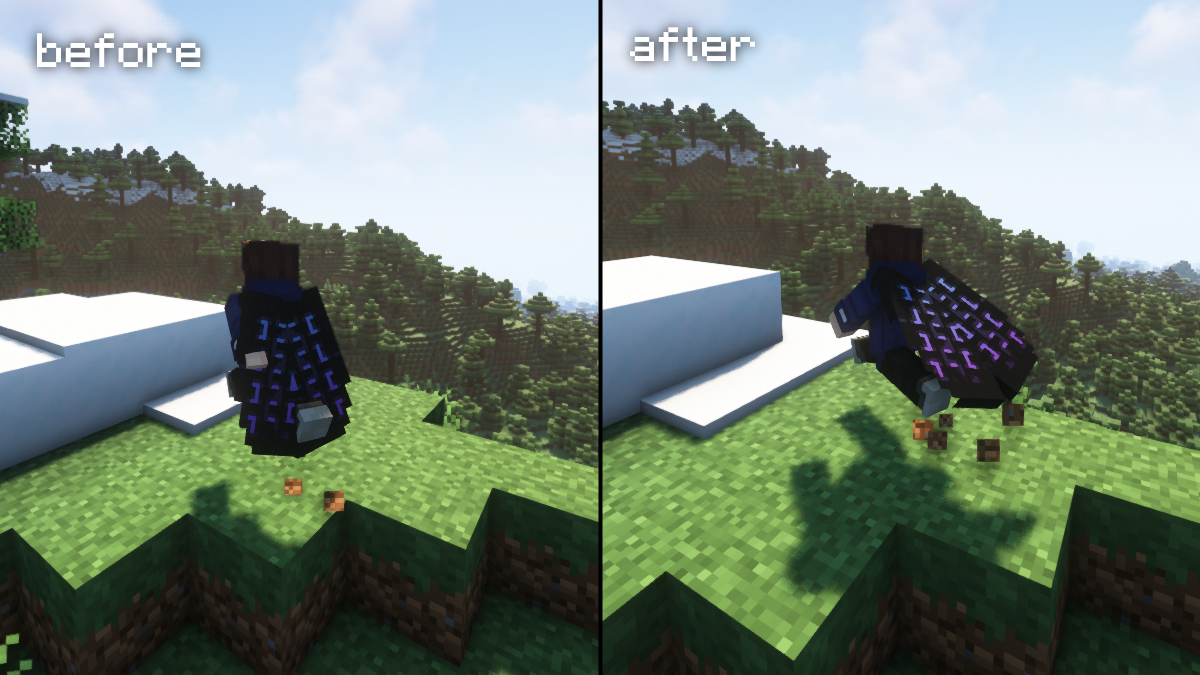
A simple mod that adds cape-like physics to the elytra when worn by the player.
Über diese Mod
Elytra Physics
This is a just simple Minecraft mod that adds cape-like physics to the elytra when it are worn by the player.
No longer will the elytra look awkward and stiff on your back when running around wearing it.
Download
https://www.curseforge.com/minecraft/mc-mods/elytra-physics
https://modrinth.com/mod/elytra-physics
Available for both Forge and Fabric
Compatibility
As of version 2.0, the mod now supports adding custom compatibility with layer renderers from other mods.
If another mod has an elytra that doesn't work with Elytra Physics, open the config file (elytra_physics-client.toml for Forge, elytra-physics-config.json for Fabric) and add the classpath of the layer renderer for the custom elytra to the inject_layers list.
How do I find the classpath?
The classpath of a class is the package path to that class (found at the top of the .java file for the layer, 'package {classpath}') + the name of the class.
Some of the requested mod compatibilities are already included in the config.
I am getting a mixin conflicts with another mod?
If this happens, it could be because of the cape / elytra snapping fix; try disabling the prevent snapping option in the config. I recommend temporarily disabling the other mod, launching the game, and disabling it through the in-game config screen.
If you decide to change it by editing the config file instead, remember to set the snapping_fix flag in elytra_physics_mixin-flags.txt as well as the prevent_snapping option in the regular config file.
Verfügbare Versionen
Elytra Physics auf deinem Client installieren
Mod-Loader lokal installieren
Installiere fabric für deine lokale Minecraft-Version.
Passende Datei herunterladen
Wähle die Elytra Physics-Datei für fabric und Minecraft 26.3.
Mod installieren
Lege die .jar-Datei in deinem lokalen .minecraft/mods-Ordner ab und starte Minecraft neu. Eine Installation auf dem Server ist nicht nötig.
Kompatibilität
Mod-Loader
Minecraft-Versionen
26.3, 26.2, 26.1.2 (+31 weitere)
Server-seitig
✗ Nicht unterstütztEmpfohlener RAM
4 GB(min. 3 GB)Häufige Fragen
Muss Elytra Physics auf dem Minecraft Server installiert werden?
Nein. Modrinth kennzeichnet Elytra Physics serverseitig als nicht unterstützt. Installiere die Mod nur im lokalen Minecraft-Mods-Ordner. Dein Server kann unverändert bleiben, sofern die Mod-Seite keine zusätzliche Abhängigkeit nennt.
Welche Version und welchen Loader braucht Elytra Physics?
Nutze eine Datei für fabric, forge, neoforge und exakt deine Minecraft-Version. Unterstützte Versionen sind unter anderem 26.3, 26.2, 26.1.2. Loader-Dateien sind nicht untereinander austauschbar.
Elytra Physics funktioniert nicht – was kann ich prüfen?
Prüfe zuerst Minecraft-Version, Loader-Version und erforderliche Abhängigkeiten. Lege die .jar-Datei im lokalen .minecraft/mods-Ordner ab und entferne ältere Duplikate. Da die Mod clientseitig ist, löst mehr Server-RAM dieses Problem nicht.
Ähnliche Mods

![[ETF] Entity Texture Features](https://cdn.modrinth.com/data/BVzZfTc1/af683d206d50b05258d865b0d6e4aa2f2cee12f2_96.webp)
![[EMF] Entity Model Features](https://cdn.modrinth.com/data/4I1XuqiY/6e5bbd0d06b1741bfdab6c0cfab6de8fdaf0064c_96.webp)



Minecraft Server für deine Gruppe
Elytra Physics bleibt auf deinem Client. Hoste dazu eine kompatible Welt für deine Mitspieler.