
Elytra Physics
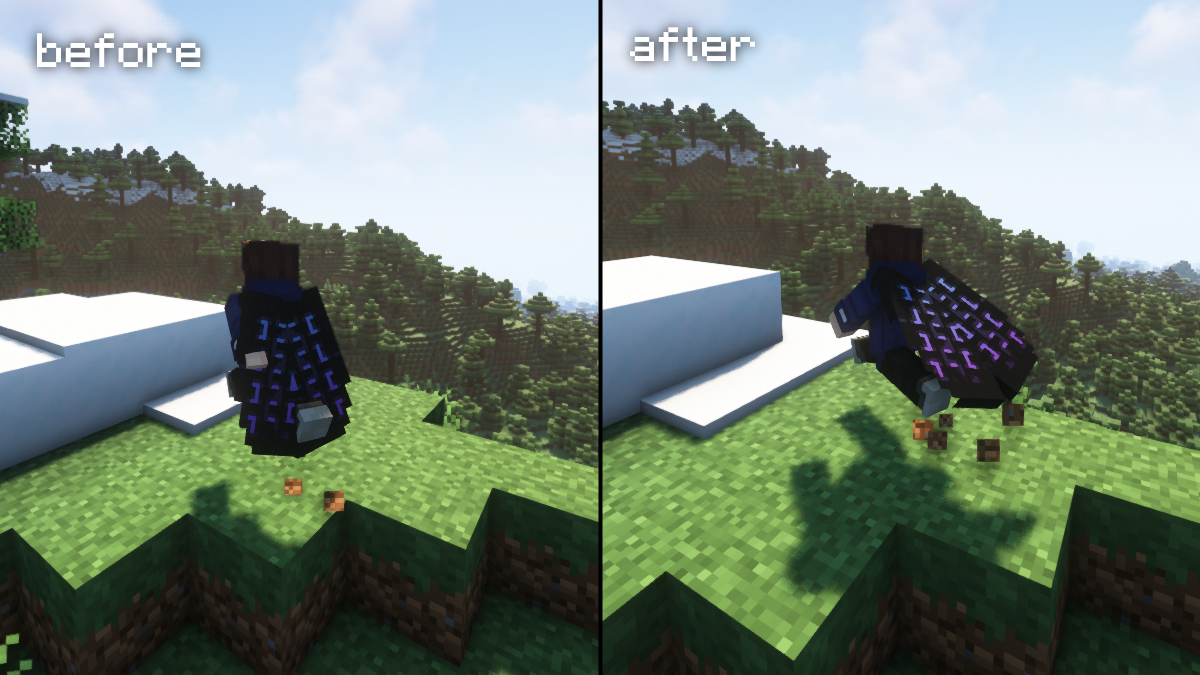
A simple mod that adds cape-like physics to the elytra when worn by the player.
About this Mod
Elytra Physics
This is a just simple Minecraft mod that adds cape-like physics to the elytra when it are worn by the player.
No longer will the elytra look awkward and stiff on your back when running around wearing it.
Download
https://www.curseforge.com/minecraft/mc-mods/elytra-physics
https://modrinth.com/mod/elytra-physics
Available for both Forge and Fabric
Compatibility
As of version 2.0, the mod now supports adding custom compatibility with layer renderers from other mods.
If another mod has an elytra that doesn't work with Elytra Physics, open the config file (elytra_physics-client.toml for Forge, elytra-physics-config.json for Fabric) and add the classpath of the layer renderer for the custom elytra to the inject_layers list.
How do I find the classpath?
The classpath of a class is the package path to that class (found at the top of the .java file for the layer, 'package {classpath}') + the name of the class.
Some of the requested mod compatibilities are already included in the config.
I am getting a mixin conflicts with another mod?
If this happens, it could be because of the cape / elytra snapping fix; try disabling the prevent snapping option in the config. I recommend temporarily disabling the other mod, launching the game, and disabling it through the in-game config screen.
If you decide to change it by editing the config file instead, remember to set the snapping_fix flag in elytra_physics_mixin-flags.txt as well as the prevent_snapping option in the regular config file.
Available Versions
How to Install Elytra Physics on Your Client
Install the Mod Loader Locally
Install fabric for your local Minecraft version.
Download the Matching File
Choose the Elytra Physics file for fabric and Minecraft 26.3.
Install Mod
Place the .jar file in your local .minecraft/mods folder and restart Minecraft. No server-side installation is required.
Compatibility
Mod Loaders
Minecraft Versions
26.3, 26.2, 26.1.2 (+31 more)
Server-side
✗ UnsupportedRecommended RAM
4 GB(min. 3 GB)Frequently Asked Questions
Does Elytra Physics need to be installed on the Minecraft server?
No. Modrinth marks Elytra Physics as unsupported on the server side. Install it only in your local Minecraft mods folder. Your server can remain unchanged unless the mod page lists an additional dependency.
Which version and loader does Elytra Physics require?
Use a file for fabric, forge, neoforge and your exact Minecraft version. Supported versions include 26.3, 26.2, 26.1.2. Files for different loaders are not interchangeable.
Elytra Physics is not working – what should I check?
First check the Minecraft version, loader version and required dependencies. Put the .jar file in your local .minecraft/mods folder and remove older duplicates. Because this mod is client-side, adding server RAM will not fix it.
Similar Mods

![[ETF] Entity Texture Features](https://cdn.modrinth.com/data/BVzZfTc1/af683d206d50b05258d865b0d6e4aa2f2cee12f2_96.webp)
![[EMF] Entity Model Features](https://cdn.modrinth.com/data/4I1XuqiY/6e5bbd0d06b1741bfdab6c0cfab6de8fdaf0064c_96.webp)



Minecraft Server for Your Group
Elytra Physics stays on your client. Host a compatible world for your group.