filament
Data driven Items, Blocks, Decorations and Mobs for Fabric based servers. No client mods required!
Screenshots


Über diese Mod
Filament: Custom Content Adder for Fabric Servers





filament simplifies adding custom content to Fabric-based Minecraft servers. It allows server owners to add new items, blocks, decorations and even mobs using JSON files—no coding required. Configure a block, item, decoration, or armor, and you're ready to go!
Clients can connect to servers using filament without installing any mods, as it relies on a resource pack, item display entities, and packet-based methods.
Decorations and other features have minimal server performance impact due to their packet-based nature.
Use Polymer's auto-hosting capability to host the resource pack—no third-party server required.
TLDR: ItemsAdder/Oraxen alternative for Fabric.
Features
Custom Items: Add items with unique behaviors, including:
- Armor
- Cosmetics
- Items running commands
- Bows/Crossbows
Custom Blocks: Add your own custom blocks like:
- Trapdoors
- Doors
- Crops
- Budding blocks
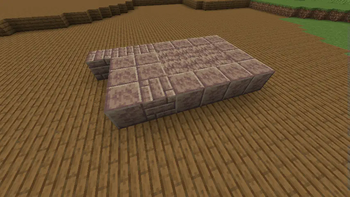
Custom Decorations: Add furniture and decorations with configurable placement and interactions:
- Benches
- Showcases/Item-Displays
- Container
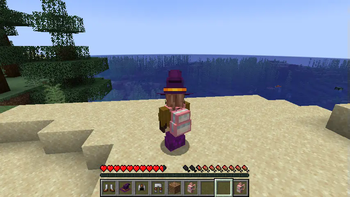
- Wearable & placeable backpacks
Custom Mobs: Add your own mobs with simple goal-based AI - supports custom models too! Create:
- Animals
- Hostile mobs
- Supports custom attributes
- Control spawn chances and biomes to spawn in

Installation
Requires Fabric API and Polymer.
Download filament and drop the example_datapack into the datapacks folder of your server world. filament uses Polymer's resource pack generation and hosting features.
Usage
An example datapack is available in the GitHub repo. Just drop it into your world's datapacks folder.
Check out the documentation!
Mods using filament
These mods & datapacks demonstrate filament's capabilities:
- Hat Club by MJRamon
- Backported Shelves by palm1
- Planked Chests by palm1
- Toms Server Additions: Decorations & Furniture
- Toms Server Additions: Stone!
- Toms Server Additions: Planks!
- Toms Server Additions: Concrete!
Archived:
Credits
This project includes code from FactoryTools by Patbox, specifically the Virtual Destroy stages for decorations.
A copy of the FactoryTools LGPL3 license is included in factorytools-license.txt.
Verfügbare Versionen
filament auf dem Server installieren
Server bestellen
Bestelle einen Minecraft Java Server mit mindestens 3 GB RAM (4 GB empfohlen).
fabric Loader setzen
Wähle im Panel unter "Egg" den fabric-Loader und die passende Minecraft-Version (26.3).
Mod installieren
Öffne den Mod-Browser im Dashboard und suche nach "filament". Klicke "Installieren" – fertig! Alternativ: Lade die .jar via SFTP in den /mods Ordner.
Kompatibilität
Mod-Loader
Minecraft-Versionen
26.3, 26.2, 26.1.2 (+25 weitere)
Server-seitig
✓ ErforderlichEmpfohlener RAM
4 GB(min. 3 GB)Häufige Fragen
filament Server crasht beim Start – was tun?
Häufigste Ursache: falsche fabric-Version oder zu wenig RAM. Prüfe im Server-Log (latest.log), ob ein "OutOfMemoryError" oder "Mixin"-Fehler auftritt. Bei Mado Hosting: Stelle sicher, dass mindestens 3 GB RAM zugewiesen sind und der Loader zur Mod-Version passt (26.3). Über das Panel kannst du den Loader mit einem Klick wechseln.
Ist filament mit fabric kompatibel?
filament unterstützt offiziell fabric für Minecraft 26.3, 26.2, 26.1.2. Im Mado Dashboard werden inkompatible Loader-Kombinationen automatisch erkannt.
Server laggt mit filament – wie optimiere ich die Performance?
Empfohlener RAM: 4 GB (+1 GB pro 8 Spieler). Prüfe mit /spark profiler, ob filament den meisten Tick-Time verbraucht. Häufige Fixes: Server-View-Distance auf 8-10 reduzieren, bei Forge "performant" oder "starlight" als Zusatz-Mod installieren. Bei Mado Hosting läuft dein Server auf NVMe-SSDs mit dedizierten CPU-Kernen für minimale Latenz.
Ähnliche Mods

![[ETF] Entity Texture Features](https://cdn.modrinth.com/data/BVzZfTc1/af683d206d50b05258d865b0d6e4aa2f2cee12f2_96.webp)
![[EMF] Entity Model Features](https://cdn.modrinth.com/data/4I1XuqiY/6e5bbd0d06b1741bfdab6c0cfab6de8fdaf0064c_96.webp)



Modded Server mieten
Installiere filament mit nur einem Klick auf deinem Server.
Details
- Lizenz
- GNU Lesser General Public License v3.0 or later
- Server-seitig
- Erforderlich