
Create: Interiors
A complement to the Create mod that adds new furniture.
Screenshots
Über diese Mod
Mod created by Alexander Weimer -
Website ·
GitHub ·
LinkedIn ·
Google Scholar ·
ResearchGate ·
ORCiD ·
Article

Create: Interiors⠀ ⠀
⠀
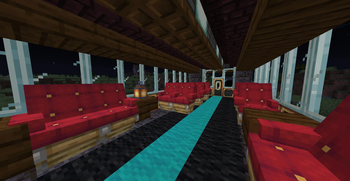
Create: Interiors is an addon mod that extends Create's furnishing options.
Current list of features:
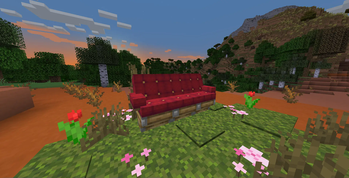
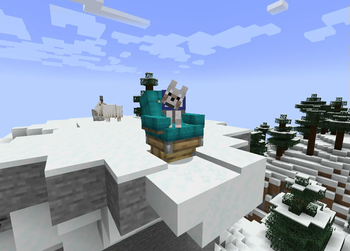
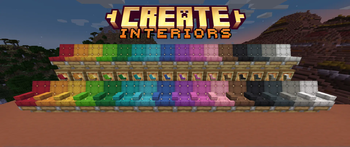
- Chair Blocks
- Come in all 16 Minecraft Dye Colors
- Right-click with a wrench to cycle armrest state (None, Left Only, Right Only, or Both Armrests)
- Can be crafted either from 1 Colored Wool and 2 Wooden Slabs OR from 1 Colored Seat and 1 Wooden Slab
- Can be sat on, both as a part of contraptions and standalone.
- Can pick up entities just like Seat blocks
- Bouncy!
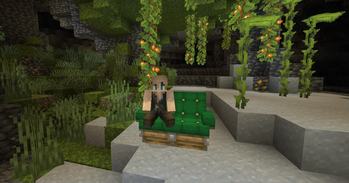
- Kelp Chair
- Cheaper & easier-to-farm alternative to colored chairs
- Can be crafted either from 1 Dried Kelp and 2 Wooden Slabs OR from 1 Kelp Seat block and 1 Wooden Slab
- Work exactly the same as colored chairs
⠀⠀⠀
- Kelp Seat
- Cheaper & easier-to-farm alternative to colored seats
- Can be crafted from 1 Dried Kelp item and 1 Wooden Slab
- Work exactly like Create's seat blocks
- Can be crafted or made in a stonecutter
⠀⠀⠀⠀
- Seatwood Planks
- Useful together with Copycat Steps & Copycat Panels as a decoration for Seats & Chairs
- 3 Seatwood Planks can be crafted from 2 Wooden Slabs and 2 Wooden Planks
⠀⠀⠀⠀⠀
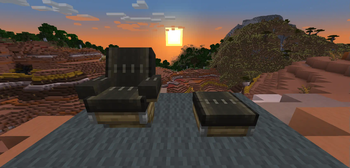
⠀⠀⠀⠀⠀⠀⠀⠀⠀⠀⠀⠀⠀⠀⠀Seatwood Tray Tables
Contributions
Many thanks to rdh for all his many critical contributions!
Thanks to Luna for the wonderful logo :)
Translations! 🥳
Thanks to @AsseyGithub for translating Create: Interiors to Korean. 🎉
Thanks to @rim4oo for translating Create: Interiors to Russian. 🎉
Create: Interiors is currently available in English, German, Swedish, Russian and Korean. If you don't see your language and want to help, please do feel free! Again, it's much appreciated.
Find Create: Interiors on  GitHub or
  CurseForge
Report Issues here
Verfügbare Versionen
Create: Interiors auf dem Server installieren
Server bestellen
Bestelle einen Minecraft Java Server mit mindestens 4 GB RAM (6 GB empfohlen).
fabric Loader setzen
Wähle im Panel unter "Egg" den fabric-Loader und die passende Minecraft-Version (1.21.1).
Mod installieren
Öffne den Mod-Browser im Dashboard und suche nach "Create: Interiors". Klicke "Installieren" – fertig! Alternativ: Lade die .jar via SFTP in den /mods Ordner.
Kompatibilität
Mod-Loader
Minecraft-Versionen
1.21.1, 1.20.1, 1.19.2 (+1 weitere)
Server-seitig
✓ ErforderlichEmpfohlener RAM
6 GB(min. 4 GB)Häufige Fragen
Create: Interiors Server crasht beim Start – was tun?
Häufigste Ursache: falsche fabric-Version oder zu wenig RAM. Prüfe im Server-Log (latest.log), ob ein "OutOfMemoryError" oder "Mixin"-Fehler auftritt. Bei Mado Hosting: Stelle sicher, dass mindestens 4 GB RAM zugewiesen sind und der Loader zur Mod-Version passt (1.21.1). Über das Panel kannst du den Loader mit einem Klick wechseln.
Ist Create: Interiors mit fabric und forge und neoforge und quilt kompatibel?
Create: Interiors unterstützt offiziell fabric, forge, neoforge, quilt für Minecraft 1.21.1, 1.20.1, 1.19.2. Achtung: Forge- und Fabric-Mods sind NICHT untereinander kompatibel – wähle einen Loader und bleibe dabei. Im Mado Dashboard werden inkompatible Loader-Kombinationen automatisch erkannt.
Server laggt mit Create: Interiors – wie optimiere ich die Performance?
Empfohlener RAM: 6 GB (+1 GB pro 5 Spieler). Prüfe mit /spark profiler, ob Create: Interiors den meisten Tick-Time verbraucht. Häufige Fixes: Server-View-Distance auf 8-10 reduzieren, bei Forge "performant" oder "starlight" als Zusatz-Mod installieren. Bei Mado Hosting läuft dein Server auf NVMe-SSDs mit dedizierten CPU-Kernen für minimale Latenz.
Ähnliche Mods

![[ETF] Entity Texture Features](https://cdn.modrinth.com/data/BVzZfTc1/af683d206d50b05258d865b0d6e4aa2f2cee12f2_96.webp)
![[EMF] Entity Model Features](https://cdn.modrinth.com/data/4I1XuqiY/6e5bbd0d06b1741bfdab6c0cfab6de8fdaf0064c_96.webp)



Modded Server mieten
Installiere Create: Interiors mit nur einem Klick auf deinem Server.