
Create: Interiors
A complement to the Create mod that adds new furniture.
Screenshots
About this Mod
Mod created by Alexander Weimer -
Website ·
GitHub ·
LinkedIn ·
Google Scholar ·
ResearchGate ·
ORCiD ·
Article

Create: Interiors⠀ ⠀
⠀
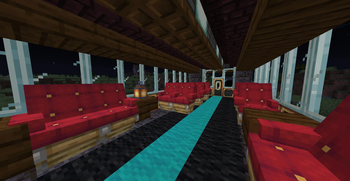
Create: Interiors is an addon mod that extends Create's furnishing options.
Current list of features:
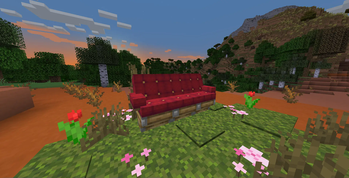
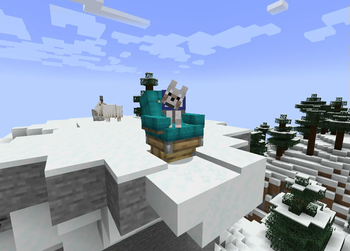
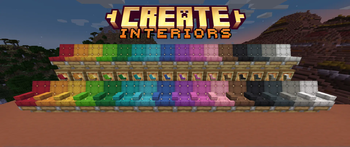
- Chair Blocks
- Come in all 16 Minecraft Dye Colors
- Right-click with a wrench to cycle armrest state (None, Left Only, Right Only, or Both Armrests)
- Can be crafted either from 1 Colored Wool and 2 Wooden Slabs OR from 1 Colored Seat and 1 Wooden Slab
- Can be sat on, both as a part of contraptions and standalone.
- Can pick up entities just like Seat blocks
- Bouncy!
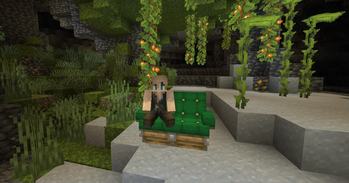
- Kelp Chair
- Cheaper & easier-to-farm alternative to colored chairs
- Can be crafted either from 1 Dried Kelp and 2 Wooden Slabs OR from 1 Kelp Seat block and 1 Wooden Slab
- Work exactly the same as colored chairs
⠀⠀⠀
- Kelp Seat
- Cheaper & easier-to-farm alternative to colored seats
- Can be crafted from 1 Dried Kelp item and 1 Wooden Slab
- Work exactly like Create's seat blocks
- Can be crafted or made in a stonecutter
⠀⠀⠀⠀
- Seatwood Planks
- Useful together with Copycat Steps & Copycat Panels as a decoration for Seats & Chairs
- 3 Seatwood Planks can be crafted from 2 Wooden Slabs and 2 Wooden Planks
⠀⠀⠀⠀⠀
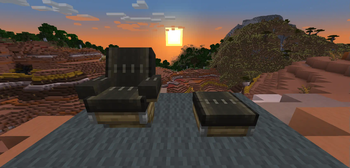
⠀⠀⠀⠀⠀⠀⠀⠀⠀⠀⠀⠀⠀⠀⠀Seatwood Tray Tables
Contributions
Many thanks to rdh for all his many critical contributions!
Thanks to Luna for the wonderful logo :)
Translations! 🥳
Thanks to @AsseyGithub for translating Create: Interiors to Korean. 🎉
Thanks to @rim4oo for translating Create: Interiors to Russian. 🎉
Create: Interiors is currently available in English, German, Swedish, Russian and Korean. If you don't see your language and want to help, please do feel free! Again, it's much appreciated.
Find Create: Interiors on  GitHub or
  CurseForge
Report Issues here
Available Versions
How to Install Create: Interiors on Your Server
Order Server
Order a Minecraft Java server with at least 4 GB RAM (6 GB recommended).
Set fabric Loader
In the panel under "Egg", select the fabric loader and matching Minecraft version (1.21.1).
Install Mod
Open the mod browser in the dashboard and search for "Create: Interiors". Click "Install" – done! Alternatively, upload the .jar via SFTP to the /mods folder.
Compatibility
Mod Loaders
Minecraft Versions
1.21.1, 1.20.1, 1.19.2 (+1 more)
Server-side
✓ RequiredRecommended RAM
6 GB(min. 4 GB)Frequently Asked Questions
Create: Interiors server crashes on startup – what to do?
Most common cause: wrong fabric version or insufficient RAM. Check the server log (latest.log) for "OutOfMemoryError" or "Mixin" errors. With Mado Hosting: ensure at least 4 GB RAM is allocated and the loader matches the mod version (1.21.1). You can switch loaders with one click in the panel.
Is Create: Interiors compatible with fabric and forge and neoforge and quilt?
Create: Interiors officially supports fabric, forge, neoforge, quilt for Minecraft 1.21.1, 1.20.1, 1.19.2. Note: Forge and Fabric mods are NOT cross-compatible – pick one loader and stick with it. The Mado dashboard automatically detects incompatible loader combinations.
Server lagging with Create: Interiors – how to optimize performance?
Recommended RAM: 6 GB (per 5 players). Use /spark profiler to check if Create: Interiors consumes the most tick time. Common fixes: reduce server view-distance to 8-10, install "performant" or "starlight" as supplementary mods on Forge. With Mado Hosting, your server runs on NVMe SSDs with dedicated CPU cores for minimal latency.
Similar Mods

![[ETF] Entity Texture Features](https://cdn.modrinth.com/data/BVzZfTc1/af683d206d50b05258d865b0d6e4aa2f2cee12f2_96.webp)
![[EMF] Entity Model Features](https://cdn.modrinth.com/data/4I1XuqiY/6e5bbd0d06b1741bfdab6c0cfab6de8fdaf0064c_96.webp)



Rent Modded Server
Install Create: Interiors with just one click on your server.