
Joban Client Mod
Railway Facilities addon and Enhancement mod for the Minecraft Transit Railway (MTR) Mod
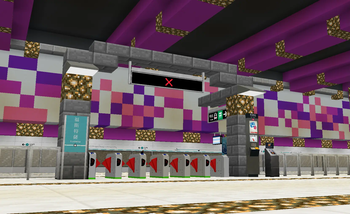
Screenshots
Über diese Mod
This mod is an addon to the Minecraft Transit Railway 4.0 mod that adds various decoration blocks and scripting support.
IMPORTANT: For MTR 4, use JCM v2.x.x. For MTR 3, use JCM v1.2.2
Joban Client Mod
This is an addon based on Minecraft Transit Railway Mod, adding various blocks from the Hong Kong MTR and utility blocks that will greatly improve your world.
Some of the blocks this mod adds including Static Signal Light, Fare Saver machine, Railway Vision PIDS and other decoration blocks to help you build your very own railway system!

Supports Minecraft Forge/Fabric modloader, of the following version:
- 1.16.5
- 1.17.1
- 1.18.2
- 1.19.2
- 1.19.4
- 1.20.1
- 1.20.4
FAQ & Support
Why does my game crash?
There's a variety of reasons, one of the main reasons is that you're using the wrong version of the MTR Mod.
Version labeled as Beta should only be used with a preview version of MTR Mod in their Discord.
If you're unable to download the preview version of MTR, please download the versions labeled as Release.
The game still crashes / I want to report a bug / I want to give suggestions
Most of the support are done in our Discord for easier communication, please join our Discord Server here.
I want to know more!
We have documented most parts of the mod in our wiki.
Verfügbare Versionen
Joban Client Mod auf dem Server installieren
Server bestellen
Bestelle einen Minecraft Java Server mit mindestens 3 GB RAM (4 GB empfohlen).
fabric Loader setzen
Wähle im Panel unter "Egg" den fabric-Loader und die passende Minecraft-Version (1.20.4).
Mod installieren
Öffne den Mod-Browser im Dashboard und suche nach "Joban Client Mod". Klicke "Installieren" – fertig! Alternativ: Lade die .jar via SFTP in den /mods Ordner.
Kompatibilität
Mod-Loader
Minecraft-Versionen
1.20.4, 1.20.1, 1.20 (+7 weitere)
Server-seitig
✓ ErforderlichEmpfohlener RAM
4 GB(min. 3 GB)Häufige Fragen
Joban Client Mod Server crasht beim Start – was tun?
Häufigste Ursache: falsche fabric-Version oder zu wenig RAM. Prüfe im Server-Log (latest.log), ob ein "OutOfMemoryError" oder "Mixin"-Fehler auftritt. Bei Mado Hosting: Stelle sicher, dass mindestens 3 GB RAM zugewiesen sind und der Loader zur Mod-Version passt (1.20.4). Über das Panel kannst du den Loader mit einem Klick wechseln.
Ist Joban Client Mod mit fabric und forge und neoforge und quilt kompatibel?
Joban Client Mod unterstützt offiziell fabric, forge, neoforge, quilt für Minecraft 1.20.4, 1.20.1, 1.20. Achtung: Forge- und Fabric-Mods sind NICHT untereinander kompatibel – wähle einen Loader und bleibe dabei. Im Mado Dashboard werden inkompatible Loader-Kombinationen automatisch erkannt.
Server laggt mit Joban Client Mod – wie optimiere ich die Performance?
Empfohlener RAM: 4 GB (+1 GB pro 8 Spieler). Prüfe mit /spark profiler, ob Joban Client Mod den meisten Tick-Time verbraucht. Häufige Fixes: Server-View-Distance auf 8-10 reduzieren, bei Forge "performant" oder "starlight" als Zusatz-Mod installieren. Bei Mado Hosting läuft dein Server auf NVMe-SSDs mit dedizierten CPU-Kernen für minimale Latenz.
Ähnliche Mods

![[ETF] Entity Texture Features](https://cdn.modrinth.com/data/BVzZfTc1/af683d206d50b05258d865b0d6e4aa2f2cee12f2_96.webp)
![[EMF] Entity Model Features](https://cdn.modrinth.com/data/4I1XuqiY/6e5bbd0d06b1741bfdab6c0cfab6de8fdaf0064c_96.webp)



Modded Server mieten
Installiere Joban Client Mod mit nur einem Klick auf deinem Server.