
Joban Client Mod
Railway Facilities addon and Enhancement mod for the Minecraft Transit Railway (MTR) Mod
Screenshots
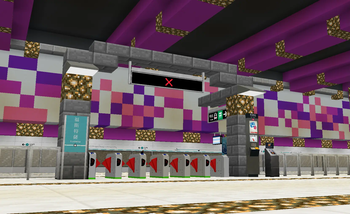
About this Mod
This mod is an addon to the Minecraft Transit Railway 4.0 mod that adds various decoration blocks and scripting support.
IMPORTANT: For MTR 4, use JCM v2.x.x. For MTR 3, use JCM v1.2.2
Joban Client Mod
This is an addon based on Minecraft Transit Railway Mod, adding various blocks from the Hong Kong MTR and utility blocks that will greatly improve your world.
Some of the blocks this mod adds including Static Signal Light, Fare Saver machine, Railway Vision PIDS and other decoration blocks to help you build your very own railway system!

Supports Minecraft Forge/Fabric modloader, of the following version:
- 1.16.5
- 1.17.1
- 1.18.2
- 1.19.2
- 1.19.4
- 1.20.1
- 1.20.4
FAQ & Support
Why does my game crash?
There's a variety of reasons, one of the main reasons is that you're using the wrong version of the MTR Mod.
Version labeled as Beta should only be used with a preview version of MTR Mod in their Discord.
If you're unable to download the preview version of MTR, please download the versions labeled as Release.
The game still crashes / I want to report a bug / I want to give suggestions
Most of the support are done in our Discord for easier communication, please join our Discord Server here.
I want to know more!
We have documented most parts of the mod in our wiki.
Available Versions
How to Install Joban Client Mod on Your Server
Order Server
Order a Minecraft Java server with at least 3 GB RAM (4 GB recommended).
Set fabric Loader
In the panel under "Egg", select the fabric loader and matching Minecraft version (1.20.4).
Install Mod
Open the mod browser in the dashboard and search for "Joban Client Mod". Click "Install" – done! Alternatively, upload the .jar via SFTP to the /mods folder.
Compatibility
Mod Loaders
Minecraft Versions
1.20.4, 1.20.1, 1.20 (+7 more)
Server-side
✓ RequiredRecommended RAM
4 GB(min. 3 GB)Frequently Asked Questions
Joban Client Mod server crashes on startup – what to do?
Most common cause: wrong fabric version or insufficient RAM. Check the server log (latest.log) for "OutOfMemoryError" or "Mixin" errors. With Mado Hosting: ensure at least 3 GB RAM is allocated and the loader matches the mod version (1.20.4). You can switch loaders with one click in the panel.
Is Joban Client Mod compatible with fabric and forge and neoforge and quilt?
Joban Client Mod officially supports fabric, forge, neoforge, quilt for Minecraft 1.20.4, 1.20.1, 1.20. Note: Forge and Fabric mods are NOT cross-compatible – pick one loader and stick with it. The Mado dashboard automatically detects incompatible loader combinations.
Server lagging with Joban Client Mod – how to optimize performance?
Recommended RAM: 4 GB (per 8 players). Use /spark profiler to check if Joban Client Mod consumes the most tick time. Common fixes: reduce server view-distance to 8-10, install "performant" or "starlight" as supplementary mods on Forge. With Mado Hosting, your server runs on NVMe SSDs with dedicated CPU cores for minimal latency.
Similar Mods

![[ETF] Entity Texture Features](https://cdn.modrinth.com/data/BVzZfTc1/af683d206d50b05258d865b0d6e4aa2f2cee12f2_96.webp)
![[EMF] Entity Model Features](https://cdn.modrinth.com/data/4I1XuqiY/6e5bbd0d06b1741bfdab6c0cfab6de8fdaf0064c_96.webp)



Rent Modded Server
Install Joban Client Mod with just one click on your server.