
Loot Beams: Refork
Loot items, guided by light!
Über diese Mod
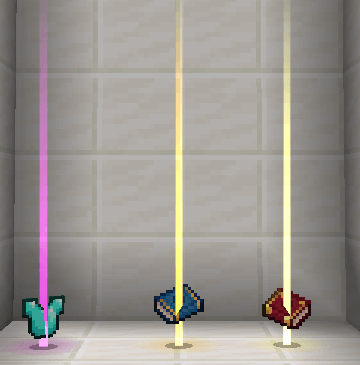
a client-side mod that adds a beam of light effect to items dropped in the world, making them more noticeable and guiding players to loot with ease.
This mod is a fork of Loot Beams: Relooted!. but its code has been overwritten totally. The aim of rewriting the code is to provide more compatibility and extension possibilities.
Features:
Great Compatibility: The mod doesn’t rely on custom shaders, ensuring compatibility with popular shaders. It also works well with other mods, while addressing and fixing compatibility issues found in the original mod.
Developer-Friendly: Provide several events that can be listened to.
Highly Configurable: Provide many configurations to let you fully control the mod function. It's advisable to edit the config in GUI instead of toml.
Current Mod Compatibility:
- Apotheosis(1.20/1.21)/Zenith(1.20): Supports affix gear, gems, and rarity materials.
- Photon(1.20.1 only): Players can use customized FX to replace the original effect. Check the config for more information! If you want to use this feature in your game, you need to enable the configs enableFXOverride and replaceAllBeam
- Mine and Slash: Fully compatible with all rarity items, including gear, gems, and more.
- Obscure Tooltips: The related function will be disabled when installed.
- TieredZ/Tiered Reforged: will use the rarity provided by mods, but the rare sound effect is not available.
- Curios/Trinket/Three trinket mods(1.21): Any items recognized as artifacts will also be recognized as equipment, so Refork can fully control its light effect and sound.
- Spartan Weaponry(internal), Balkon's WeaponMod: Legacy(in config)
Feel free to contact me on GitHub if you find any mod that needs special compatibility!
Verfügbare Versionen
Loot Beams: Refork auf deinem Client installieren
Mod-Loader lokal installieren
Installiere fabric für deine lokale Minecraft-Version.
Passende Datei herunterladen
Wähle die Loot Beams: Refork-Datei für fabric und Minecraft 1.21.11.
Mod installieren
Lege die .jar-Datei in deinem lokalen .minecraft/mods-Ordner ab und starte Minecraft neu. Eine Installation auf dem Server ist nicht nötig.
Kompatibilität
Mod-Loader
Minecraft-Versionen
1.21.11, 1.21.10, 1.21.8 (+9 weitere)
Server-seitig
✗ Nicht unterstütztEmpfohlener RAM
4 GB(min. 3 GB)Häufige Fragen
Muss Loot Beams: Refork auf dem Minecraft Server installiert werden?
Nein. Modrinth kennzeichnet Loot Beams: Refork serverseitig als nicht unterstützt. Installiere die Mod nur im lokalen Minecraft-Mods-Ordner. Dein Server kann unverändert bleiben, sofern die Mod-Seite keine zusätzliche Abhängigkeit nennt.
Welche Version und welchen Loader braucht Loot Beams: Refork?
Nutze eine Datei für fabric, forge, neoforge und exakt deine Minecraft-Version. Unterstützte Versionen sind unter anderem 1.21.11, 1.21.10, 1.21.8. Loader-Dateien sind nicht untereinander austauschbar.
Loot Beams: Refork funktioniert nicht – was kann ich prüfen?
Prüfe zuerst Minecraft-Version, Loader-Version und erforderliche Abhängigkeiten. Lege die .jar-Datei im lokalen .minecraft/mods-Ordner ab und entferne ältere Duplikate. Da die Mod clientseitig ist, löst mehr Server-RAM dieses Problem nicht.
Ähnliche Mods

![[ETF] Entity Texture Features](https://cdn.modrinth.com/data/BVzZfTc1/af683d206d50b05258d865b0d6e4aa2f2cee12f2_96.webp)
![[EMF] Entity Model Features](https://cdn.modrinth.com/data/4I1XuqiY/6e5bbd0d06b1741bfdab6c0cfab6de8fdaf0064c_96.webp)



Minecraft Server für deine Gruppe
Loot Beams: Refork bleibt auf deinem Client. Hoste dazu eine kompatible Welt für deine Mitspieler.