
Loot Beams: Refork
Loot items, guided by light!
About this Mod
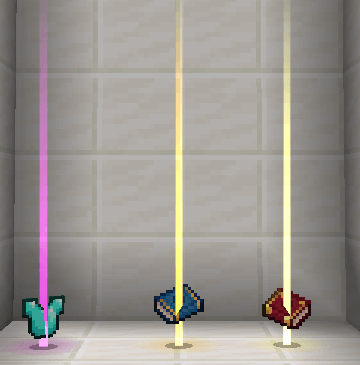
a client-side mod that adds a beam of light effect to items dropped in the world, making them more noticeable and guiding players to loot with ease.
This mod is a fork of Loot Beams: Relooted!. but its code has been overwritten totally. The aim of rewriting the code is to provide more compatibility and extension possibilities.
Features:
Great Compatibility: The mod doesn’t rely on custom shaders, ensuring compatibility with popular shaders. It also works well with other mods, while addressing and fixing compatibility issues found in the original mod.
Developer-Friendly: Provide several events that can be listened to.
Highly Configurable: Provide many configurations to let you fully control the mod function. It's advisable to edit the config in GUI instead of toml.
Current Mod Compatibility:
- Apotheosis(1.20/1.21)/Zenith(1.20): Supports affix gear, gems, and rarity materials.
- Photon(1.20.1 only): Players can use customized FX to replace the original effect. Check the config for more information! If you want to use this feature in your game, you need to enable the configs enableFXOverride and replaceAllBeam
- Mine and Slash: Fully compatible with all rarity items, including gear, gems, and more.
- Obscure Tooltips: The related function will be disabled when installed.
- TieredZ/Tiered Reforged: will use the rarity provided by mods, but the rare sound effect is not available.
- Curios/Trinket/Three trinket mods(1.21): Any items recognized as artifacts will also be recognized as equipment, so Refork can fully control its light effect and sound.
- Spartan Weaponry(internal), Balkon's WeaponMod: Legacy(in config)
Feel free to contact me on GitHub if you find any mod that needs special compatibility!
Available Versions
How to Install Loot Beams: Refork on Your Client
Install the Mod Loader Locally
Install fabric for your local Minecraft version.
Download the Matching File
Choose the Loot Beams: Refork file for fabric and Minecraft 1.21.11.
Install Mod
Place the .jar file in your local .minecraft/mods folder and restart Minecraft. No server-side installation is required.
Compatibility
Mod Loaders
Minecraft Versions
1.21.11, 1.21.10, 1.21.8 (+9 more)
Server-side
✗ UnsupportedRecommended RAM
4 GB(min. 3 GB)Frequently Asked Questions
Does Loot Beams: Refork need to be installed on the Minecraft server?
No. Modrinth marks Loot Beams: Refork as unsupported on the server side. Install it only in your local Minecraft mods folder. Your server can remain unchanged unless the mod page lists an additional dependency.
Which version and loader does Loot Beams: Refork require?
Use a file for fabric, forge, neoforge and your exact Minecraft version. Supported versions include 1.21.11, 1.21.10, 1.21.8. Files for different loaders are not interchangeable.
Loot Beams: Refork is not working – what should I check?
First check the Minecraft version, loader version and required dependencies. Put the .jar file in your local .minecraft/mods folder and remove older duplicates. Because this mod is client-side, adding server RAM will not fix it.
Similar Mods

![[ETF] Entity Texture Features](https://cdn.modrinth.com/data/BVzZfTc1/af683d206d50b05258d865b0d6e4aa2f2cee12f2_96.webp)
![[EMF] Entity Model Features](https://cdn.modrinth.com/data/4I1XuqiY/6e5bbd0d06b1741bfdab6c0cfab6de8fdaf0064c_96.webp)



Minecraft Server for Your Group
Loot Beams: Refork stays on your client. Host a compatible world for your group.