
Mishang Urban Construction
An amount of blocks and items that make a beautiful city!
Screenshots
Über diese Mod
Mishang Urban Construction
Mishang Urban Construction is a building and decoration mod that provides a variety of useful blocks, including:
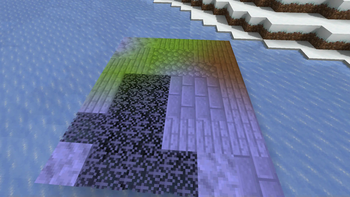
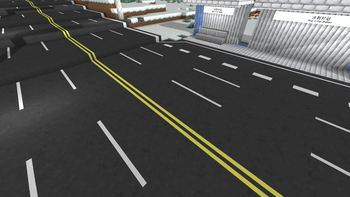
- Road blocks: lines can be painted on them to make them look realistic. The road lines have various combinations and can be generated automatically in some situations.
- Road marks: simple road markings, such as guide arrows; can be placed on roads and road slabs.
- Lights: available in various shapes and colors, including white, yellow, orange, cyan, green, and pink. There are full light blocks as well as decorations that can be placed on walls, floors, or ceilings.
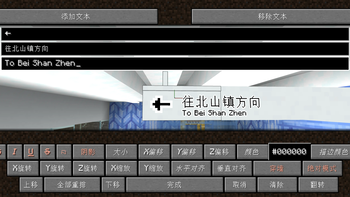
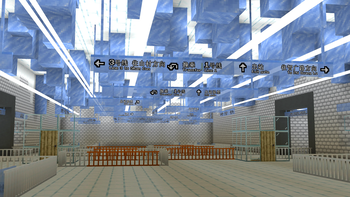
- Sign blocks: available in different styles. Compared with vanilla signs, signs in this mod allow parameters such as color, size, and position to be adjusted flexibly. Sign presets can be managed via the
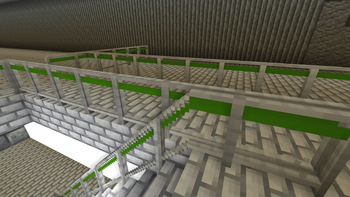
/mishanguc:signpresetcommand. - Handrail blocks: available with various textures, appearances, and connection methods, and can be placed on stairs.
- Custom-colored blocks: allow any color to be specified instead of being limited to the 16 colors available for concrete and wool.
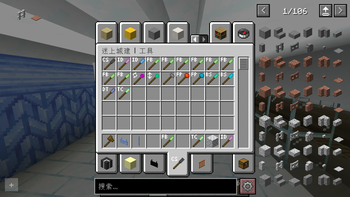
Moreover, the mod contains a series of useful tools, such as:
- Fast Building Tool: quickly places multiple blocks on a plane.
- Column Building Tool: quickly places multiple blocks in a column.
- Force Placing Tool: places blocks while ignoring placement restrictions and block updates.
- Teleportation Tool: teleports you to any location.
- ID Checking Tool, Block State Tool, and Data Tag Tool: query the properties or NBT of a block or entity, or query the current biome.
- Explosion Tool: creates an explosion when clicked.
- Rotating or Mirroring Tool: rotates or flips a block when clicked.
- Color Tool: obtains and modifies block colors; only some blocks support custom coloring.
- Text Copy Tool: copies and pastes text on signs, including vanilla signs.
- Growth Tool: makes creatures and crops grow or regress. When holding a golden dandelion in the offhand, it can also freeze or unfreeze a creature's age (version 26.1 and above).
- Carrying Tool: picks up a block or entity and carries it to another location.
- Road Tool: quickly adds or removes road markings.
- ……
For detailed information about this mod, see GitHub or MC模组百科.
This mod depends on Fabric API and, since version 1.4.0, no longer depends on the BRRP (Better Runtime Resource Pack) mod.
Only a Fabric version is available; there is no Forge or NeoForge version of this mod.
Please also refer to the update log.
This mod is published under the LGPLv3 license, which you must follow when propagating this mod.
You are welcome to join the Tencent QQ group 587928350 for discussion. You can also report issues on GitHub.
Verfügbare Versionen
Mishang Urban Construction auf dem Server installieren
Server bestellen
Bestelle einen Minecraft Java Server mit mindestens 3 GB RAM (4 GB empfohlen).
fabric Loader setzen
Wähle im Panel unter "Egg" den fabric-Loader und die passende Minecraft-Version (26.1.2).
Mod installieren
Öffne den Mod-Browser im Dashboard und suche nach "Mishang Urban Construction". Klicke "Installieren" – fertig! Alternativ: Lade die .jar via SFTP in den /mods Ordner.
Kompatibilität
Mod-Loader
Minecraft-Versionen
26.1.2, 26.1.1, 26.1 (+39 weitere)
Server-seitig
✓ ErforderlichEmpfohlener RAM
4 GB(min. 3 GB)Häufige Fragen
Mishang Urban Construction Server crasht beim Start – was tun?
Häufigste Ursache: falsche fabric-Version oder zu wenig RAM. Prüfe im Server-Log (latest.log), ob ein "OutOfMemoryError" oder "Mixin"-Fehler auftritt. Bei Mado Hosting: Stelle sicher, dass mindestens 3 GB RAM zugewiesen sind und der Loader zur Mod-Version passt (26.1.2). Über das Panel kannst du den Loader mit einem Klick wechseln.
Ist Mishang Urban Construction mit fabric kompatibel?
Mishang Urban Construction unterstützt offiziell fabric für Minecraft 26.1.2, 26.1.1, 26.1. Im Mado Dashboard werden inkompatible Loader-Kombinationen automatisch erkannt.
Server laggt mit Mishang Urban Construction – wie optimiere ich die Performance?
Empfohlener RAM: 4 GB (+1 GB pro 8 Spieler). Prüfe mit /spark profiler, ob Mishang Urban Construction den meisten Tick-Time verbraucht. Häufige Fixes: Server-View-Distance auf 8-10 reduzieren, bei Forge "performant" oder "starlight" als Zusatz-Mod installieren. Bei Mado Hosting läuft dein Server auf NVMe-SSDs mit dedizierten CPU-Kernen für minimale Latenz.
Ähnliche Mods

![[ETF] Entity Texture Features](https://cdn.modrinth.com/data/BVzZfTc1/af683d206d50b05258d865b0d6e4aa2f2cee12f2_96.webp)
![[EMF] Entity Model Features](https://cdn.modrinth.com/data/4I1XuqiY/6e5bbd0d06b1741bfdab6c0cfab6de8fdaf0064c_96.webp)



Modded Server mieten
Installiere Mishang Urban Construction mit nur einem Klick auf deinem Server.
Details
- Lizenz
- GNU Lesser General Public License v3.0 only
- Server-seitig
- Erforderlich