
Mishang Urban Construction
An amount of blocks and items that make a beautiful city!
Screenshots
About this Mod
Mishang Urban Construction
Mishang Urban Construction is a building and decoration mod that provides a variety of useful blocks, including:
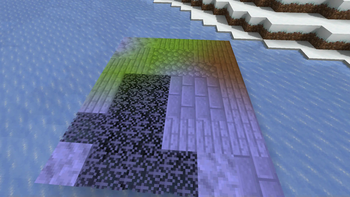
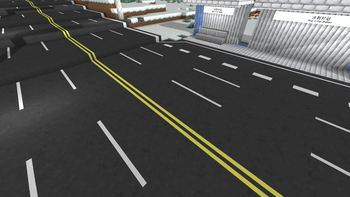
- Road blocks: lines can be painted on them to make them look realistic. The road lines have various combinations and can be generated automatically in some situations.
- Road marks: simple road markings, such as guide arrows; can be placed on roads and road slabs.
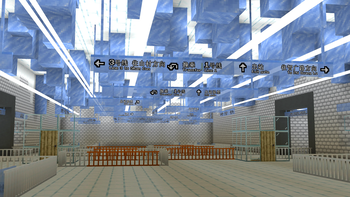
- Lights: available in various shapes and colors, including white, yellow, orange, cyan, green, and pink. There are full light blocks as well as decorations that can be placed on walls, floors, or ceilings.
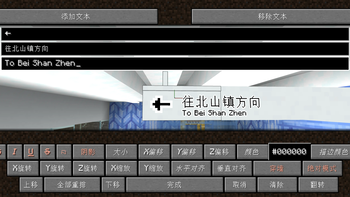
- Sign blocks: available in different styles. Compared with vanilla signs, signs in this mod allow parameters such as color, size, and position to be adjusted flexibly. Sign presets can be managed via the
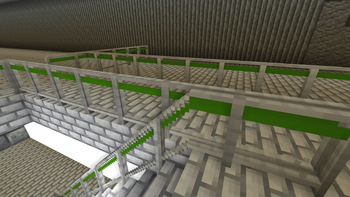
/mishanguc:signpresetcommand. - Handrail blocks: available with various textures, appearances, and connection methods, and can be placed on stairs.
- Custom-colored blocks: allow any color to be specified instead of being limited to the 16 colors available for concrete and wool.
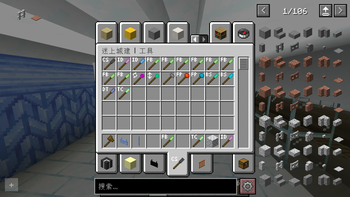
Moreover, the mod contains a series of useful tools, such as:
- Fast Building Tool: quickly places multiple blocks on a plane.
- Column Building Tool: quickly places multiple blocks in a column.
- Force Placing Tool: places blocks while ignoring placement restrictions and block updates.
- Teleportation Tool: teleports you to any location.
- ID Checking Tool, Block State Tool, and Data Tag Tool: query the properties or NBT of a block or entity, or query the current biome.
- Explosion Tool: creates an explosion when clicked.
- Rotating or Mirroring Tool: rotates or flips a block when clicked.
- Color Tool: obtains and modifies block colors; only some blocks support custom coloring.
- Text Copy Tool: copies and pastes text on signs, including vanilla signs.
- Growth Tool: makes creatures and crops grow or regress. When holding a golden dandelion in the offhand, it can also freeze or unfreeze a creature's age (version 26.1 and above).
- Carrying Tool: picks up a block or entity and carries it to another location.
- Road Tool: quickly adds or removes road markings.
- ……
For detailed information about this mod, see GitHub or MC模组百科.
This mod depends on Fabric API and, since version 1.4.0, no longer depends on the BRRP (Better Runtime Resource Pack) mod.
Only a Fabric version is available; there is no Forge or NeoForge version of this mod.
Please also refer to the update log.
This mod is published under the LGPLv3 license, which you must follow when propagating this mod.
You are welcome to join the Tencent QQ group 587928350 for discussion. You can also report issues on GitHub.
Available Versions
How to Install Mishang Urban Construction on Your Server
Order Server
Order a Minecraft Java server with at least 3 GB RAM (4 GB recommended).
Set fabric Loader
In the panel under "Egg", select the fabric loader and matching Minecraft version (26.1.2).
Install Mod
Open the mod browser in the dashboard and search for "Mishang Urban Construction". Click "Install" – done! Alternatively, upload the .jar via SFTP to the /mods folder.
Compatibility
Mod Loaders
Minecraft Versions
26.1.2, 26.1.1, 26.1 (+39 more)
Server-side
✓ RequiredRecommended RAM
4 GB(min. 3 GB)Frequently Asked Questions
Mishang Urban Construction server crashes on startup – what to do?
Most common cause: wrong fabric version or insufficient RAM. Check the server log (latest.log) for "OutOfMemoryError" or "Mixin" errors. With Mado Hosting: ensure at least 3 GB RAM is allocated and the loader matches the mod version (26.1.2). You can switch loaders with one click in the panel.
Is Mishang Urban Construction compatible with fabric?
Mishang Urban Construction officially supports fabric for Minecraft 26.1.2, 26.1.1, 26.1. The Mado dashboard automatically detects incompatible loader combinations.
Server lagging with Mishang Urban Construction – how to optimize performance?
Recommended RAM: 4 GB (per 8 players). Use /spark profiler to check if Mishang Urban Construction consumes the most tick time. Common fixes: reduce server view-distance to 8-10, install "performant" or "starlight" as supplementary mods on Forge. With Mado Hosting, your server runs on NVMe SSDs with dedicated CPU cores for minimal latency.
Similar Mods

![[ETF] Entity Texture Features](https://cdn.modrinth.com/data/BVzZfTc1/af683d206d50b05258d865b0d6e4aa2f2cee12f2_96.webp)
![[EMF] Entity Model Features](https://cdn.modrinth.com/data/4I1XuqiY/6e5bbd0d06b1741bfdab6c0cfab6de8fdaf0064c_96.webp)



Rent Modded Server
Install Mishang Urban Construction with just one click on your server.