
More Functional Storage
Functional Storage addon that adds drawer upgrades with more advanced functionality.
Über diese Mod
This is a Functional Storage addon that adds drawer upgrades with more advanced functionality.
Breaker Upgrade
Breaks blocks and places them in the drawer. Requires a tool inserted in the upgrade (durability is not consumed).
Placer Upgrade
Places blocks from the drawer.
Refill Upgrade
Refills the player's hotbar, inventory or ender chest with items from the drawer. Will only refill slots with at least one item. Use the dimensional variant for it to work cross dimensionally.
Stonecutting Upgrade
Stonecuts items from the drawer automatically. The stonecutting output can be configured via the filter. Therefore, a tag filter can be used to for example turn any stones into stairs by matching on the stairs tag.
The direction of the upgrades can be configured in the GUI using the arrow button.
All upgrades added by this mod have a base processing time (usually once every 3 seconds) which can be reduced via Speed Upgrade Augments (placing the maximum 6 augments will make the upgrade work every tick).
Upgrade GUIs can be accessed by placing the upgrade in a drawer's utility slot, hovering over it and then right clicking. There you can configure the upgrade (redstone control, slot selection, filtering, augments etc.).
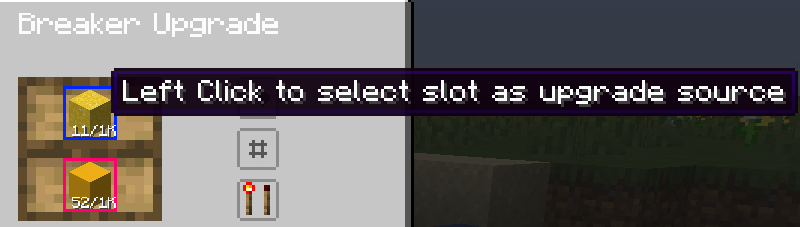
Upgrades have redstone control which makes them work only if the power the drawer receives meets the configured criteria. The slots with which an upgrade interacts can be selected on a per-upgrade basis by clicking them:
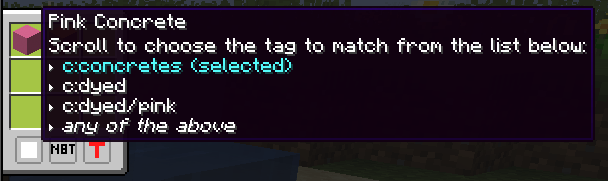
Filtering is also supported, in a panel opened by clicking the second button (the one below the direction button). The filters support blacklisting or whitelisting, matching NBT strictly or matching based on tags (see the image below)
More upgrades will be added in the future!
Verfügbare Versionen
More Functional Storage auf dem Server installieren
Server bestellen
Bestelle einen Minecraft Java Server mit mindestens 3 GB RAM (4 GB empfohlen).
neoforge Loader setzen
Wähle im Panel unter "Egg" den neoforge-Loader und die passende Minecraft-Version (1.21.8).
Mod installieren
Öffne den Mod-Browser im Dashboard und suche nach "More Functional Storage". Klicke "Installieren" – fertig! Alternativ: Lade die .jar via SFTP in den /mods Ordner.
Kompatibilität
Mod-Loader
Minecraft-Versionen
1.21.8, 1.21.7, 1.21.6 (+5 weitere)
Server-seitig
✓ ErforderlichEmpfohlener RAM
4 GB(min. 3 GB)Häufige Fragen
More Functional Storage Server crasht beim Start – was tun?
Häufigste Ursache: falsche neoforge-Version oder zu wenig RAM. Prüfe im Server-Log (latest.log), ob ein "OutOfMemoryError" oder "Mixin"-Fehler auftritt. Bei Mado Hosting: Stelle sicher, dass mindestens 3 GB RAM zugewiesen sind und der Loader zur Mod-Version passt (1.21.8). Über das Panel kannst du den Loader mit einem Klick wechseln.
Ist More Functional Storage mit neoforge kompatibel?
More Functional Storage unterstützt offiziell neoforge für Minecraft 1.21.8, 1.21.7, 1.21.6. Im Mado Dashboard werden inkompatible Loader-Kombinationen automatisch erkannt.
Server laggt mit More Functional Storage – wie optimiere ich die Performance?
Empfohlener RAM: 4 GB (+1 GB pro 8 Spieler). Prüfe mit /spark profiler, ob More Functional Storage den meisten Tick-Time verbraucht. Häufige Fixes: Server-View-Distance auf 8-10 reduzieren, bei Forge "performant" oder "starlight" als Zusatz-Mod installieren. Bei Mado Hosting läuft dein Server auf NVMe-SSDs mit dedizierten CPU-Kernen für minimale Latenz.
Ähnliche Mods






Modded Server mieten
Installiere More Functional Storage mit nur einem Klick auf deinem Server.