

Modrinth · NeoForge
More Functional Storage on your Minecraft server
More Functional Storage runs on Minecraft servers with NeoForge. Order your server, set the loader in the panel and install the mod with one click in the mod browser.
Functional Storage addon that adds drawer upgrades with more advanced functionality.
- Downloads
- 9.9K
- Author
- Matyrobbrt
- Loader
- NeoForge
- Minecraft
- 1.21.1 – 1.21.8
- Updated
- –
Setup
Install More Functional Storage on your server
The server and players need the same loader and Minecraft version. Back up the world before adding or updating mods.
- 01
Configure
4 GB of RAM is preselected. You choose the term and add-ons and pay by credit card or PayPal.
- 02
Set the loader
In the panel, set the server software to NeoForge and choose the matching Minecraft version, for example 1.21.8.
- 03
Install the mod
Search the mod browser for “More Functional Storage” and install the release for your loader. Alternatively, upload the .jar to the mods folder via SFTP. Required dependencies are listed on the project page.
- 04
Connect
Every player installs the same More Functional Storage release locally and connects using the server address from the panel.
- On the server
- Required
- On the client
- Required
- Loader
- NeoForge
- Minecraft
- 1.21.8, 1.21.7, 1.21.6 +5 more
- License
- MIT License
The panel
Install mods, find errors.
Real screenshots from the Mado panel. Both come with every Minecraft server.
Mod browser
Modrinth and CurseForge, right in the panel.
The browser filters by your Minecraft version. Install mods with one click, without uploading .jar files.

AI crash analysis
When a mod crashes, the analyzer reads the log.
Mods often fail on a wrong loader version, Java version or missing dependency. The analyzer names a likely cause and suggests a fix.

Releases
Published releases
Pick the file that matches your server’s loader and Minecraft version. The server and players need the same release.
More Functional Storage · ModrinthOriginal description by the project author
This is a Functional Storage addon that adds drawer upgrades with more advanced functionality.
Breaker Upgrade
Breaks blocks and places them in the drawer. Requires a tool inserted in the upgrade (durability is not consumed).
Placer Upgrade
Places blocks from the drawer.
Refill Upgrade
Refills the player's hotbar, inventory or ender chest with items from the drawer. Will only refill slots with at least one item. Use the dimensional variant for it to work cross dimensionally.
Stonecutting Upgrade
Stonecuts items from the drawer automatically. The stonecutting output can be configured via the filter. Therefore, a tag filter can be used to for example turn any stones into stairs by matching on the stairs tag.
The direction of the upgrades can be configured in the GUI using the arrow button.
All upgrades added by this mod have a base processing time (usually once every 3 seconds) which can be reduced via Speed Upgrade Augments (placing the maximum 6 augments will make the upgrade work every tick).
Upgrade GUIs can be accessed by placing the upgrade in a drawer's utility slot, hovering over it and then right clicking. There you can configure the upgrade (redstone control, slot selection, filtering, augments etc.).
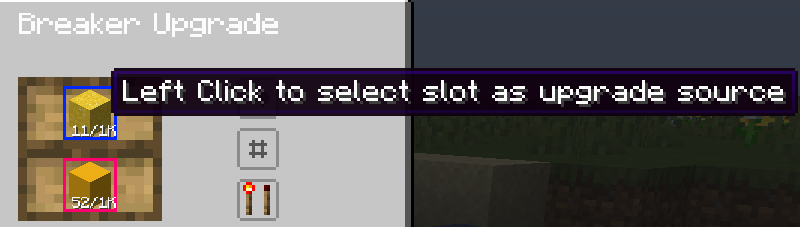
Upgrades have redstone control which makes them work only if the power the drawer receives meets the configured criteria. The slots with which an upgrade interacts can be selected on a per-upgrade basis by clicking them:
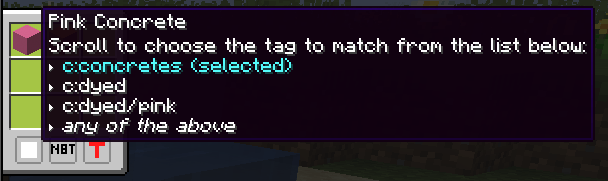
Filtering is also supported, in a panel opened by clicking the second button (the one below the direction button). The filters support blacklisting or whitelisting, matching NBT strictly or matching based on tags (see the image below)
More upgrades will be added in the future!
More Functional Storage server crashes on startup – what to do?
Common causes: the loader or Minecraft version does not match the mod file, a dependency is missing, or RAM is too low. Check the log (latest.log) for “OutOfMemoryError”, “Mixin” or missing mods. At Mado, the AI crash analysis reads the log and suggests a cause. You can change the loader and version in the panel.
Which loader does More Functional Storage run on?
According to Modrinth, More Functional Storage supports NeoForge for Minecraft 1.21.8, 1.21.7, 1.21.6.
How much RAM does a server with More Functional Storage need?
As guidance, 3–4 GB for a server with this mod. This is an estimate, not a measured minimum. More mods, many players and long view distances need more. The spark profiler shows whether a mod is costing tick time.
Similar mods
Popular mods in the same category
 Server-ready

YetAnotherConfigLib (YACL)
by isxander
A builder-based configuration library for Minecraft!
 Server-ready

Text Placeholder API
by Patbox
Placeholder and Text manipulation library for your Minecraft mods.
 Client only

Dynamic FPS
by juliand665
Reduce resource usage while Minecraft is in the background, idle, or on battery.
 Server-ready

No Chat Reports
by Aizistral
Makes chat unreportable (where possible)
Ready for your server with More Functional Storage?
4 GB of RAM from €8.00 per month. 35% off your first month with MADO35.