
Modrinth · Fabric, NeoForge
Snow auf deinem Minecraft Server
Snow läuft auf Minecraft Servern mit Fabric oder NeoForge. Bestell deinen Server, stell den Loader im Panel ein und installiere die Mod mit einem Klick im Mod-Browser.
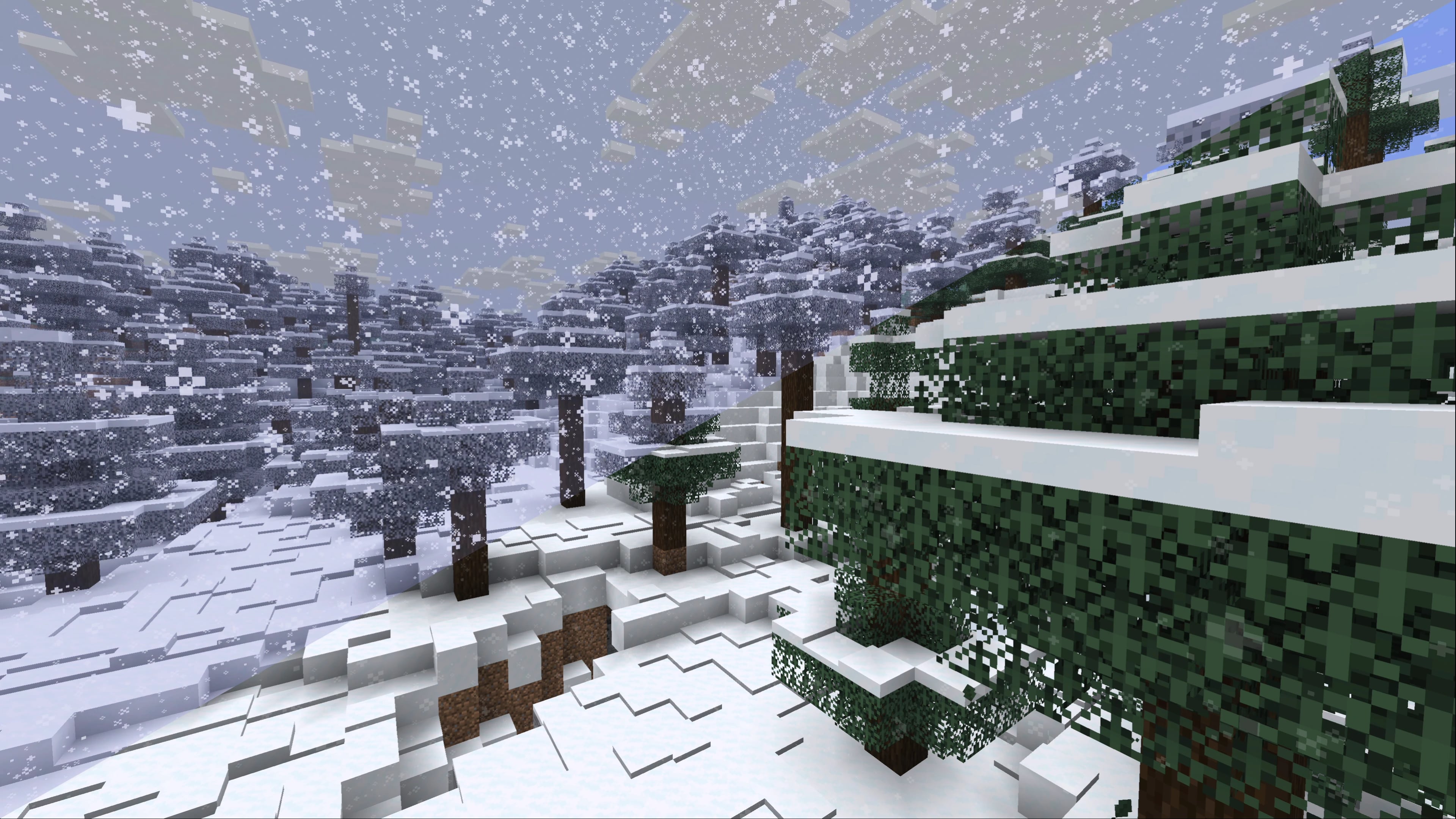
Snowlogging, snowy leaves, better generation and more. Simple & complete parity with Bedrock Edition's snow mechanics while being as unobtrusive as possible
- Downloads
- 4.7M
- Autor
- IMB11
- Loader
- Fabric, NeoForge
- Minecraft
- 1.18 – 26.3
- Aktualisiert
- –
Screenshots
So sieht Snow aus


Bilder: Snow auf Modrinth, vom Projektteam veröffentlicht.
Einrichtung
Snow auf dem Server installieren
Server und Spieler brauchen denselben Loader und dieselbe Minecraft-Version. Sichere die Welt, bevor du Mods hinzufügst oder aktualisierst.
- 01
Konfigurieren
6 GB RAM sind vorausgewählt. Laufzeit und Add-ons wählst du selbst, bezahlt wird per Kreditkarte oder PayPal.
- 02
Loader einstellen
Stell im Panel die Serversoftware auf Fabric oder NeoForge und wähl die passende Minecraft-Version, zum Beispiel 26.3.
- 03
Mod installieren
Such im Mod-Browser nach „Snow“ und installiere die Version für deinen Loader. Alternativ lädst du die .jar per SFTP in den Ordner mods. Erforderliche Abhängigkeiten stehen auf der Projektseite.
- 04
Verbinden
Snow ist auf dem Client nicht nötig. Spieler verbinden sich über die Serveradresse aus dem Panel.
- Auf dem Server
- Erforderlich
- Auf dem Client
- Nicht nötig
- Loader
- Fabric, NeoForge
- Minecraft
- 26.3, 26.2-rc-2, 26.2-rc-1 +32 weitere
- Lizenz
- LicenseRef-All-Rights-Reserved
Das Panel
Mods installieren, Fehler finden.
Echte Screenshots aus dem Mado Panel. Beides ist bei jedem Minecraft Server enthalten.
Mod-Browser
Modrinth und CurseForge direkt im Panel.
Der Browser filtert nach deiner Minecraft-Version. Mods installierst du mit einem Klick, ohne .jar-Dateien hochzuladen.

KI-Crash-Analyse
Wenn ein Mod crasht, liest die Analyse das Log.
Mods scheitern oft an einer falschen Loader-Version, Java-Version oder fehlenden Abhängigkeit. Die Analyse nennt eine wahrscheinliche Ursache und einen Lösungsvorschlag.

Versionen
Veröffentlichte Versionen
Nimm die Datei, die zu Loader und Minecraft-Version deines Servers passt. Server und Spieler brauchen dieselbe Version.
Snow · Modrinth- Snow Under Trees 2.7.59. Dezember 2025Minecraft 1.21.11 · Fabric
- Snow Under Trees 2.7.47. Oktober 2025Minecraft 1.21, 1.21.1 · Fabric
- Snow Under Trees 2.7.47. Oktober 2025Minecraft 1.21.10, 1.21.9 · Fabric
- Snow Under Trees 2.7.47. Oktober 2025Minecraft 1.21.6, 1.21.7, 1.21.8 · Fabric
- Snow Under Trees 2.7.330. September 2025Minecraft 1.21.10, 1.21.10-rc1, 1.21.9 · Fabric
Originalbeschreibung des Projektautors


Note: Snow Under Trees (Fabric) is now Snow - enjoy all the new features!
Complete parity with Bedrock Edition's snow mechanics while being as unobtrusive as possible.
Snow is a mod that is focused around Minecraft's snow mechanics, specifically bringing much-requested features from Bedrock Edition. Most of the mod is client-side only, some things will be needed to be installed on both client and server to use though, like Snowlogging.
Snowlogging
You need to install Snow on the server-side to use this to use this on multiplayer servers - but if you have Snow installed client-side you'll still be able to join Vanilla servers.
Plants can be snowlogged if they're in the snow:snowloggable block tag. To remove the snow just break it like normal, it will leave the plant alone.

Snowy leaves
This is completely client-side only, you don't need to install Snow on the server-side to use this!
When you're in a snowy biome, and it starts snowing, leaves will slowly turn white! This uses core shaders, and is fully compatible with Sodium and Iris.

Better snow generation
You need to install Snow on the server-side to use this on multiplayer servers - but if you have Snow installed client-side you'll still be able to join Vanilla servers.
Snow changes the way snow generates in snowy biomes, there's much more layering that follows the terrain, and when it snows it will continue to layer up, with each biome having it's own unique thickness of snow on the ground - this can be controlled via datapacks and data generation, check out the wiki (coming soon)!

Snow under trees
You need to install Snow on the server-side to use this on multiplayer servers - but if you have Snow installed client-side you'll still be able to join Vanilla servers.
Self-explanatory! Snow will generate below trees to make snowy tree biomes more immersive. This works for any vanilla and modded biome with trees that have snow precipitation.

Configuration
You can configure the mod with YACL through Mod Menu, or through the mod list on NeoForge. On servers running Snow, the config is controlled by the server, only /op players can change it from in-game.
- Variable Snowfall (
accumulation, defaulttrue): This lets each biome have its own snowfall rate, you can modify this using a datapack. - Multi-Layer Generation (
generation, defaulttrue): If enabled, snowy biomes will generate with several layers of snow instead of just one. - Snow Under Trees (
snowUnderTrees, defaulttrue): When enabled, snow falls and generates on the ground beneath tree canopies. - Gradual Melting (
gradualMelting, defaulttrue): When enabled, snow melts one layer at a time instead of disappearing all at once. - Melt in Warm Biomes (
meltInWarmBiomes, defaultfalse): If enabled snow will melt in biomes that are warm enough to rain. - Shovel Harvesting (
shovelHarvesting, defaulttrue): Using a shovel on snow clears it and drops snowballs. - Snowlogging (
snowlogging, defaulttrue): If enabled, snow can cover small plants like flowers and grass - similar to waterlogging.
The config file is config/snow.json. Some features can be tweaked with a datapack (the wiki is being worked on! come back later for a link)
Compatibility
Snow is compatible with:
- Sodium
- Iris
- Serene Seasons: snowfall, snowlogging, melting and snowy leaves all follow the seasonal temperature, and seasonal melting respects Gradual Melting.
By using my mods, you agree to the End User License Agreement. You are free to use this mod within your Modrinth & CurseForge modpacks as long as the EULA is respected.
PS. For pre-3.0/Snow Under Trees (Fabric) versions: this mod has no code from the original mod, and is essentially a complete rewrite at this point, hence why I have chosen to license it under ARR. All versions before 2.2.0 are still MIT, you can view their code on the original GitHub here.
Snow Server crasht beim Start – was tun?
Häufige Ursachen: Loader- oder Minecraft-Version passen nicht zur Mod-Datei, eine Abhängigkeit fehlt oder der RAM reicht nicht. Such im Log (latest.log) nach „OutOfMemoryError“, „Mixin“ oder fehlenden Mods. Bei Mado wertet die KI-Crash-Analyse das Log aus und schlägt eine Ursache vor. Loader und Version änderst du im Panel.
Mit welchem Loader läuft Snow?
Laut Modrinth unterstützt Snow Fabric, NeoForge für Minecraft 26.3, 26.2-rc-2, 26.2-rc-1.
Wie viel RAM braucht ein Server mit Snow?
Als Orientierung 4–6 GB für einen Server mit dieser Mod. Das ist eine Schätzung, keine gemessene Mindestanforderung. Weitere Mods, viele Spieler und große Sichtweiten brauchen mehr. Ob eine Mod die Tick-Zeit belastet, siehst du mit dem spark-Profiler.
Ähnliche Mods
Beliebte Mods aus derselben Kategorie
 Nur Client

Iris Shaders
von coderbot
A modern shader pack loader for Minecraft intended to be compatible with existing OptiFine shader packs
 Nur Client

[ETF] Entity Texture Features
von Traben
Emissive, Random & Custom texture support for entities in resourcepacks just like Optifine but for Fabric
 Nur Client

[EMF] Entity Model Features
von Traben
EMF is an, OptiFine format, Custom Entity Model replacement mod available for Fabric and Forge.
 Nur Client

Not Enough Animations
von tr7zw
Bringing first-person animations to the third-person
Bereit für deinen Server mit Snow?
6 GB RAM ab 12,00 € im Monat. 35 % auf den 1. Monat mit MADO35.