
Modrinth · Fabric, NeoForge
Snow on your Minecraft server
Snow runs on Minecraft servers with Fabric or NeoForge. Order your server, set the loader in the panel and install the mod with one click in the mod browser.
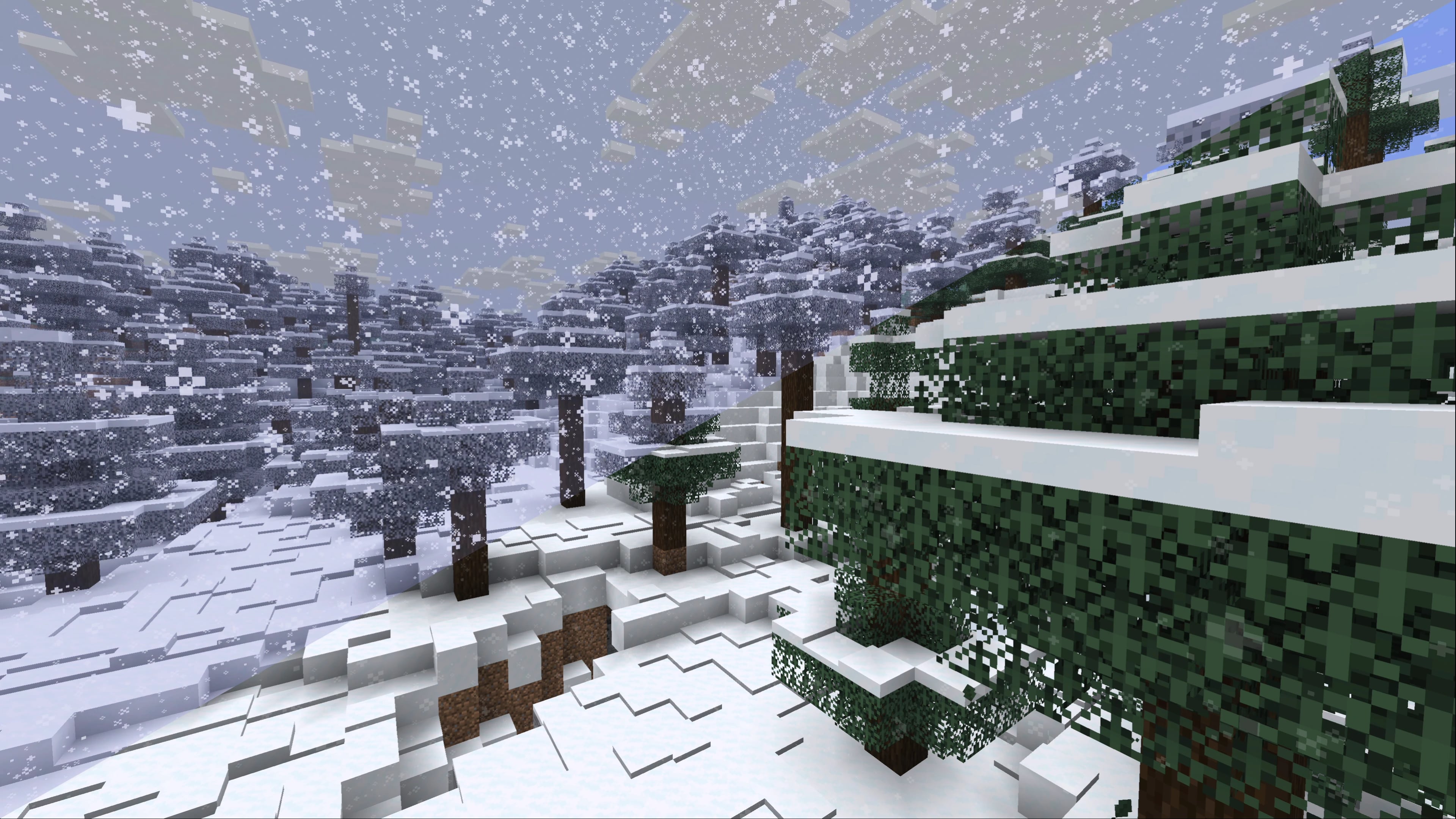
Snowlogging, snowy leaves, better generation and more. Simple & complete parity with Bedrock Edition's snow mechanics while being as unobtrusive as possible
- Downloads
- 4.7M
- Author
- IMB11
- Loader
- Fabric, NeoForge
- Minecraft
- 1.18 – 26.3
- Updated
- –
Screenshots
What Snow looks like


Images: Snow on Modrinth, published by the project team.
Setup
Install Snow on your server
The server and players need the same loader and Minecraft version. Back up the world before adding or updating mods.
- 01
Configure
6 GB of RAM is preselected. You choose the term and add-ons and pay by credit card or PayPal.
- 02
Set the loader
In the panel, set the server software to Fabric or NeoForge and choose the matching Minecraft version, for example 26.3.
- 03
Install the mod
Search the mod browser for “Snow” and install the release for your loader. Alternatively, upload the .jar to the mods folder via SFTP. Required dependencies are listed on the project page.
- 04
Connect
Snow is not needed on the client. Players connect using the server address from the panel.
- On the server
- Required
- On the client
- Not needed
- Loader
- Fabric, NeoForge
- Minecraft
- 26.3, 26.2-rc-2, 26.2-rc-1 +32 more
- License
- LicenseRef-All-Rights-Reserved
The panel
Install mods, find errors.
Real screenshots from the Mado panel. Both come with every Minecraft server.
Mod browser
Modrinth and CurseForge, right in the panel.
The browser filters by your Minecraft version. Install mods with one click, without uploading .jar files.

AI crash analysis
When a mod crashes, the analyzer reads the log.
Mods often fail on a wrong loader version, Java version or missing dependency. The analyzer names a likely cause and suggests a fix.

Releases
Published releases
Pick the file that matches your server’s loader and Minecraft version. The server and players need the same release.
Snow · Modrinth- Snow Under Trees 2.7.5December 9, 2025Minecraft 1.21.11 · Fabric
- Snow Under Trees 2.7.4October 7, 2025Minecraft 1.21, 1.21.1 · Fabric
- Snow Under Trees 2.7.4October 7, 2025Minecraft 1.21.10, 1.21.9 · Fabric
- Snow Under Trees 2.7.4October 7, 2025Minecraft 1.21.6, 1.21.7, 1.21.8 · Fabric
- Snow Under Trees 2.7.3September 30, 2025Minecraft 1.21.10, 1.21.10-rc1, 1.21.9 · Fabric
Original description by the project author


Note: Snow Under Trees (Fabric) is now Snow - enjoy all the new features!
Complete parity with Bedrock Edition's snow mechanics while being as unobtrusive as possible.
Snow is a mod that is focused around Minecraft's snow mechanics, specifically bringing much-requested features from Bedrock Edition. Most of the mod is client-side only, some things will be needed to be installed on both client and server to use though, like Snowlogging.
Snowlogging
You need to install Snow on the server-side to use this to use this on multiplayer servers - but if you have Snow installed client-side you'll still be able to join Vanilla servers.
Plants can be snowlogged if they're in the snow:snowloggable block tag. To remove the snow just break it like normal, it will leave the plant alone.

Snowy leaves
This is completely client-side only, you don't need to install Snow on the server-side to use this!
When you're in a snowy biome, and it starts snowing, leaves will slowly turn white! This uses core shaders, and is fully compatible with Sodium and Iris.

Better snow generation
You need to install Snow on the server-side to use this on multiplayer servers - but if you have Snow installed client-side you'll still be able to join Vanilla servers.
Snow changes the way snow generates in snowy biomes, there's much more layering that follows the terrain, and when it snows it will continue to layer up, with each biome having it's own unique thickness of snow on the ground - this can be controlled via datapacks and data generation, check out the wiki (coming soon)!

Snow under trees
You need to install Snow on the server-side to use this on multiplayer servers - but if you have Snow installed client-side you'll still be able to join Vanilla servers.
Self-explanatory! Snow will generate below trees to make snowy tree biomes more immersive. This works for any vanilla and modded biome with trees that have snow precipitation.

Configuration
You can configure the mod with YACL through Mod Menu, or through the mod list on NeoForge. On servers running Snow, the config is controlled by the server, only /op players can change it from in-game.
- Variable Snowfall (
accumulation, defaulttrue): This lets each biome have its own snowfall rate, you can modify this using a datapack. - Multi-Layer Generation (
generation, defaulttrue): If enabled, snowy biomes will generate with several layers of snow instead of just one. - Snow Under Trees (
snowUnderTrees, defaulttrue): When enabled, snow falls and generates on the ground beneath tree canopies. - Gradual Melting (
gradualMelting, defaulttrue): When enabled, snow melts one layer at a time instead of disappearing all at once. - Melt in Warm Biomes (
meltInWarmBiomes, defaultfalse): If enabled snow will melt in biomes that are warm enough to rain. - Shovel Harvesting (
shovelHarvesting, defaulttrue): Using a shovel on snow clears it and drops snowballs. - Snowlogging (
snowlogging, defaulttrue): If enabled, snow can cover small plants like flowers and grass - similar to waterlogging.
The config file is config/snow.json. Some features can be tweaked with a datapack (the wiki is being worked on! come back later for a link)
Compatibility
Snow is compatible with:
- Sodium
- Iris
- Serene Seasons: snowfall, snowlogging, melting and snowy leaves all follow the seasonal temperature, and seasonal melting respects Gradual Melting.
By using my mods, you agree to the End User License Agreement. You are free to use this mod within your Modrinth & CurseForge modpacks as long as the EULA is respected.
PS. For pre-3.0/Snow Under Trees (Fabric) versions: this mod has no code from the original mod, and is essentially a complete rewrite at this point, hence why I have chosen to license it under ARR. All versions before 2.2.0 are still MIT, you can view their code on the original GitHub here.
Snow server crashes on startup – what to do?
Common causes: the loader or Minecraft version does not match the mod file, a dependency is missing, or RAM is too low. Check the log (latest.log) for “OutOfMemoryError”, “Mixin” or missing mods. At Mado, the AI crash analysis reads the log and suggests a cause. You can change the loader and version in the panel.
Which loader does Snow run on?
According to Modrinth, Snow supports Fabric, NeoForge for Minecraft 26.3, 26.2-rc-2, 26.2-rc-1.
How much RAM does a server with Snow need?
As guidance, 4–6 GB for a server with this mod. This is an estimate, not a measured minimum. More mods, many players and long view distances need more. The spark profiler shows whether a mod is costing tick time.
Similar mods
Popular mods in the same category
 Client only

Iris Shaders
by coderbot
A modern shader pack loader for Minecraft intended to be compatible with existing OptiFine shader packs
 Client only

[ETF] Entity Texture Features
by Traben
Emissive, Random & Custom texture support for entities in resourcepacks just like Optifine but for Fabric
 Client only

[EMF] Entity Model Features
by Traben
EMF is an, OptiFine format, Custom Entity Model replacement mod available for Fabric and Forge.
 Client only

Not Enough Animations
by tr7zw
Bringing first-person animations to the third-person
Ready for your server with Snow?
6 GB of RAM from €12.00 per month. 35% off your first month with MADO35.