
SnowyLeavesPlus
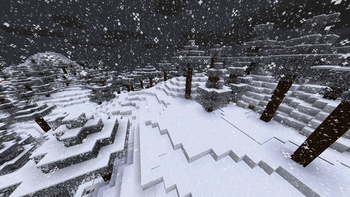
When it is snowing, leaves will slowly turn white, and when it is not, they will turn back to normal
Screenshots
Über diese Mod
NOTICE
I have decided to abandon this mod as the method it uses to implement the mechanic is fundamentally broken and causes issues when mod is present on the client but not on the server. I tried working around it but I'm not proficient enough in Minecraft modding to make it work. The project has an open-source license so anyone who is willing is free to fork this project and update it.
As of May 2026 there is a mod for 1.21.11 called Visual Snowy Leaves that address some of the issues of this mod by implementing the feature client-side using shaders, however it has some of its own issues due to using that method.
Old readme
SnowyLeavesPlus
In Bedrock Edition, leaves slowly turn white when it is snowing.
SnowyLeavesPlus brings this feature to Java Edition!
When it is snowing, leaves will slowly turn white, and when it is not, they will turn back to normal.
Installation
You can install SnowyLeavesPlus by downloading it from any of the following:



You will also need (Quilted) Fabric API. Put the mod files in your mods folder, and load Minecraft using Fabric or Quilt.
You can also use a mod manager like GDLauncher, Prism Launcher, or my own ferium.
Compiling from Source
Prerequisites: JDK 17
- Clone this repository by running
git clone https://github.com/theRookieCoder/SnowyLeavesPlus.gitorgh repo clone theRookieCoder/SnowyLeavesPlus - Build the project by running
./gradlew build - The mod jar file can be found at
build/libs/
Verfügbare Versionen
SnowyLeavesPlus auf dem Server installieren
Server bestellen
Bestelle einen Minecraft Java Server mit mindestens 3 GB RAM (4 GB empfohlen).
fabric Loader setzen
Wähle im Panel unter "Egg" den fabric-Loader und die passende Minecraft-Version (1.21.9).
Mod installieren
Öffne den Mod-Browser im Dashboard und suche nach "SnowyLeavesPlus". Klicke "Installieren" – fertig! Alternativ: Lade die .jar via SFTP in den /mods Ordner.
Kompatibilität
Mod-Loader
Minecraft-Versionen
1.21.9, 1.21.8, 1.21.7 (+19 weitere)
Server-seitig
✓ ErforderlichEmpfohlener RAM
4 GB(min. 3 GB)Häufige Fragen
SnowyLeavesPlus Server crasht beim Start – was tun?
Häufigste Ursache: falsche fabric-Version oder zu wenig RAM. Prüfe im Server-Log (latest.log), ob ein "OutOfMemoryError" oder "Mixin"-Fehler auftritt. Bei Mado Hosting: Stelle sicher, dass mindestens 3 GB RAM zugewiesen sind und der Loader zur Mod-Version passt (1.21.9). Über das Panel kannst du den Loader mit einem Klick wechseln.
Ist SnowyLeavesPlus mit fabric und quilt kompatibel?
SnowyLeavesPlus unterstützt offiziell fabric, quilt für Minecraft 1.21.9, 1.21.8, 1.21.7. Im Mado Dashboard werden inkompatible Loader-Kombinationen automatisch erkannt.
Server laggt mit SnowyLeavesPlus – wie optimiere ich die Performance?
Empfohlener RAM: 4 GB (+1 GB pro 8 Spieler). Prüfe mit /spark profiler, ob SnowyLeavesPlus den meisten Tick-Time verbraucht. Häufige Fixes: Server-View-Distance auf 8-10 reduzieren, bei Forge "performant" oder "starlight" als Zusatz-Mod installieren. Bei Mado Hosting läuft dein Server auf NVMe-SSDs mit dedizierten CPU-Kernen für minimale Latenz.
Ähnliche Mods

![[ETF] Entity Texture Features](https://cdn.modrinth.com/data/BVzZfTc1/af683d206d50b05258d865b0d6e4aa2f2cee12f2_96.webp)
![[EMF] Entity Model Features](https://cdn.modrinth.com/data/4I1XuqiY/6e5bbd0d06b1741bfdab6c0cfab6de8fdaf0064c_96.webp)



Modded Server mieten
Installiere SnowyLeavesPlus mit nur einem Klick auf deinem Server.