
SnowyLeavesPlus
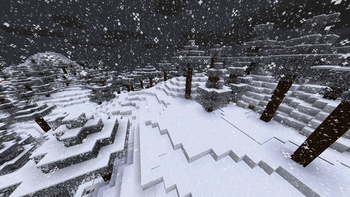
When it is snowing, leaves will slowly turn white, and when it is not, they will turn back to normal
Screenshots
About this Mod
NOTICE
I have decided to abandon this mod as the method it uses to implement the mechanic is fundamentally broken and causes issues when mod is present on the client but not on the server. I tried working around it but I'm not proficient enough in Minecraft modding to make it work. The project has an open-source license so anyone who is willing is free to fork this project and update it.
As of May 2026 there is a mod for 1.21.11 called Visual Snowy Leaves that address some of the issues of this mod by implementing the feature client-side using shaders, however it has some of its own issues due to using that method.
Old readme
SnowyLeavesPlus
In Bedrock Edition, leaves slowly turn white when it is snowing.
SnowyLeavesPlus brings this feature to Java Edition!
When it is snowing, leaves will slowly turn white, and when it is not, they will turn back to normal.
Installation
You can install SnowyLeavesPlus by downloading it from any of the following:



You will also need (Quilted) Fabric API. Put the mod files in your mods folder, and load Minecraft using Fabric or Quilt.
You can also use a mod manager like GDLauncher, Prism Launcher, or my own ferium.
Compiling from Source
Prerequisites: JDK 17
- Clone this repository by running
git clone https://github.com/theRookieCoder/SnowyLeavesPlus.gitorgh repo clone theRookieCoder/SnowyLeavesPlus - Build the project by running
./gradlew build - The mod jar file can be found at
build/libs/
Available Versions
How to Install SnowyLeavesPlus on Your Server
Order Server
Order a Minecraft Java server with at least 3 GB RAM (4 GB recommended).
Set fabric Loader
In the panel under "Egg", select the fabric loader and matching Minecraft version (1.21.9).
Install Mod
Open the mod browser in the dashboard and search for "SnowyLeavesPlus". Click "Install" – done! Alternatively, upload the .jar via SFTP to the /mods folder.
Compatibility
Mod Loaders
Minecraft Versions
1.21.9, 1.21.8, 1.21.7 (+19 more)
Server-side
✓ RequiredRecommended RAM
4 GB(min. 3 GB)Frequently Asked Questions
SnowyLeavesPlus server crashes on startup – what to do?
Most common cause: wrong fabric version or insufficient RAM. Check the server log (latest.log) for "OutOfMemoryError" or "Mixin" errors. With Mado Hosting: ensure at least 3 GB RAM is allocated and the loader matches the mod version (1.21.9). You can switch loaders with one click in the panel.
Is SnowyLeavesPlus compatible with fabric and quilt?
SnowyLeavesPlus officially supports fabric, quilt for Minecraft 1.21.9, 1.21.8, 1.21.7. The Mado dashboard automatically detects incompatible loader combinations.
Server lagging with SnowyLeavesPlus – how to optimize performance?
Recommended RAM: 4 GB (per 8 players). Use /spark profiler to check if SnowyLeavesPlus consumes the most tick time. Common fixes: reduce server view-distance to 8-10, install "performant" or "starlight" as supplementary mods on Forge. With Mado Hosting, your server runs on NVMe SSDs with dedicated CPU cores for minimal latency.
Similar Mods

![[ETF] Entity Texture Features](https://cdn.modrinth.com/data/BVzZfTc1/af683d206d50b05258d865b0d6e4aa2f2cee12f2_96.webp)
![[EMF] Entity Model Features](https://cdn.modrinth.com/data/4I1XuqiY/6e5bbd0d06b1741bfdab6c0cfab6de8fdaf0064c_96.webp)



Rent Modded Server
Install SnowyLeavesPlus with just one click on your server.