Modrinth · Fabric, Forge, NeoForge, Quilt · Client-Mod
Sprint Indicator
Sprint Indicator ist eine clientseitige Mod. Du installierst sie auf deinem Rechner, auf dem Server ist sie nicht nötig.
Simple UI element showing whether you're currently sprinting.
- Downloads
- 285.6K
- Autor
- Roundaround
- Loader
- Fabric, Forge, NeoForge, Quilt
- Minecraft
- 1.19 – 26.3
- Aktualisiert
- –
Screenshots
So sieht Sprint Indicator aus
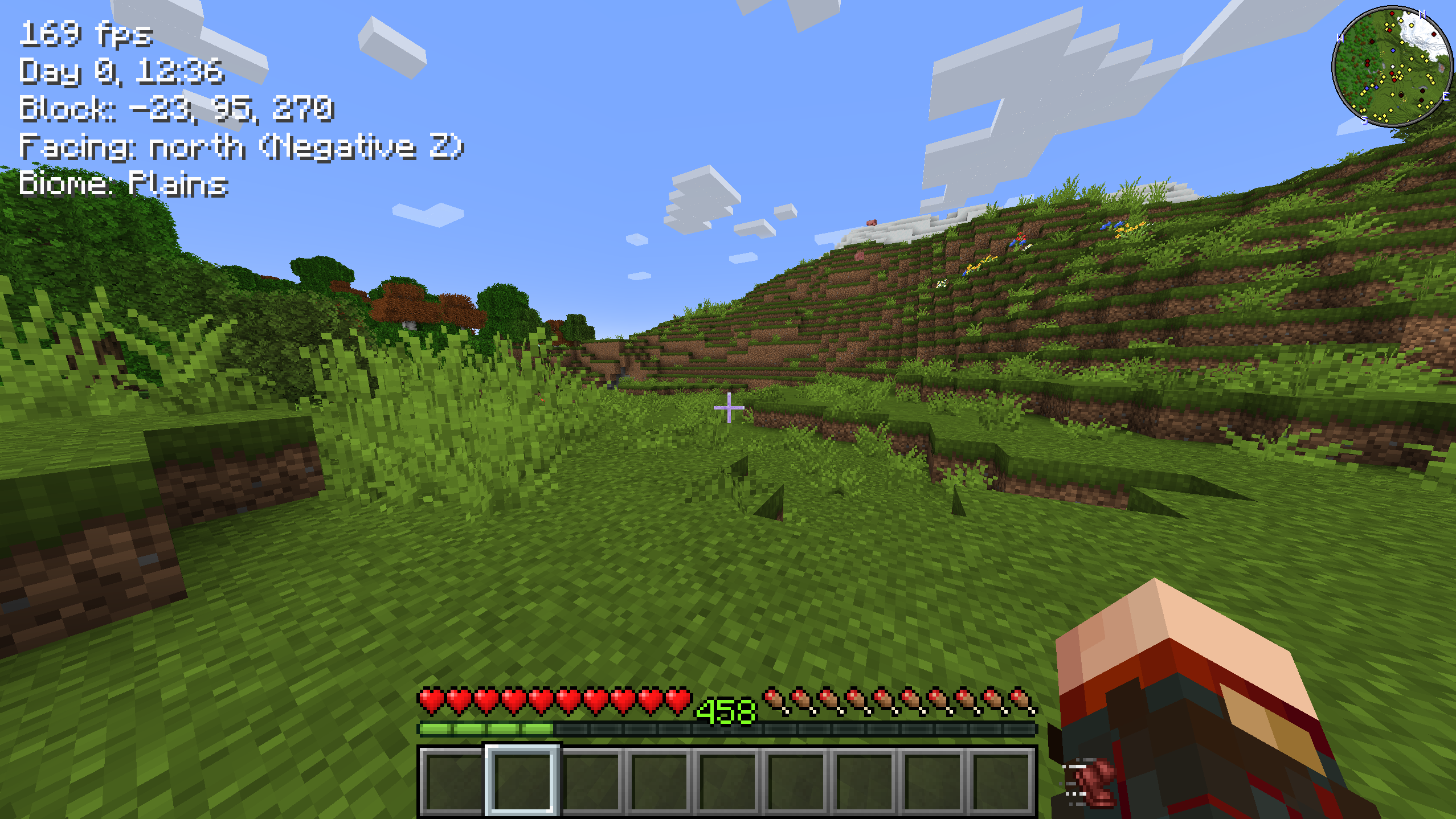
Bilder: Sprint Indicator auf Modrinth, vom Projektteam veröffentlicht.
Einrichtung
Sprint Indicator auf deinem Client installieren
Clientseitige Mods laufen nur auf deinem Rechner. Mehr Server-RAM ändert an ihrer Leistung nichts.
- 01
Loader lokal installieren
Installiere Fabric oder Forge oder NeoForge oder Quilt für deine Minecraft-Version in deinem Launcher.
- 02
Datei herunterladen
Lade die Sprint Indicator-Datei für deinen Loader und exakt deine Minecraft-Version herunter, zum Beispiel 26.3.
- 03
In den Mods-Ordner legen
Lege die .jar-Datei in den lokalen Ordner .minecraft/mods und entferne ältere Duplikate.
- 04
Starten
Starte Minecraft mit dem Loader-Profil. Auf dem Server musst du nichts ändern.
- Auf dem Server
- Nicht nötig
- Auf dem Client
- Erforderlich
- Loader
- Fabric, Forge, NeoForge, Quilt
- Minecraft
- 26.3, 26.2, 26.1.2 +26 weitere
- Lizenz
- MIT License
Versionen
Veröffentlichte Versionen
Nimm die Datei, die zu Loader und Minecraft-Version deines Servers passt. Server und Spieler brauchen dieselbe Version.
Sprint Indicator · Modrinth- 2.1.0 for 26.3 Forge20. September 2026Minecraft 26.3 · Forge
- 2.1.0 for 26.3 Fabric17. September 2026Minecraft 26.3 · Fabric, Quilt
- 2.1.0 for 26.3 NeoForge17. September 2026Minecraft 26.3 · NeoForge
- 2.1.0 for 26.2 Fabric17. September 2026Minecraft 26.2 · Fabric, Quilt
- 2.1.0 for 26.2 NeoForge17. September 2026Minecraft 26.2 · NeoForge
Originalbeschreibung des Projektautors

Simple UI element showing whether you're currently sprinting - and now whether you're crouching too. Sprinting uses the
built-in beacon speed-boost icon; crouching uses the built-in slowness icon.
If you play with the left-handed or hotbar attack indicator options, the mod adjusts the UI accordingly so that
everything fits together!

Configuration — sprintindicator.toml
Open the settings from ModMenu (Fabric) or the Config button on the mods list (NeoForge / Forge). The configuration
file is also directly editable from the sprintindicator.toml file in your config folder.
sprintEnabled: true|false - Whether to show an icon when sprinting.
sprintShowWhenActive: true|false - Whether to also show the sprint icon (dimmed) while the sprint key is held or
toggled on but you aren't sprinting.
crouchEnabled: true|false - Whether to show an icon when crouching.
offset: x,y - An x,y pixel offset for rendering the icons.
adjustAttackIndicator: true|false - Whether to shift the attack indicator to put the sprint/crouch icons closer to
the hotbar.
Made for the Minecraft streamer Linkzzey over on Twitch!
Links
Also on CurseForge · Source on GitHub · Report an issue

Muss Sprint Indicator auf dem Minecraft Server installiert werden?
Nein. Modrinth kennzeichnet Sprint Indicator serverseitig als nicht unterstützt. Installiere die Mod nur im lokalen Mods-Ordner. Dein Server kann unverändert bleiben, sofern die Projektseite keine zusätzliche Abhängigkeit nennt.
Welche Version und welchen Loader braucht Sprint Indicator?
Nutze eine Datei für Fabric, Forge, NeoForge, Quilt und exakt deine Minecraft-Version. Unterstützt werden unter anderem 26.3, 26.2, 26.1.2. Dateien für verschiedene Loader sind nicht austauschbar.
Sprint Indicator funktioniert nicht – was kann ich prüfen?
Prüfe zuerst Minecraft-Version, Loader-Version und erforderliche Abhängigkeiten. Da die Mod clientseitig ist, löst mehr Server-RAM das Problem nicht.
Ähnliche Mods
Beliebte Mods aus derselben Kategorie
 Nur Client

Iris Shaders
von coderbot
A modern shader pack loader for Minecraft intended to be compatible with existing OptiFine shader packs
 Nur Client

[ETF] Entity Texture Features
von Traben
Emissive, Random & Custom texture support for entities in resourcepacks just like Optifine but for Fabric
 Nur Client

[EMF] Entity Model Features
von Traben
EMF is an, OptiFine format, Custom Entity Model replacement mod available for Fabric and Forge.
 Nur Client

Not Enough Animations
von tr7zw
Bringing first-person animations to the third-person
Mods für deinen eigenen Server gesucht?
Im Katalog findest du Mods, die auf Minecraft Servern laufen.