
Wintery Atmosphere
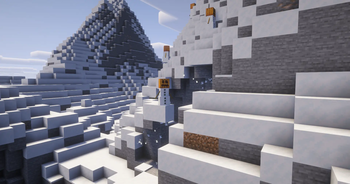
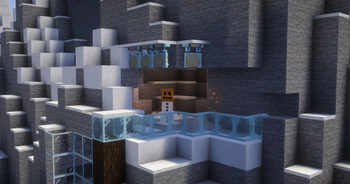
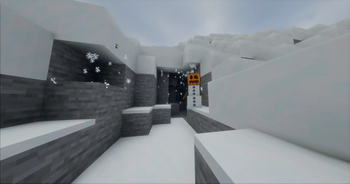
Adds snow particles falling from snow, snow blocks, and powder snow when there's air or transparent blocks underneath, plus frost overlays on glass and other clear surfaces near snow.
Screenshots

Über diese Mod

A small client-side Fabric mod that makes snowy places feel alive.
Snowflakes drift from snowy overhangs, cliffs, and cave entrances. Frost quietly builds up on glass and other transparent surfaces near snow.
No new blocks. No items. No gameplay changes.
Just a little more winter.
Snow Drip
Snow naturally falls from:
- Snow layers
- Snow blocks
- Powder snow
- Hollow transparent blocks, such as glass panes
Particles appear wherever there is open space underneath, making snowy overhangs and cave entrances feel more natural.
Frost
Snow can leave a subtle layer of frost on nearby transparent surfaces.
Supported surfaces include:
- Glass
- Glass panes
- Other transparent full blocks
The effect stays purely visual and disappears when the conditions for frost are no longer met.
Sign Frost
Signs and hanging signs can also become frosted over, adding another small detail to snowy builds.
Available on Minecraft 26.x.
Designed to Stay Out of the Way
Wintery Atmosphere is fully client-side and lightweight.
It doesn't add items, blocks, recipes, entities, or gameplay mechanics. It simply adds environmental details that make snowy areas feel a little less static.
Dependencies
Requires
Compatibility
| Minecraft | Support |
|---|---|
| 26.x | Supported |
| 1.21.x | Supported |
| 1.20.x | Supported |
| 1.19.x | Supported |
| 1.18.x | Supported |
Verfügbare Versionen
Wintery Atmosphere auf deinem Client installieren
Mod-Loader lokal installieren
Installiere fabric für deine lokale Minecraft-Version.
Passende Datei herunterladen
Wähle die Wintery Atmosphere-Datei für fabric und Minecraft 26.2.
Mod installieren
Lege die .jar-Datei in deinem lokalen .minecraft/mods-Ordner ab und starte Minecraft neu. Eine Installation auf dem Server ist nicht nötig.
Kompatibilität
Mod-Loader
Minecraft-Versionen
26.2, 26.1.2, 26.1.1 (+28 weitere)
Server-seitig
✗ Nicht unterstütztEmpfohlener RAM
4 GB(min. 3 GB)Häufige Fragen
Muss Wintery Atmosphere auf dem Minecraft Server installiert werden?
Nein. Modrinth kennzeichnet Wintery Atmosphere serverseitig als nicht unterstützt. Installiere die Mod nur im lokalen Minecraft-Mods-Ordner. Dein Server kann unverändert bleiben, sofern die Mod-Seite keine zusätzliche Abhängigkeit nennt.
Welche Version und welchen Loader braucht Wintery Atmosphere?
Nutze eine Datei für fabric und exakt deine Minecraft-Version. Unterstützte Versionen sind unter anderem 26.2, 26.1.2, 26.1.1. Loader-Dateien sind nicht untereinander austauschbar.
Wintery Atmosphere funktioniert nicht – was kann ich prüfen?
Prüfe zuerst Minecraft-Version, Loader-Version und erforderliche Abhängigkeiten. Lege die .jar-Datei im lokalen .minecraft/mods-Ordner ab und entferne ältere Duplikate. Da die Mod clientseitig ist, löst mehr Server-RAM dieses Problem nicht.
Ähnliche Mods

![[ETF] Entity Texture Features](https://cdn.modrinth.com/data/BVzZfTc1/af683d206d50b05258d865b0d6e4aa2f2cee12f2_96.webp)
![[EMF] Entity Model Features](https://cdn.modrinth.com/data/4I1XuqiY/6e5bbd0d06b1741bfdab6c0cfab6de8fdaf0064c_96.webp)



Minecraft Server für deine Gruppe
Wintery Atmosphere bleibt auf deinem Client. Hoste dazu eine kompatible Welt für deine Mitspieler.