
Wintery Atmosphere
Adds snow particles falling from snow, snow blocks, and powder snow when there's air or transparent blocks underneath, plus frost overlays on glass and other clear surfaces near snow.
Screenshots
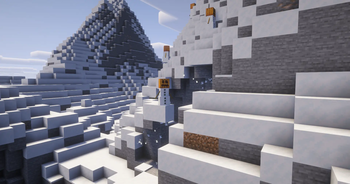
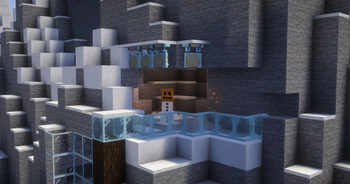
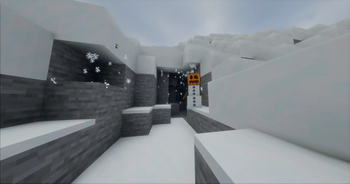

About this Mod

A small client-side Fabric mod that makes snowy places feel alive.
Snowflakes drift from snowy overhangs, cliffs, and cave entrances. Frost quietly builds up on glass and other transparent surfaces near snow.
No new blocks. No items. No gameplay changes.
Just a little more winter.
Snow Drip
Snow naturally falls from:
- Snow layers
- Snow blocks
- Powder snow
- Hollow transparent blocks, such as glass panes
Particles appear wherever there is open space underneath, making snowy overhangs and cave entrances feel more natural.
Frost
Snow can leave a subtle layer of frost on nearby transparent surfaces.
Supported surfaces include:
- Glass
- Glass panes
- Other transparent full blocks
The effect stays purely visual and disappears when the conditions for frost are no longer met.
Sign Frost
Signs and hanging signs can also become frosted over, adding another small detail to snowy builds.
Available on Minecraft 26.x.
Designed to Stay Out of the Way
Wintery Atmosphere is fully client-side and lightweight.
It doesn't add items, blocks, recipes, entities, or gameplay mechanics. It simply adds environmental details that make snowy areas feel a little less static.
Dependencies
Requires
Compatibility
| Minecraft | Support |
|---|---|
| 26.x | Supported |
| 1.21.x | Supported |
| 1.20.x | Supported |
| 1.19.x | Supported |
| 1.18.x | Supported |
Available Versions
How to Install Wintery Atmosphere on Your Client
Install the Mod Loader Locally
Install fabric for your local Minecraft version.
Download the Matching File
Choose the Wintery Atmosphere file for fabric and Minecraft 26.2.
Install Mod
Place the .jar file in your local .minecraft/mods folder and restart Minecraft. No server-side installation is required.
Compatibility
Mod Loaders
Minecraft Versions
26.2, 26.1.2, 26.1.1 (+28 more)
Server-side
✗ UnsupportedRecommended RAM
4 GB(min. 3 GB)Frequently Asked Questions
Does Wintery Atmosphere need to be installed on the Minecraft server?
No. Modrinth marks Wintery Atmosphere as unsupported on the server side. Install it only in your local Minecraft mods folder. Your server can remain unchanged unless the mod page lists an additional dependency.
Which version and loader does Wintery Atmosphere require?
Use a file for fabric and your exact Minecraft version. Supported versions include 26.2, 26.1.2, 26.1.1. Files for different loaders are not interchangeable.
Wintery Atmosphere is not working – what should I check?
First check the Minecraft version, loader version and required dependencies. Put the .jar file in your local .minecraft/mods folder and remove older duplicates. Because this mod is client-side, adding server RAM will not fix it.
Similar Mods

![[ETF] Entity Texture Features](https://cdn.modrinth.com/data/BVzZfTc1/af683d206d50b05258d865b0d6e4aa2f2cee12f2_96.webp)
![[EMF] Entity Model Features](https://cdn.modrinth.com/data/4I1XuqiY/6e5bbd0d06b1741bfdab6c0cfab6de8fdaf0064c_96.webp)



Minecraft Server for Your Group
Wintery Atmosphere stays on your client. Host a compatible world for your group.