
DirtTW's Basement Optimize Pack
A modpack that aims to optimize Minecraft by using mostly client-side mods while maintaining the vanilla experience.
Screenshots


About this Modpack

DirtTW's Basement Optimize Pack (DBOP)
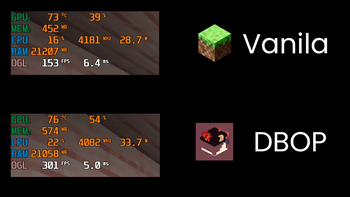
Boost your Minecraft performance without sacrificing the vanilla experience!





DBOP is a Fabric modpack carefully curated to maximize your Minecraft performance while preserving the core vanilla gameplay you know and love.
Key Features:
- Supercharged Performance: Experience significant FPS boosts with the power of Sodium.
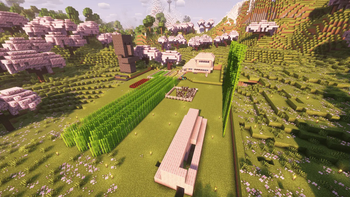
- Beautiful Visuals: Immerse yourself with stunning shader support provided by Iris.
- Vanilla Gameplay: Enjoy the classic Minecraft experience without any gameplay altering modifications.
- Lightning-Fast Loading: Get into the game quicker with the enhanced loading speeds of ModernFix.
- Optifine Parity: Enjoy familiar features from Optifine seamlessly integrated.
- Performance Profiling: Easily identify and address performance bottlenecks with the help of Spark.
- Enhanced Multiplayer: Connect with friends seamlessly using WorldHost and share your singleplayer worlds with e4mc.
中文
DirtTW's Basement Optimize Pack (DBOP) (土靈的地下室優化包)
提升你的Minecraft效能,同時保留原版遊戲體驗!
DBOP 是一個基於 Fabric 模组平台的優化包,大部分模组都是客戶端的,能夠顯著提升 Minecraft 的遊戲效能。
主要特色:
- 極致效能: 借助 Sodium 的強大功能,體驗顯著的 FPS 提升。
- 精美畫面: 使用 Iris 提供的驚艷光影效果,讓遊戲世界更加身臨其境。
- 原版體驗: 享受經典的 Minecraft 遊戲體驗,不含任何會改變遊戲玩法的模組。
- 快速載入: ModernFix 讓 Minecraft 的載入速度更快,讓你更快進入遊戲。
- Optifine 功能: 無縫整合 Optifine 的常用功能,讓你倍感熟悉。
- 效能分析: 使用 Spark 輕鬆識別和解決效能瓶頸。
- 強化多人遊戲體驗: 使用 WorldHost 與好友無縫連線,並透過 e4mc 分享你的單人遊戲世界。
需要幫助或想回報問題?
- GitHub: https://github.com/dirttw/DBOP
- 開發者 GitHub: https://github.com/dirttw
- 安裝教學: https://dirttw.github.io/DBOP-Installtutorial/
- Discord: dirttw
- Discord 伺服器: 土靈泥土幫
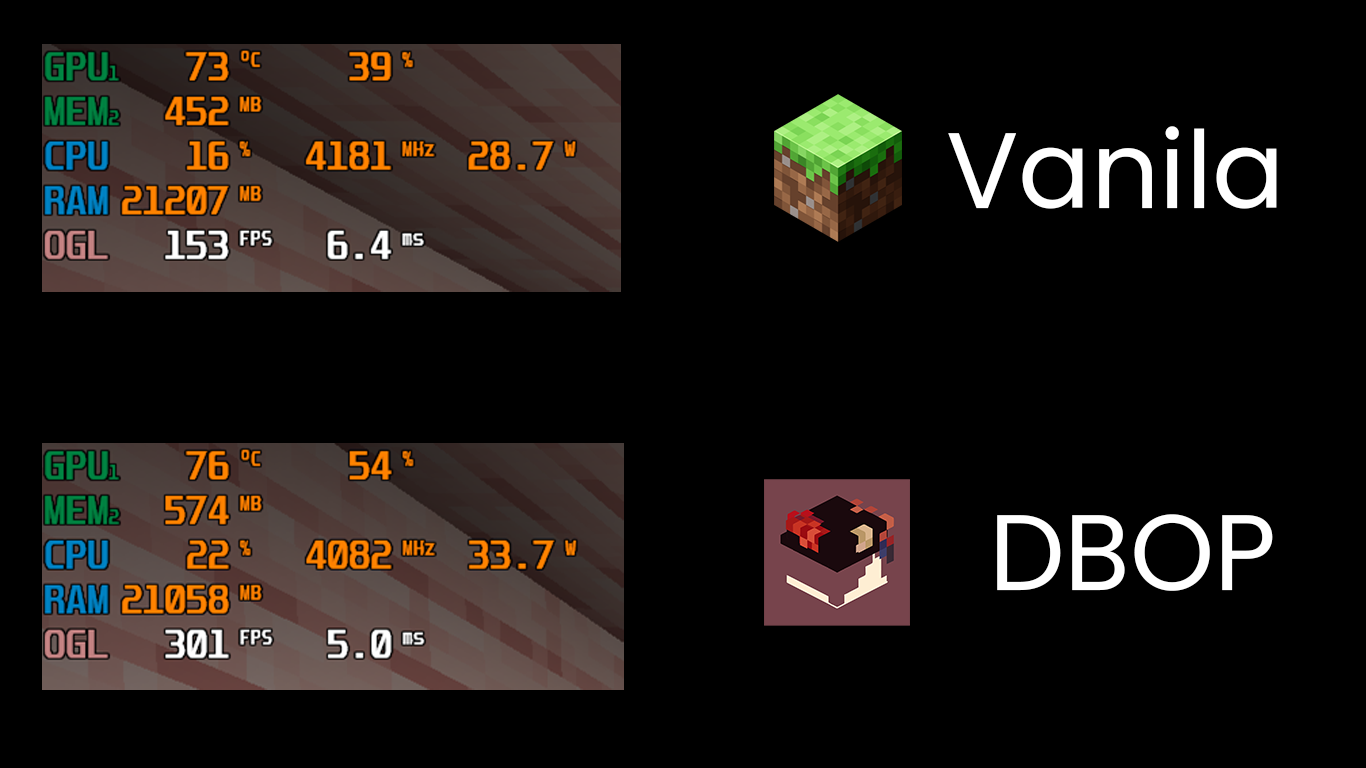
(Tested on Intel i5-11400H, NVIDIA GeForce RTX 3050, 32GB RAM - utilizing 4GB for the game)
Credits:
- Autopublish github workflow from Fabulously Optimized
- All mod authors
Need Help or Want to Report an Issue?
- GitHub: https://github.com/dirttw/DBOP
- Developer's GitHub: https://github.com/dirttw
- Installation Tutorial: https://dirttw.github.io/DBOP-Installtutorial/
- Discord: dirttw
- Discord Server: 土靈泥土幫
Available Versions
How to Set Up a DirtTW's Basement Optimize Pack Server
Order Server
Choose at least 4 GB RAM (6 GB recommended for DirtTW's Basement Optimize Pack). Based on player count: per 8 players.
Install Modpack in Dashboard
Open the modpack browser in the dashboard, search for "DirtTW's Basement Optimize Pack" and click "Install". The fabric loader and Minecraft 1.21.8 are configured automatically.
Start Server & Play
Start the server – all mods are loaded automatically. Share the server IP with friends and play together!
Frequently Asked Questions
DirtTW's Basement Optimize Pack server crashes or won't start – what to do?
Most common causes: insufficient RAM or wrong fabric loader. Check latest.log for "OutOfMemoryError" → increase RAM to at least 6 GB. For "Mixin" or "ClassNotFoundException" errors: modpack version and loader don't match. With Mado Hosting, loader and Minecraft version are auto-configured on modpack install – preventing most startup issues.
How much RAM does a DirtTW's Basement Optimize Pack server really need?
Minimum 4 GB, recommended 6 GB for stable performance. per 8 players. Important: Minecraft modpacks need more RAM than vanilla – plan extra per additional player. With Mado Hosting, you can scale RAM up live at any time without data loss (from €5.2/month).
Can I add custom mods to DirtTW's Basement Optimize Pack without conflicts?
Yes, but check compatibility: only use mods for the same loader (fabric) and same Minecraft version (1.21.8). Common issues: ID conflicts with recipe mods and incompatible coremod versions. The Mado dashboard mod browser only shows compatible mods and warns about known conflicts.
DirtTW's Basement Optimize Pack server lagging – performance tips
1) Increase RAM to 6 GB+. 2) Reduce server view-distance to 8 (server.properties). 3) Pre-generate chunks with the "Chunky" plugin. 4) Use /spark profiler to check which mods consume the most tick time. With Mado Hosting, all servers run on NVMe SSDs with dedicated CPU cores – eliminating hardware as a bottleneck.
Similar Modpacks

![Cobblemon Official Modpack [Fabric]](https://cdn.modrinth.com/data/5FFgwNNP/e7f9ee2e9d361623847853fe2ddce42f519ee64f.png)
![COBBLEVERSE - Pokemon Adventure [Cobblemon]](https://cdn.modrinth.com/data/Jkb29YJU/581ecf54530972afb18a04660afd820f2f24f6c7.png)
![Better MC [FABRIC] - BMC2](https://cdn.modrinth.com/data/shFhR8Vx/a19c2bcb51d38f32f138d3607e91cb2b7b8e387f_96.webp)


Rent DirtTW's Basement Optimize Pack Server
Start your own server with automatic modpack installation.
Supported Versions
Start your DirtTW's Basement Optimize Pack Server now
From €5.20/month; 6 GB RAM is recommended for best performance.
Configure Server →