Advancements Fullscreen
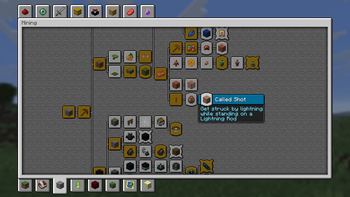
A client-side mod that makes the advancements window bigger by expanding it to full screen. Continuation of the Advancements Enlarger mod.
Screenshots
About this Mod
Advancements Fullscreen
A client-side mod that makes the advancements window bigger by expanding it to full screen.
Large mods that overhaul the advancements system often take a long time to update when a new Minecraft version is released. This is because they add extensive new features or deeply modify the advancements interface. Additionally, these mods usually replace the vanilla advancements screen with a completely new layout, which can feel unfamiliar or overwhelming to players who prefer the classic look.
The goal of this mod is to fill that gap—to provide a simple, easy-to-install solution:
- A larger advancements window that retains the familiar vanilla interface.
- No major changes—just a quality-of-life improvement.
- Quick updates for new Minecraft versions, since it keeps the core system intact.
If you love the vanilla style but wish the advancements screen was bigger and easier to navigate, this mod is for you!
Tip: If you have many advancements, check out Advancements Search. It integrates a search feature directly into the enlarged window.
Available Versions
How to Install Advancements Fullscreen on Your Client
Install the Mod Loader Locally
Install fabric for your local Minecraft version.
Download the Matching File
Choose the Advancements Fullscreen file for fabric and Minecraft 26.3.
Install Mod
Place the .jar file in your local .minecraft/mods folder and restart Minecraft. No server-side installation is required.
Compatibility
Mod Loaders
Minecraft Versions
26.3, 26.2, 26.1.2 (+43 more)
Server-side
✗ UnsupportedRecommended RAM
4 GB(min. 3 GB)Frequently Asked Questions
Does Advancements Fullscreen need to be installed on the Minecraft server?
No. Modrinth marks Advancements Fullscreen as unsupported on the server side. Install it only in your local Minecraft mods folder. Your server can remain unchanged unless the mod page lists an additional dependency.
Which version and loader does Advancements Fullscreen require?
Use a file for fabric, forge, legacy-fabric, neoforge, quilt and your exact Minecraft version. Supported versions include 26.3, 26.2, 26.1.2. Files for different loaders are not interchangeable.
Advancements Fullscreen is not working – what should I check?
First check the Minecraft version, loader version and required dependencies. Put the .jar file in your local .minecraft/mods folder and remove older duplicates. Because this mod is client-side, adding server RAM will not fix it.
Similar Mods




![[ETF] Entity Texture Features](https://cdn.modrinth.com/data/BVzZfTc1/af683d206d50b05258d865b0d6e4aa2f2cee12f2_96.webp)

Minecraft Server for Your Group
Advancements Fullscreen stays on your client. Host a compatible world for your group.