
Aeronautics: Winds & Weather
Adds realistic wind, weather and temperature to create aeronautics and create mod
Screenshots



About this Mod
Aeronautics: Winds & Weather
Realistic wind, sails, weather, temperature and more cool shi-
(see images in galery, im too lazy to add them here this time)
Credit: Hesherovich For the models!!
Features
Sailing & Rigging
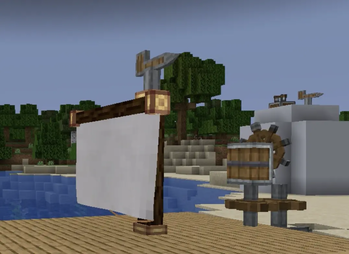
- Masts & Yards: Place Masts to have something to attach the sail to.
- Area Selection Rigging: Right-click a Yard with a Cotton Sail or Canvas Sail, then click the lower opposite corner.
- Cloth Simulation: Rigged sails use cloth physics which works with wind direction, wind speed, and ship velocity.
- Moving sails:
- Reefing: Sneak-right-click the cloth to or roll up the sail.
- Rope Stuff: Attach a rope to the sail for a continuous trim.
- Sail Materials:
- Cotton Sail: Lightweight.
- Canvas Sail: Not light weight lol.
- Dye Support: Right-click any sail with dye to recolor the entire sail
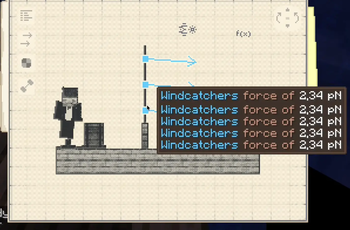
- Windcatcher Canvas: Works with windmills and with sable sublevels aka those cool phsyics things aeronautics adds.
Keels & Rudders (Hydrodynamics)
- Keel: Put below the waterline along the hull's forward axis. Provides lateral hydrodynamic resistance to eliminate sideways leeway drift, converting lateral wind push into forward drive and allowing ships to tack into the wind. Connect multiple segments in line to increase grip.
- Rudder: Steer ships using rotation (Who would have thought). Connect a vertical shaft to the Rudder block to set its angle anywhere from 0° to 360°. Stack rudder blocks vertically to increase turning.
Wind Rider
- Basically aliexpress version elytra that works with wind
Instruments
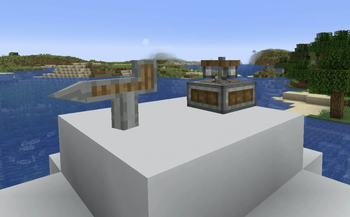
- Anemometer: Measures local wind speed.
- Wind Vane: Tracks wind direction.
- Captain's Hat: Its just cool. (and gives goggles HUD)
Cotton
- Wild Cotton: Generates naturally in warm biomes and appears in shipwreck, villages and stuff.
Weather
- 19 Weather Types: Includes calm breezes, overcast skies, drizzle, heavy rain, thunderstorms, fog, heatwaves, snow, blizzards, hailstorms, sandstorms, and monsoons.
- Altitude Wind: Wind speeds naturally increase with elevation, featuring strong jet streams at high altitudes.
Dependencies & Requirements
| Mod | Version | Note |
|---|---|---|
| Minecraft | 1.21.1 | NeoForge 21.1.228+ |
| Sable | 2.0.3+ | Required physics API |
| Create | 6.0.10+ | Required |
| Create Aeronautics | 1.3.x | Required |
| Curios API / Accessories | Any 1.21.1 build | Optional |
| JEI | Any 1.21.1 build | Optional |
Commands
/aerowind query— Read wind speed, direction, temperature, and pressure at current coordinates./aerowind set <speed> <bearing>— Set a manual wind speed and heading./aerowind clear— Return to simulated weather wind./aerowind mode [windcatchers|everything]— Deprecated/aeroweather query— Check regional weather state./aeroweather set <type> <intensity> [duration]— Set regional weather conditions.
Configuration
Config files are located in config/aeronauticswinds-common.toml and config/aeronauticswinds-client.toml
Available Versions
How to Install Aeronautics: Winds & Weather on Your Server
Order Server
Order a Minecraft Java server with at least 3 GB RAM (4 GB recommended).
Set neoforge Loader
In the panel under "Egg", select the neoforge loader and matching Minecraft version (1.21.1).
Install Mod
Open the mod browser in the dashboard and search for "Aeronautics: Winds & Weather". Click "Install" – done! Alternatively, upload the .jar via SFTP to the /mods folder.
Compatibility
Mod Loaders
Minecraft Versions
1.21.1
Server-side
✓ RequiredRecommended RAM
4 GB(min. 3 GB)Frequently Asked Questions
Aeronautics: Winds & Weather server crashes on startup – what to do?
Most common cause: wrong neoforge version or insufficient RAM. Check the server log (latest.log) for "OutOfMemoryError" or "Mixin" errors. With Mado Hosting: ensure at least 3 GB RAM is allocated and the loader matches the mod version (1.21.1). You can switch loaders with one click in the panel.
Is Aeronautics: Winds & Weather compatible with neoforge?
Aeronautics: Winds & Weather officially supports neoforge for Minecraft 1.21.1. The Mado dashboard automatically detects incompatible loader combinations.
Server lagging with Aeronautics: Winds & Weather – how to optimize performance?
Recommended RAM: 4 GB (per 8 players). Use /spark profiler to check if Aeronautics: Winds & Weather consumes the most tick time. Common fixes: reduce server view-distance to 8-10, install "performant" or "starlight" as supplementary mods on Forge. With Mado Hosting, your server runs on NVMe SSDs with dedicated CPU cores for minimal latency.
Similar Mods




Rent Modded Server
Install Aeronautics: Winds & Weather with just one click on your server.