
Aggro Indicator
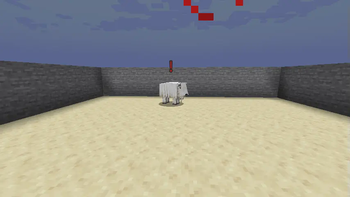
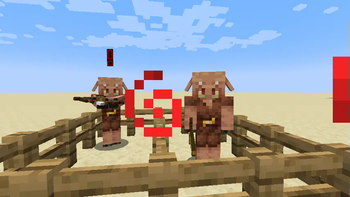
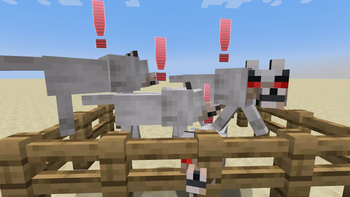
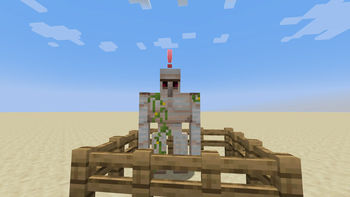
Display an alert icon above mobs that are aggroing onto you
Screenshots
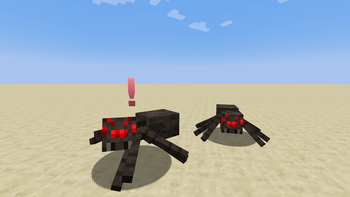
About this Mod
Ever ran into mobs that path towards your general direction and wondered whether they are aggressive or not? With this mod, you can see who has an issue with you being around their vicinity and teach them a lesson or book it out of there.
Modloader
This mod needs to be installed on both client and server to work. It won't crash or do anything if installed on just 1 side. For singleplayer you just need to install it normally.
Requires Fabric API for Fabric versions.
Config
Mod config file should be located under "config" folder, inside your Minecraft root folder, .minecraft in most cases. Where this is depends on your launcher.
- Blacklist for both client and server
- Adjustable x and y offsets
- Change aggro icon styles and color
- Ability to make icons go away after a couple of seconds
- Alert sound that plays when mobs target the player like in Metal Gear Solid
Misc
Aggro icons won't show if mob has invisibility or if you have blindness or darkness. That would be too easy.
Compatibility
Should work on anything that uses the Mob#target property, or those whose brain uses ATTACK_TARGET memory module. Goats are special-cased with dedicated ram behavior mixins so mobs reusing those behaviors should work too.
Feature Poll
Should this mod play an alert sound when a mob targets you? Result: Yes, added.
Credits
- Thank you to djlprojects who provided the Metal Gear Solid-like alert sound.
- Metal Gear Solid Inspired Alert Surprise SFX by djlprojects -- https://freesound.org/s/413641/ -- License: Creative Commons 0
Note
I did not want to take any copyright risk for the alert sound, so I found a close recreation licensed under Creative Commons 0 from freesound.org. Should you want to use a different sound, a resource pack can be used.
Resource pack makers can check out the path to files you want to replace here (1.20.1) or here (1.21+). Make sure to select the branch corresponding to the version you want using the side bar.
Available Versions
How to Install Aggro Indicator on Your Server
Order Server
Order a Minecraft Java server with at least 3 GB RAM (4 GB recommended).
Set fabric Loader
In the panel under "Egg", select the fabric loader and matching Minecraft version (26.2).
Install Mod
Open the mod browser in the dashboard and search for "Aggro Indicator". Click "Install" – done! Alternatively, upload the .jar via SFTP to the /mods folder.
Compatibility
Mod Loaders
Minecraft Versions
26.2, 26.1.2, 26.1.1 (+19 more)
Server-side
✓ RequiredRecommended RAM
4 GB(min. 3 GB)Frequently Asked Questions
Aggro Indicator server crashes on startup – what to do?
Most common cause: wrong fabric version or insufficient RAM. Check the server log (latest.log) for "OutOfMemoryError" or "Mixin" errors. With Mado Hosting: ensure at least 3 GB RAM is allocated and the loader matches the mod version (26.2). You can switch loaders with one click in the panel.
Is Aggro Indicator compatible with fabric and forge and neoforge?
Aggro Indicator officially supports fabric, forge, neoforge for Minecraft 26.2, 26.1.2, 26.1.1. Note: Forge and Fabric mods are NOT cross-compatible – pick one loader and stick with it. The Mado dashboard automatically detects incompatible loader combinations.
Server lagging with Aggro Indicator – how to optimize performance?
Recommended RAM: 4 GB (per 8 players). Use /spark profiler to check if Aggro Indicator consumes the most tick time. Common fixes: reduce server view-distance to 8-10, install "performant" or "starlight" as supplementary mods on Forge. With Mado Hosting, your server runs on NVMe SSDs with dedicated CPU cores for minimal latency.
Similar Mods




![[ETF] Entity Texture Features](https://cdn.modrinth.com/data/BVzZfTc1/af683d206d50b05258d865b0d6e4aa2f2cee12f2_96.webp)

Rent Modded Server
Install Aggro Indicator with just one click on your server.