
Argonyte
A clean, customizable FPS display that helps you monitor performance in style.
Screenshots
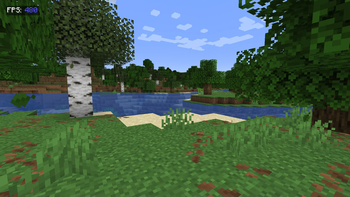
About this Mod
A clean, customizable FPS display that helps you monitor performance in style
Features
Color-coded FPS values:
🔵 Blue (90+ FPS) = Excellent
🟢 Green (60-89 FPS) = Smooth
🟡 Yellow (30-59 FPS) = Playable
🔴 Red (<30 FPS) = Needs optimization
Clean design:
"FPS:"label in crisp white- Semi-transparent background for readability
- Perfectly positioned at 10x10 pixels (top-left)
Lightweight:
- Only uses essential Fabric API modules
- Near-zero performance impact
Accurate measurement:
- Real frame-per-second calculation (not MC's smoothed F3 counter)
Perfect For
✔️ Benchmarking modpacks
✔️ Streamers who show performance
✔️ Troubleshooting lag spikes
✔️ Competitive players optimizing setups
Technical Info
🔹 Requires Fabric API + Mod Menu
🔹 Client-side only
🔹 Configurable position (edit in code)
"Because sometimes you need to see the numbers behind the magic"
Available Versions
How to Install Argonyte on Your Client
Install the Mod Loader Locally
Install fabric for your local Minecraft version.
Download the Matching File
Choose the Argonyte file for fabric and Minecraft 26.2.
Install Mod
Place the .jar file in your local .minecraft/mods folder and restart Minecraft. No server-side installation is required.
Compatibility
Mod Loaders
Minecraft Versions
26.2, 1.21.10, 1.21.5 (+5 more)
Server-side
✗ UnsupportedRecommended RAM
4 GB(min. 3 GB)Frequently Asked Questions
Does Argonyte need to be installed on the Minecraft server?
No. Modrinth marks Argonyte as unsupported on the server side. Install it only in your local Minecraft mods folder. Your server can remain unchanged unless the mod page lists an additional dependency.
Which version and loader does Argonyte require?
Use a file for fabric, neoforge and your exact Minecraft version. Supported versions include 26.2, 1.21.10, 1.21.5. Files for different loaders are not interchangeable.
Argonyte is not working – what should I check?
First check the Minecraft version, loader version and required dependencies. Put the .jar file in your local .minecraft/mods folder and remove older duplicates. Because this mod is client-side, adding server RAM will not fix it.
Similar Mods






Minecraft Server for Your Group
Argonyte stays on your client. Host a compatible world for your group.