
Armour Durablity Hud
Display the durability of all wearable equipment directly on the HUD with customizable positioning and scaling
Screenshots
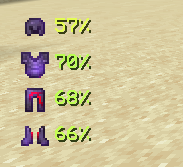
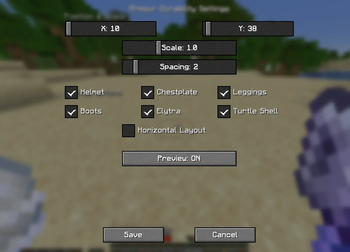
About this Mod
Armour Durability HUD
Tired of your armour breaking mid-fight without warning? The Armour Durability HUD mod is here to save the day!
This lightweight and powerful mod adds a customizable HUD on your screen that shows the durability of every piece of armour you’re wearing – including helmets, chestplates, leggings, boots, elytra, turtle shells, and more.
Features Overview
On-Screen Armour HUD
Always know the condition of your armour without opening the inventory.Durability in Percentage
The HUD displays exact percentages, making it easy to decide when to repair or swap gear.Colour-Coded Alerts
- 🟢 Green = High durability
- 🟡 Yellow = Mid durability
- 🟠 Orange = Between Mid and Low durability
- 🔴 Red = Low durability (time to repair or replace!)
Supports All Wearables
Works with every vanilla wearable item, from diamond armour to elytra.Customizable Placement
Adjust the HUD position by clicking "O" on keyboard to match your screen layout and preferences.
Available Versions
How to Install Armour Durablity Hud on Your Client
Install the Mod Loader Locally
Install fabric for your local Minecraft version.
Download the Matching File
Choose the Armour Durablity Hud file for fabric and Minecraft 26.3.
Install Mod
Place the .jar file in your local .minecraft/mods folder and restart Minecraft. No server-side installation is required.
Compatibility
Mod Loaders
Minecraft Versions
26.3, 26.2, 26.1.2 (+14 more)
Server-side
✗ UnsupportedRecommended RAM
4 GB(min. 3 GB)Frequently Asked Questions
Does Armour Durablity Hud need to be installed on the Minecraft server?
No. Modrinth marks Armour Durablity Hud as unsupported on the server side. Install it only in your local Minecraft mods folder. Your server can remain unchanged unless the mod page lists an additional dependency.
Which version and loader does Armour Durablity Hud require?
Use a file for fabric and your exact Minecraft version. Supported versions include 26.3, 26.2, 26.1.2. Files for different loaders are not interchangeable.
Armour Durablity Hud is not working – what should I check?
First check the Minecraft version, loader version and required dependencies. Put the .jar file in your local .minecraft/mods folder and remove older duplicates. Because this mod is client-side, adding server RAM will not fix it.
Similar Mods



![[TaCZ] Timeless and Classics Zero](https://cdn.modrinth.com/data/SzzJttH8/fd27766d2bb8390d284696b1dbd358f87e081439_96.webp)


Minecraft Server for Your Group
Armour Durablity Hud stays on your client. Host a compatible world for your group.