
BadMoon
BadMoon client is a 1.8.9 bedwars client which provides fun visual features that improve gameplay drastically! (Ranked/Unranked)
Screenshots
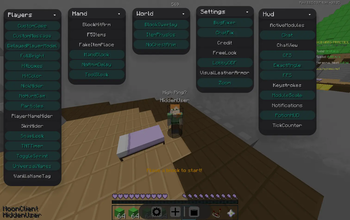
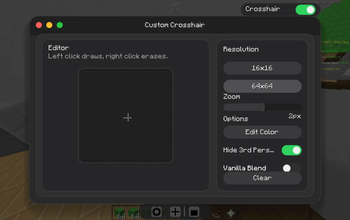
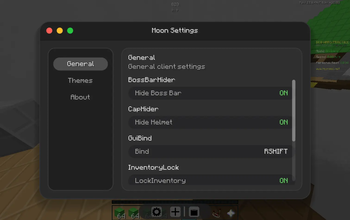
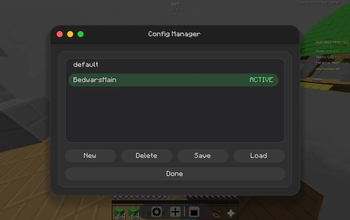
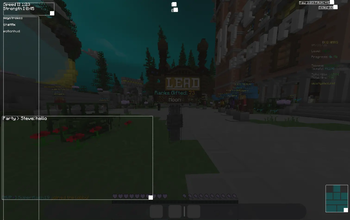
About this Mod
This is BadMoon Client, a client built for easy use.
What is this client for?
BadMoon is mainly for BedWars with BedWars-specific features that will be covered below
What makes this client better than others?
BadMoon client has a lot of features that make it both Hypixel-legal while also being a mixin-based client, meaning you can pair it with almost anything on Forge! it also is built to allow so much more customizablility that BadLion and Lunar just dont give you.
Notable Features:ActiveModules
A hack-client-like module viewer which displays all active modules on your HUD.
This module supports customizability such as:
- Custom Color
- Custom Scale
- Custom Color Module (like rainbow and pulsing)
- Size and position changing
- Max module amounts
- SideBar
- etc…
Chat Module
A simple module that allows you to:
- Remove Chat Background
- Move chat around the screen
- Copy any chat message with a custom key
- Highlight your own name/underline it
ModuleScale
Allows you to make the modules smaller
Notifications
This module removes the “Username Purchased This Item” message and replaces it with a single
toast that pops up in the top right of the screen. The notification displays how many
items were purchased over the past 3 seconds. Here is an example:
Without the module, chat looks like:
- You Purchased 16 Wool
- You Purchased 16 Wool
- You Purchased 16 Wool
- You Purchased 16 Wool
With my module enabled you see at the top of your screen
- Bought: Wool x4
ItemPhysics
A highly configurable module that allows dropped items to have physics!
You can change settings like:
Spin X Speed
Spin Y Speed
and the size of different resources
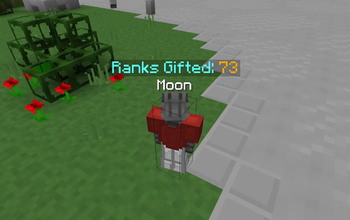
Custom Message
A simple client-side message that floats above your head :)
DelayedPlayerModel
A simple visual module that makes the player head have a slight delay
(This does not affect where your head actually is! Just the client-side model)
HitBoxes
A simple mod that just allows you to change the color of hitboxes
HitColor
A simple mod that allows you to change the hit color to whatever color you want
NickHider
A custom module that allows you to change your own name visually
(Just like the one in Lunar/BadLion)
HandBlock
Visually blocks the right hand across the screen when right-clicking without an item.
NoAnimDelay
Makes it so when you punch, the animation happens instantly, and when you click again the animation cuts itself off to start again. This makes the hit feedback feel a lot better.
Issue Tracker!:
| Issue Source | Issue | Fix Date |
|---|---|---|
| Canceling Vanilla Crosshair | Small Gl State Leak on HotBar | FIXED 1.5(coming soon) |
| Zoom | multiple issues | FIXED 1.5(coming soon) |
| Unknown Source | Broken Shader on Hand | When Source is Identified |
| Particles | the "Always Show Sharpness particles" doesnt always work | FIXED 1.4 |
| PlayerNameHider | Tab list/Chat doesnt always hide | FIXED 1.4 |
| HudEditor | large screen size prevents moving modules to the bottom of screen | FIXED 1.5(coming soon) |
(Please check the Versions to see bug history)
Compatibility! (All mods listed below are confirmed to work with BadMoon)
| Mod | version tested | Date Tested |
|---|---|---|
| Essentials Mod | 1.3.10.1 - 1.3.10.4 | Jun 15th 2026 |
| Entity Culling | 1.5.0 | Jun 15th 2026 |
| Optifine | _1.8.9_HD_U_M5 | Jun 15th 2026 |
| Animatium Legacy (OverflowAnimations) | 2.2.5 | Jun 15th 2026 |
| Idle Tweaks | 1.0.5 | Jun 15th 2026 |
| VanillaHUD | 2.2.12 | Jun 15th 2026 |
| EvergreenHUD | 2.1.7 | Jun 15th 2026 |
| In-Game Account Switcher | 8.0.1 | Jun 15th 2026 |
| 3D Skin Layers | 1.2.0 | Jun 15th 2026 |
These versions are the ones ive tested, newer/older versions aswell as other mods may work aswell!
Support:
Need Support?
Please reach out for help with bugs, feedback, or questions in our Discord
Or, direct message me
Discord: wowmoonwow
Dont have discord?
You can reach out to me on Twitch when im live on fridays or on hypixel whenever im on!
Twitch: wowmoonwow
Hypixel: wowmoonwow
Before you report a bug! check the "About" tab inside the settings app (on the client dock) and make sure it isn't already marked there. (Or just check the Issue Tracker above!)
Available Versions
How to Install BadMoon on Your Client
Install the Mod Loader Locally
Install forge for your local Minecraft version.
Download the Matching File
Choose the BadMoon file for forge and Minecraft 1.8.9.
Install Mod
Place the .jar file in your local .minecraft/mods folder and restart Minecraft. No server-side installation is required.
Compatibility
Mod Loaders
Minecraft Versions
1.8.9
Server-side
✗ UnsupportedRecommended RAM
4 GB(min. 3 GB)Frequently Asked Questions
Does BadMoon need to be installed on the Minecraft server?
No. Modrinth marks BadMoon as unsupported on the server side. Install it only in your local Minecraft mods folder. Your server can remain unchanged unless the mod page lists an additional dependency.
Which version and loader does BadMoon require?
Use a file for forge and your exact Minecraft version. Supported versions include 1.8.9. Files for different loaders are not interchangeable.
BadMoon is not working – what should I check?
First check the Minecraft version, loader version and required dependencies. Put the .jar file in your local .minecraft/mods folder and remove older duplicates. Because this mod is client-side, adding server RAM will not fix it.
Similar Mods






Minecraft Server for Your Group
BadMoon stays on your client. Host a compatible world for your group.
Details
- License
- Creative Commons Attribution Non Commercial 4.0 International
- Server-side
- Unsupported