Better World Loading
Adds more info to the world loading screen
Screenshots
About this Mod
Better World Loading
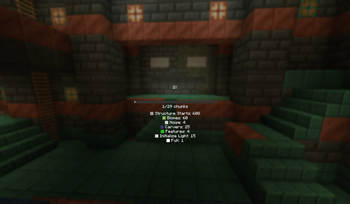
Enhance your Minecraft world loading screen with a sleek progress bar, detailed chunk generation stats, and optional sound feedback!
Features
📊 Modern Progress Display
- Replaces the default chunk map with a clean progress bar
- Shows exact chunk count (e.g., "125/256 chunks")
- Configurable through MidnightLib
🔍 Detailed Chunk Information (Optional)
- Toggleable detailed chunk status breakdown:
- Shows count of chunks in each generation phase
- Color-coded for easy reading
- Includes: Empty, Structure Starts, Biomes, Features, Light, Full, etc.
🔊 Progress Sounds (Optional)
- Gentle "hat" note sound plays as generation progresses
Configuration
Features can be toggled via MidnightLib:
- Show/hide detailed chunk info
- Toggle progress sounds
Why Choose This Mod?
- Cleaner visual feedback during world generation
- Actually useful information about what's loading
- Lightweight - won't impact loading performance
- Fully customizable to your preferences
Perfect for speedrunners, technical players, or anyone who wants better feedback during world loading!
Contact me on Discord @h1ggsk if you need help with any part of the mod!
Requirements
- Fabric Loader
- Fabric API (required)
If you found this mod helpful, please consider donating!
Bitcoin wallet address: bc1qzhuf0phu508ktrghw3x42cgvp9r7y0m36lt8wp
Available Versions
How to Install Better World Loading on Your Client
Install the Mod Loader Locally
Install fabric for your local Minecraft version.
Download the Matching File
Choose the Better World Loading file for fabric and Minecraft 1.21.4.
Install Mod
Place the .jar file in your local .minecraft/mods folder and restart Minecraft. No server-side installation is required.
Compatibility
Mod Loaders
Minecraft Versions
1.21.4, 1.21.3, 1.21.1 (+1 more)
Server-side
✗ UnsupportedRecommended RAM
4 GB(min. 3 GB)Frequently Asked Questions
Does Better World Loading need to be installed on the Minecraft server?
No. Modrinth marks Better World Loading as unsupported on the server side. Install it only in your local Minecraft mods folder. Your server can remain unchanged unless the mod page lists an additional dependency.
Which version and loader does Better World Loading require?
Use a file for fabric, forge, neoforge and your exact Minecraft version. Supported versions include 1.21.4, 1.21.3, 1.21.1. Files for different loaders are not interchangeable.
Better World Loading is not working – what should I check?
First check the Minecraft version, loader version and required dependencies. Put the .jar file in your local .minecraft/mods folder and remove older duplicates. Because this mod is client-side, adding server RAM will not fix it.
Similar Mods




![[ETF] Entity Texture Features](https://cdn.modrinth.com/data/BVzZfTc1/af683d206d50b05258d865b0d6e4aa2f2cee12f2_96.webp)

Minecraft Server for Your Group
Better World Loading stays on your client. Host a compatible world for your group.