
Botany Pots
Adds pots that you can use to grow crops!
Screenshots
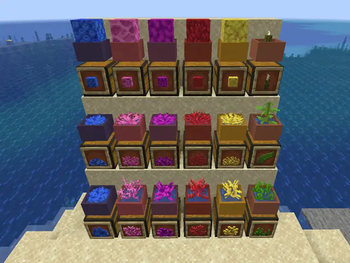
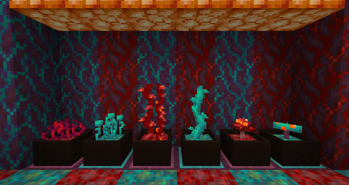
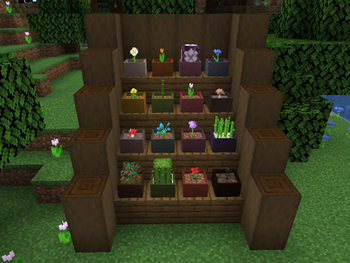
About this Mod
This mod adds the Botany Pot which is a block that can grow all kinds of crops. The Botany Pot can be used for decoration, and to also make farming certain types of crops much easier. This mod was inspired by Davenonymous's awesome Bonsai Trees mod.
Features
- Harvesting a crop in a Botany Pot will automatically replant the seed.
- Hopper Botany Pot upgrade allows the pot to harvest itself and put items in a chest or other block with an inventory.
- Seventeen different colors!
- Extensive datapack support for adding new crops, soils, and fertilizers.
- Extensive support for CraftTweaker to allow removing, modifying, and adding crops, soils, and fertilizers.
Getting Started
- First you need to craft the Botany Pot. Then you must think about the type of crop you want to grow and the soil it grows in. There are many kinds of soil blocks and certain crops will need certain soils. A good example of this is wheat growing in dirt and nether wart growing in soul sand. Once you have the soil and seed for your crop simply right click the block with your soil and then your seed. This will start the growth process for your crop. The crop may take a while to grow, you can speed it up by right clicking with bone meal and other fertilizers. Once the crop is done growing right click it to harvest and automatically plant another. To remove items from the botany pot you can sneak and right click the block with an empty hand. Breaking the block will also work.
While this mod may seem simple on it's surface, there are many technical details involved. For those who would like to get a better understanding of the mod you can read the Technical Information page on the wiki.
Mod Support
This mod uses predefined json files to add support for crops. These json files let you do things like define soils, fertilizers, and new crops. Mod authors and servers can easily add these files to their data packs to customize crops. Additionally users can create and share their own data packs to enable a broader range of mod support. If you would like to add new data for the mod please check out the wiki for more information about the mod and where to get help.
Currently Supported
- Biomes O' Plenty (15 crops, 3 soils)
- Botania (32 crops, 7 soils, 1 fertilizer)
- Buzzier Bees (13 crops)
- Metal Bushes (6 crops)
- Mystical Agriculture(43 crops, 5 soils, 1 fertilizer)
- Harvestcraft (78 crops)
- Peanut Mod (1 crop)
- Quark (1 crop, 1 soil)
- Simple Farming (34 crops)
- Snad (2 soils)
- XL Food Mod (6 crops)
Like the mod and want to support me?

This project is sponsored by Nodecraft. Use code DARKHAX for 30% off your first month of service!
Available Versions
How to Install Botany Pots on Your Server
Order Server
Order a Minecraft Java server with at least 3 GB RAM (4 GB recommended).
Set fabric Loader
In the panel under "Egg", select the fabric loader and matching Minecraft version (1.21.1).
Install Mod
Open the mod browser in the dashboard and search for "Botany Pots". Click "Install" – done! Alternatively, upload the .jar via SFTP to the /mods folder.
Compatibility
Mod Loaders
Minecraft Versions
1.21.1, 1.20.4, 1.20.3 (+14 more)
Server-side
✓ RequiredRecommended RAM
4 GB(min. 3 GB)Frequently Asked Questions
Botany Pots server crashes on startup – what to do?
Most common cause: wrong fabric version or insufficient RAM. Check the server log (latest.log) for "OutOfMemoryError" or "Mixin" errors. With Mado Hosting: ensure at least 3 GB RAM is allocated and the loader matches the mod version (1.21.1). You can switch loaders with one click in the panel.
Is Botany Pots compatible with fabric and forge and neoforge and quilt?
Botany Pots officially supports fabric, forge, neoforge, quilt for Minecraft 1.21.1, 1.20.4, 1.20.3. Note: Forge and Fabric mods are NOT cross-compatible – pick one loader and stick with it. The Mado dashboard automatically detects incompatible loader combinations.
Server lagging with Botany Pots – how to optimize performance?
Recommended RAM: 4 GB (per 8 players). Use /spark profiler to check if Botany Pots consumes the most tick time. Common fixes: reduce server view-distance to 8-10, install "performant" or "starlight" as supplementary mods on Forge. With Mado Hosting, your server runs on NVMe SSDs with dedicated CPU cores for minimal latency.
Similar Mods



Rent Modded Server
Install Botany Pots with just one click on your server.