
Brush Client
Simple, convenient and useful mod pvp client, with which your game will be much more enjoyable!
Screenshots

About this Mod
Brush Client
Simple, convenient and useful mod pvp client, with which your game will be much more enjoyable!
Information
Information
The mod supports: Russian and English language
Minecraft version: Fabric 1.20.1
Fabric-Loader: >=0.15.11
Fabric-API: *
ModMenu: *
YetAnotherConfig-API: *
Contributors
Contributors
Developer: femboyPig
Assets Manager: Drimbik, ImPiglet
Features
Features
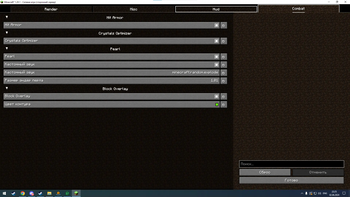
Combat:
- HitArmor
- HitColor
- Pearl
- Block Overlay
- Totem pop scale
- No Totem
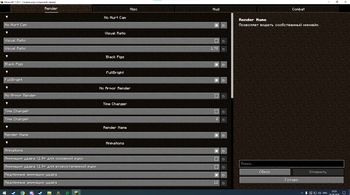
Render:
- Animations
- Black Pig
- Cape
- FullBright
- Low Fire
- Low Shield
- No Armor Render
- No Hurt Cam
- Render Name
- Time Changer
- View Model
- Visual Ratio
- Bad Models
- No Totem Particles
- Fog Changer
- Sky Changer
- Name Tags
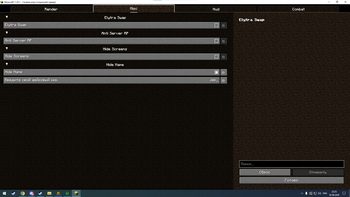
Misc:
- Elytra Swap
- Anti Server RP
- Hide Name
- Hide Screens
- Fake Tier
- HP Indicator
- Sound When Hit with bow
- Ping Me
- Sprint
- No Weather
- No Break Particles
- No Explosions
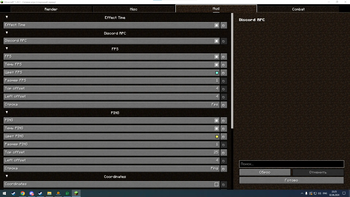
Hud:
- Discord RPC
- Effect Time
- Coordinates
- Fps
- Ping
- ServerIp
Links
Links for downloading:
Github: https://github.com/femboyPig/Brush-Client
Modrinth: https://modrinth.com/mod/brush-client
Available Versions
How to Install Brush Client on Your Client
Install the Mod Loader Locally
Install fabric for your local Minecraft version.
Download the Matching File
Choose the Brush Client file for fabric and Minecraft 1.21.1.
Install Mod
Place the .jar file in your local .minecraft/mods folder and restart Minecraft. No server-side installation is required.
Compatibility
Mod Loaders
Minecraft Versions
1.21.1, 1.21, 1.20.6 (+5 more)
Server-side
✗ UnsupportedRecommended RAM
4 GB(min. 3 GB)Frequently Asked Questions
Does Brush Client need to be installed on the Minecraft server?
No. Modrinth marks Brush Client as unsupported on the server side. Install it only in your local Minecraft mods folder. Your server can remain unchanged unless the mod page lists an additional dependency.
Which version and loader does Brush Client require?
Use a file for fabric and your exact Minecraft version. Supported versions include 1.21.1, 1.21, 1.20.6. Files for different loaders are not interchangeable.
Brush Client is not working – what should I check?
First check the Minecraft version, loader version and required dependencies. Put the .jar file in your local .minecraft/mods folder and remove older duplicates. Because this mod is client-side, adding server RAM will not fix it.
Similar Mods






Minecraft Server for Your Group
Brush Client stays on your client. Host a compatible world for your group.