
Chat-Ping
Pings you if someone writes your name in to the Chat
Screenshots
About this Mod
Chat-Ping (v1.21)
Chat-Ping is a lightweight Minecraft mod that notifies you whenever your name is mentioned in the chat by displaying a customizable in-game toast notification. It's perfect for staying on top of conversations in multiplayer worlds or servers, ensuring you never miss an important message again!
Features
Ping on Mention: Receive a toast notification whenever your Minecraft username appears in the chat.
Lightweight & Seamless: Works in the background without impacting gameplay performance.
How It Works
As soon as your name is mentioned in the Minecraft chat, a toast notification will appear on the top-right corner of the screen. The notification includes the message:
- "You got Pinged by
<username>"
For example, if another player types your name in the chat, you will see something like: You got Pinged by BlackDev
Compatibility
- Minecraft Version: 1.21
- Works with Fabric mod loader.
- Compatible with multiplayer servers.
Screenshots
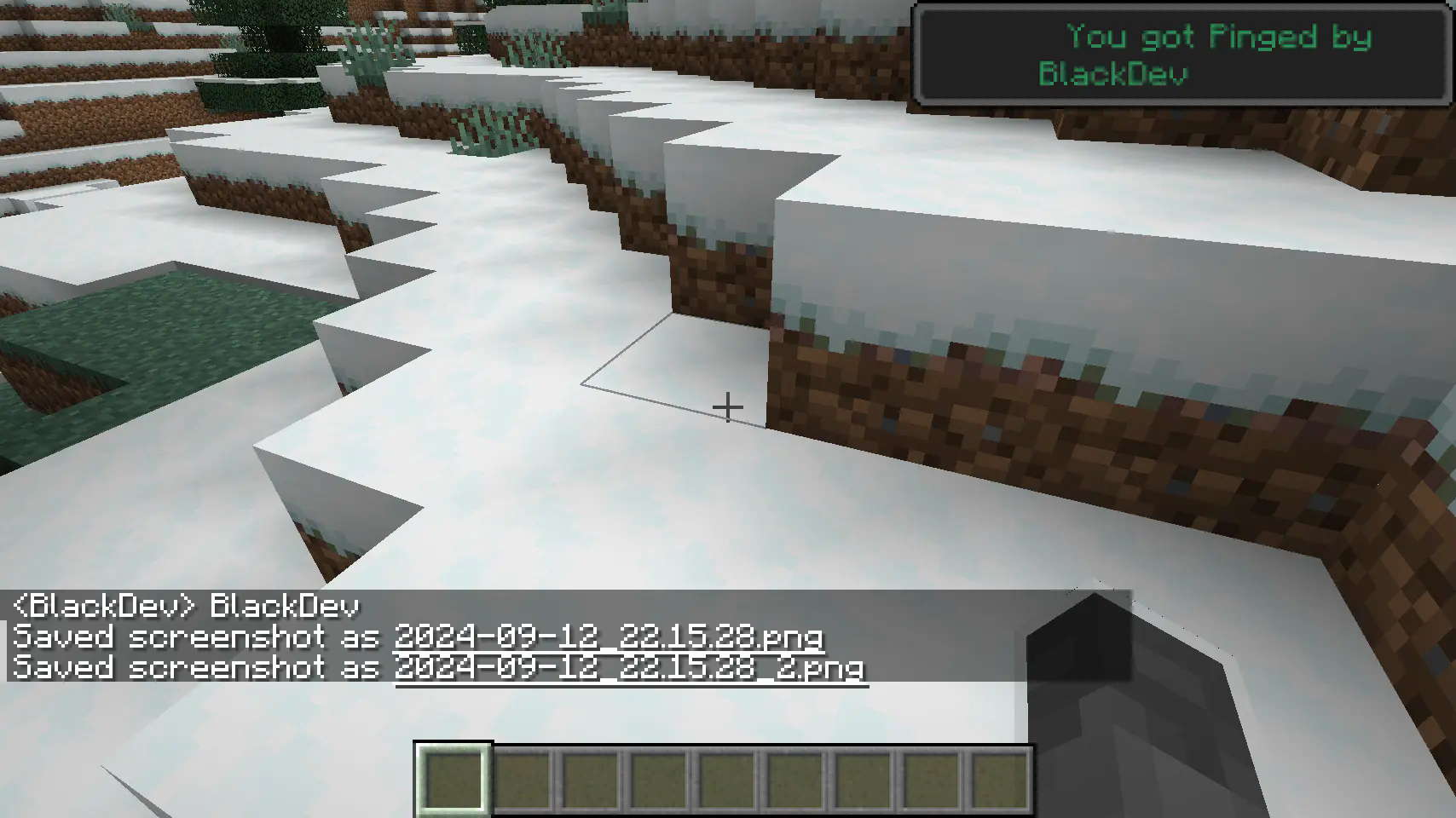
A notification is triggered when your name is mentioned in the chat.
Planned Features
- Customization: Set different colors or styles for the ping notifications.
- writing: ignore upper and lower case writing also ignore if there are letters before the name.
- Keyword Pings: Allow pings on specific keywords beyond just your username.
Feedback & Contributions
We appreciate feedback and contributions! Feel free to submit bugs or suggest features via the Discord Server.
Enjoy seamless chat monitoring with Chat-Ping, and never miss another message directed at you again!
Available Versions
How to Install Chat-Ping on Your Client
Install the Mod Loader Locally
Install fabric for your local Minecraft version.
Download the Matching File
Choose the Chat-Ping file for fabric and Minecraft 1.21.
Install Mod
Place the .jar file in your local .minecraft/mods folder and restart Minecraft. No server-side installation is required.
Compatibility
Mod Loaders
Minecraft Versions
1.21
Server-side
✗ UnsupportedRecommended RAM
4 GB(min. 3 GB)Frequently Asked Questions
Does Chat-Ping need to be installed on the Minecraft server?
No. Modrinth marks Chat-Ping as unsupported on the server side. Install it only in your local Minecraft mods folder. Your server can remain unchanged unless the mod page lists an additional dependency.
Which version and loader does Chat-Ping require?
Use a file for fabric and your exact Minecraft version. Supported versions include 1.21. Files for different loaders are not interchangeable.
Chat-Ping is not working – what should I check?
First check the Minecraft version, loader version and required dependencies. Put the .jar file in your local .minecraft/mods folder and remove older duplicates. Because this mod is client-side, adding server RAM will not fix it.
Similar Mods






Minecraft Server for Your Group
Chat-Ping stays on your client. Host a compatible world for your group.