Modrinth · Fabric, Forge, NeoForge, Quilt
Cobblemon: Legends Untold on your Minecraft server
Cobblemon: Legends Untold runs on Minecraft servers with Fabric or Forge or NeoForge or Quilt. Order your server, set the loader in the panel and install the mod with one click in the mod browser.
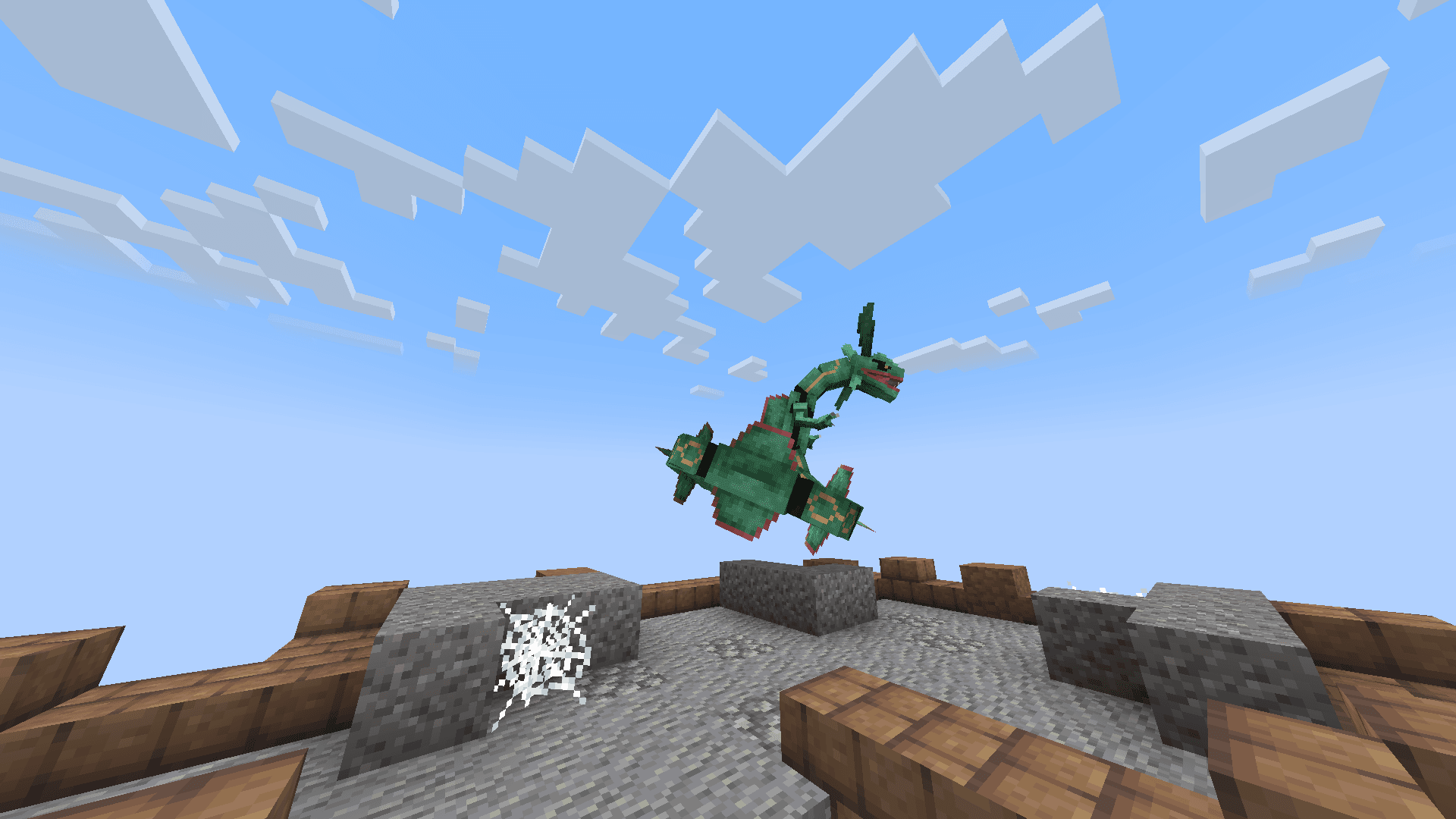
Adds legendary pokemon & their structures.
- Downloads
- 1.3M
- Author
- TSFlareon
- Loader
- Fabric, Forge, NeoForge, Quilt
- Minecraft
- 1.20.1 – 1.21.1
- Updated
- –
Screenshots
What Cobblemon: Legends Untold looks like


Images: Cobblemon: Legends Untold on Modrinth, published by the project team.
Setup
Install Cobblemon: Legends Untold on your server
The server and players need the same loader and Minecraft version. Back up the world before adding or updating mods.
- 01
Configure
6 GB of RAM is preselected. You choose the term and add-ons and pay by credit card or PayPal.
- 02
Set the loader
In the panel, set the server software to Fabric or Forge or NeoForge or Quilt and choose the matching Minecraft version, for example 1.21.1.
- 03
Install the mod
Search the mod browser for “Cobblemon: Legends Untold” and install the release for your loader. Alternatively, upload the .jar to the mods folder via SFTP. Required dependencies are listed on the project page.
- 04
Connect
Cobblemon: Legends Untold is optional on the client. Players connect using the server address from the panel.
- On the server
- Required
- On the client
- Optional
- Loader
- Fabric, Forge, NeoForge, Quilt
- Minecraft
- 1.21.1, 1.20.1
- License
- Creative Commons Zero v1.0 Universal
The panel
Install mods, find errors.
Real screenshots from the Mado panel. Both come with every Minecraft server.
Mod browser
Modrinth and CurseForge, right in the panel.
The browser filters by your Minecraft version. Install mods with one click, without uploading .jar files.

AI crash analysis
When a mod crashes, the analyzer reads the log.
Mods often fail on a wrong loader version, Java version or missing dependency. The analyzer names a likely cause and suggests a fix.

Releases
Published releases
Pick the file that matches your server’s loader and Minecraft version. The server and players need the same release.
Cobblemon: Legends Untold · Modrinth- Legends Untold v2.2August 10, 2025Minecraft 1.21.1 · Fabric, Forge, NeoForge, Quilt
- Legends Untold v2.2August 10, 2025Minecraft 1.21.1 · datapack
- 2.0October 16, 2024Minecraft 1.20.1 · Fabric, Forge, NeoForge, Quilt
- 2.0October 16, 2024Minecraft 1.20.1 · datapack
Original description by the project author

This datapack/mod adds 8 Legendary, & 1 Mythical Pokémon, 5 structures, & 7 new items to cobblemon.
If you are using the datapack version please put the file in both your resource pack folder and the datapack folder. You may need to relocate some structures when updating your world.
This has not been tested on servers, use at your own risk.

New Legendary (And Mythical) Pokémon & How to get them:
- Rayquaza

Rayquaza is found in the Sky Pillar, a new rare structure that you can find in mountian biomes. Bringing a Jade Orb to the top of Sky Pillar will spawn in a level 70 Rayquaza. Rarely in some structures you will find a Jade Orb or a Jade Map, a map that leads you directly to Sky Pillar. Every player on the server will get only one chance to catch Rayquaza.
- Mewtwo

Rarely in Legendary Structures like Sky Pillar you will find a new item called Mew DNA, using this & a nether star or a comet shard you can create Mewtwo in a Resurrection Machine.
- Mew

Mew is found in the Faraway Ruin, a new rare structure that you can find in jungle biomes. Entering the Faraway Ruins will spawn in a level 30 Mew. Rarely in some structures you will find an Old Map, a map that leads you directly to the Faraway Ruins. Every player on the server will get only one chance to catch Mew. The Faraway Ruins are based on the Faraway Island from Gen III.
- Xerneas

Xerneas is found at the Tree of Life, a new rare structure that you can find in oak forest biomes. Getting near the Tree of Life will spawn in a level 50 Xerneas. Rarely in some structures you will find a Life Map, a map that leads you directly to the Tree of Life. Every player on the server will get only one chance to catch Xerneas. The Tree of Life is based on a location from Pokemon Mystery Dungeon.
- Legendary Birds
The Legendary Birds are roaming legendarys that will randomly spawn in any biome, but they are 3 times rarer than starter pokémon. Different weather conditions will affect how likly they are to spawn. Articuno spawns 2 times more often during the rain, Zapdos spawns 2 times more often during a storm, & Moltres spawns 2 times more often during clear weather.
- Walking Wake & Iron Leaves
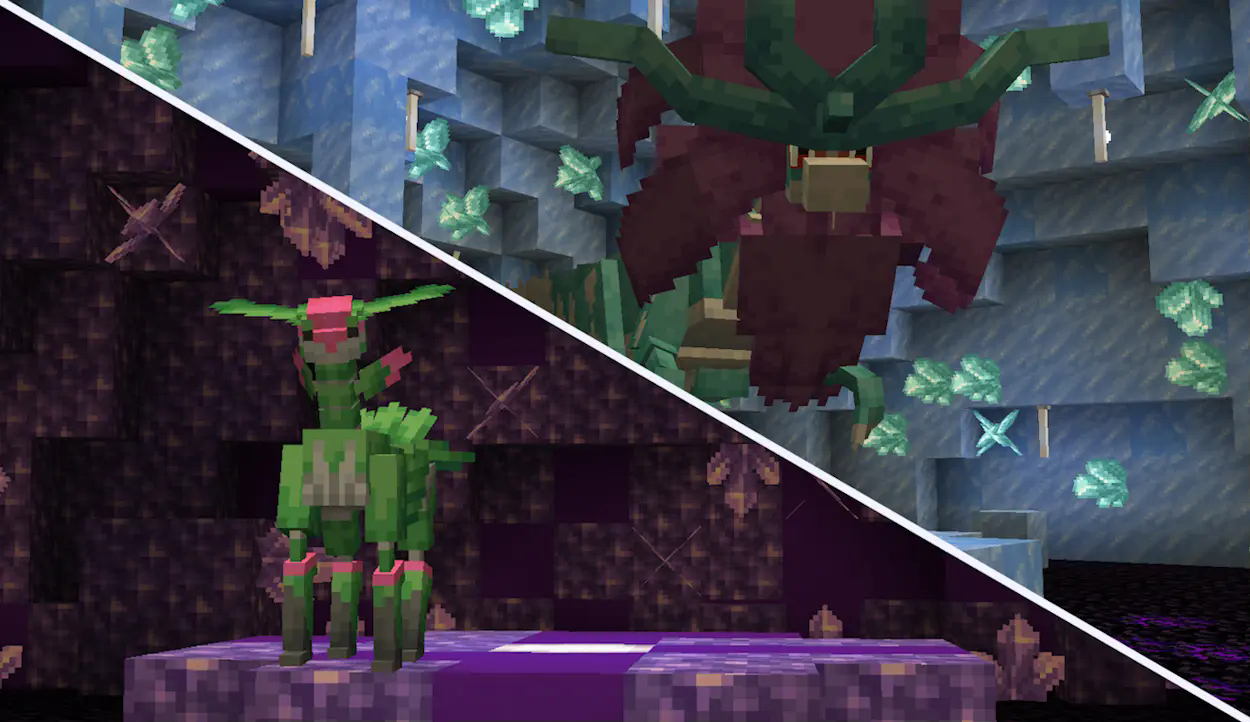
Walking Wake & Iron Leaves are found at Tera Dens, a new set of underground structure that come in 2 types: Water Tera Dens, & Psychic Tera Dens. Getting near the center of a Tera Den will spawn in the respective legendary at level 75. Walking Wake in Water Dens, & Iron Leaves in Psychic Dens. Rarely in some structures you will find a Tera Map, a map that leads you directly to either Tera Den. Every player on the server will get only one chance to catch them.
Why these set of legendaries?
¯\_(ツ)_/¯
Cobblemon: Legends Untold server crashes on startup – what to do?
Common causes: the loader or Minecraft version does not match the mod file, a dependency is missing, or RAM is too low. Check the log (latest.log) for “OutOfMemoryError”, “Mixin” or missing mods. At Mado, the AI crash analysis reads the log and suggests a cause. You can change the loader and version in the panel.
Which loader does Cobblemon: Legends Untold run on?
According to Modrinth, Cobblemon: Legends Untold supports Fabric, Forge, NeoForge, Quilt for Minecraft 1.21.1, 1.20.1. Forge and Fabric files are not interchangeable: pick one loader for the server and clients.
How much RAM does a server with Cobblemon: Legends Untold need?
As guidance, 4–6 GB for a server with this mod. This is an estimate, not a measured minimum. More mods, many players and long view distances need more. The spark profiler shows whether a mod is costing tick time.
Similar mods
Popular mods in the same category
 Server-ready

Xaero's Minimap
by thexaero
Displays a map of the nearby world terrain, players, mobs, entities in the corner of your screen. Lets you create waypoints which help you find the locations you've marked.
 Server-ready

Xaero's World Map
by thexaero
Adds a full screen world map which shows you what you have explored in the world. Works great together with Xaero's Minimap.
 Client only

Not Enough Animations
by tr7zw
Bringing first-person animations to the third-person
 Client only

3D Skin Layers
by tr7zw
Render the player skin layer in 3d!
Ready for your server with Cobblemon: Legends Untold?
6 GB of RAM from €12.00 per month. 35% off your first month with MADO35.