
Modrinth · Fabric, NeoForge
Cobblemon Utility+ (IVs, EVs, & More) on your Minecraft server
Cobblemon Utility+ (IVs, EVs, & More) runs on Minecraft servers with Fabric or NeoForge. Order your server, set the loader in the panel and install the mod with one click in the mod browser.
Adds utility items to Cobblemon for a better experience
- Downloads
- 373.9K
- Author
- brendon3
- Loader
- Fabric, NeoForge
- Minecraft
- 1.21.1
- Updated
- –
Screenshots
What Cobblemon Utility+ (IVs, EVs, & More) looks like

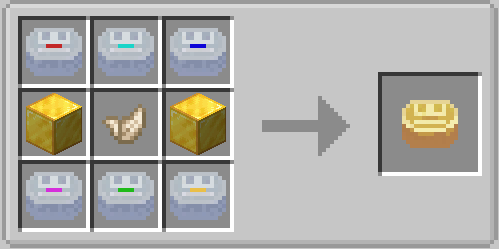
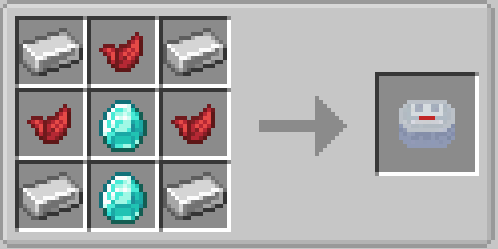
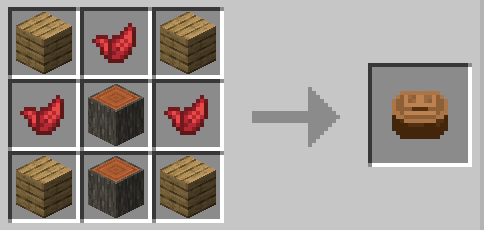
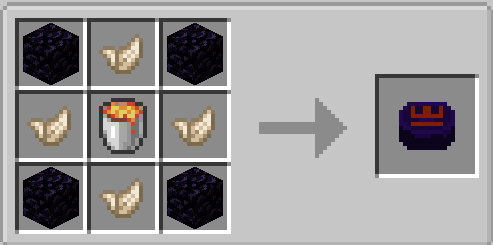
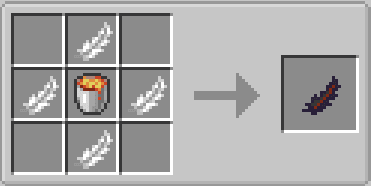
Images: Cobblemon Utility+ (IVs, EVs, & More) on Modrinth, published by the project team.
Setup
Install Cobblemon Utility+ (IVs, EVs, & More) on your server
The server and players need the same loader and Minecraft version. Back up the world before adding or updating mods.
- 01
Configure
4 GB of RAM is preselected. You choose the term and add-ons and pay by credit card or PayPal.
- 02
Set the loader
In the panel, set the server software to Fabric or NeoForge and choose the matching Minecraft version, for example 1.21.1.
- 03
Install the mod
Search the mod browser for “Cobblemon Utility+ (IVs, EVs, & More)” and install the release for your loader. Alternatively, upload the .jar to the mods folder via SFTP. Required dependencies are listed on the project page.
- 04
Connect
Every player installs the same Cobblemon Utility+ (IVs, EVs, & More) release locally and connects using the server address from the panel.
- On the server
- Required
- On the client
- Required
- Loader
- Fabric, NeoForge
- Minecraft
- 1.21.1
- License
- MIT License
The panel
Install mods, find errors.
Real screenshots from the Mado panel. Both come with every Minecraft server.
Mod browser
Modrinth and CurseForge, right in the panel.
The browser filters by your Minecraft version. Install mods with one click, without uploading .jar files.

AI crash analysis
When a mod crashes, the analyzer reads the log.
Mods often fail on a wrong loader version, Java version or missing dependency. The analyzer names a likely cause and suggests a fix.

Releases
Published releases
Pick the file that matches your server’s loader and Minecraft version. The server and players need the same release.
Cobblemon Utility+ (IVs, EVs, & More) · Modrinth- Cobblemon Utility+ (IVs, EVs, & More) 1.8.0September 13, 2026Minecraft 1.21.1 · NeoForge
- Cobblemon Utility+ (IVs, EVs, & More) 1.8.0September 13, 2026Minecraft 1.21.1 · Fabric
Original description by the project author
DATAPACK NO LONGER REQUIRED FOR RECIPES
No Recipe Version
Don't use with Brendon's Bottlecaps
Bottlecap Items (IV Boosters):
Golden Cap - Boosts all IVs to max
Silver Caps - Boosts particular IV to max
Wooden Cap - Randomizes IVs
Void Cap - Sets IVs to 0
Obsidian Caps - Decreases particular IV by 1 (v1.6)
Additional Items:
Shiny Card - Switches a Cobblemon's shiny status
Ball Synchronizer - Changes the Poké ball to the Poké ball in the Cobblemon's item slot
Transmutation Orb - Switches a Cobblemon's gender if applicable
Void Feather - Sets EVs to 0
Poké Treat - Increases Friendship (v1.1)
Common Candy - Decreases level by 1 (v1.1)
Stale Poké Treat - Decreases Friendship (v1.2)
Devolution Relic - Devolves a Cobblemon (v1.3)
Master Candy - Sets level to 100 (v1.4)
Cobblemax - Maxes a Cobblemon's level, IVs, and Friendship (v1.5)
Cobblemin - Minimizes a Cobblemon's level, IVs, and Friendship (v1.5)
Rider's Relic - Boosts riding stats by 100
Other Additions:
EV Feathers given recipes in datapack
Support available in the Cobblemon Discord #content-zone-help
No Recipe files are available in the support thread
Cobblemon Utility+ (IVs, EVs, & More) server crashes on startup – what to do?
Common causes: the loader or Minecraft version does not match the mod file, a dependency is missing, or RAM is too low. Check the log (latest.log) for “OutOfMemoryError”, “Mixin” or missing mods. At Mado, the AI crash analysis reads the log and suggests a cause. You can change the loader and version in the panel.
Which loader does Cobblemon Utility+ (IVs, EVs, & More) run on?
According to Modrinth, Cobblemon Utility+ (IVs, EVs, & More) supports Fabric, NeoForge for Minecraft 1.21.1.
How much RAM does a server with Cobblemon Utility+ (IVs, EVs, & More) need?
As guidance, 3–4 GB for a server with this mod. This is an estimate, not a measured minimum. More mods, many players and long view distances need more. The spark profiler shows whether a mod is costing tick time.
Similar mods
Popular mods in the same category
 Server-ready

FerriteCore
by malte0811
Memory usage optimizations
 Client only

Mod Menu
by Prospector
Adds a mod menu to view the list of mods you have installed.
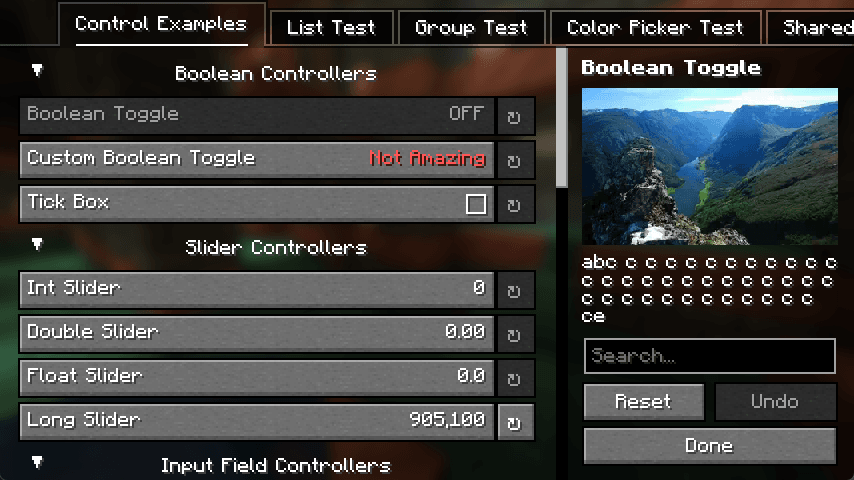 Server-ready

YetAnotherConfigLib (YACL)
by isxander
A builder-based configuration library for Minecraft!
 Server-ready

Xaero's Minimap
by thexaero
Displays a map of the nearby world terrain, players, mobs, entities in the corner of your screen. Lets you create waypoints which help you find the locations you've marked.
Ready for your server with Cobblemon Utility+ (IVs, EVs, & More)?
4 GB of RAM from €8.00 per month. 35% off your first month with MADO35.