
CobblemonRider
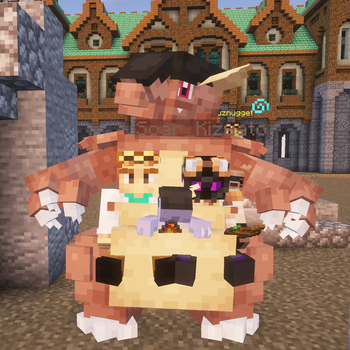
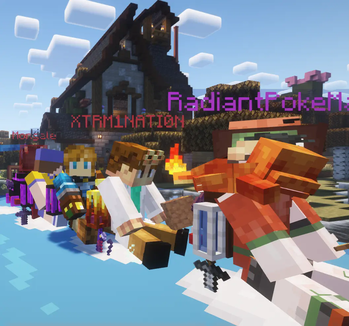
Have you played Cobblemon ? Have you wished you could ride your Cobblemon around your world ? Me too ! so i had this mod commissioned for FORGE (and now FABRIC cobblemon 1.5+)to do just that !
Screenshots
About this Mod
Have you wished you could ride your Cobblemon around your world ? Me too ! so i had this mod commissioned for FORGE (and now FABRIC cobblemon 1.5+)to do just that ! I put a demo video HERE
FORGE(only for cobblemon 1.5 below)-config is located in MCfolder>world>serverconfig>PokemonRideConfig.json for servers
FABRIC-config is located in mcfolder>saves>world and is named PokemonRideConfig.json
CONTROLS/FEATURES
Send out your Cobblemon and CROUCH + RIGHT CLICK interact to get on their backs ,
press K to dismount (key bind available for this)
Click to toggle sprint keybind to SPRINT on your Cobblemon
Press SPACE to fly up on flyers
Press/hold your crouch keybind to DECEND swimming and flying
(if enabled in config in 1.20) hold ALT to pick up entities (keybind available)
When Swimming , press crouch keybind to submerge,
ANY Cobblemon can be added to the config with the FLY SWIM, LAVA_SWIM, or WALK tag, to define what they can and cannot do when being ridden ! (such as pokes with SWIM only , cannot move on land when ridden etc)
Customizable xyz-level positioning for player seating so you’re not sitting inside the cobblemon available in the config
Multiriding available now, ride wailord and more with your friends!
LAVA_SWIM tag now available to ride pokes in lava
Compatibility with cobblemon 1.6 !(1.1.0 on)
Stamina- Now pokes have a stamina for sprinting that can be configured in the config (world>serverconfig>pokemonrideconfig.json) default is 200 if not specified !
FORM definition in config - now you can add forms like alola or hisui for different forms of pokes for different seating or speeds. See new config attached below
Can now add "mustAllowEntityRiding": false, or "mustAllowEntityRiding": true, to the config to enable / disable pick up
NEW CONFIG:HERE
MOD DEVELOPMENT CREDIT GOES TO :
zanckor
FORGE requires Kotlin for forge
If you'd like to support future updates you can donate here, any amount helps :
https://ko-fi.com/xtrm1nati0n
CLICK AND USE CODE PokeSteam FOR 25% OFF A SERVER!
Available Versions
How to Install CobblemonRider on Your Server
Order Server
Order a Minecraft Java server with at least 3 GB RAM (4 GB recommended).
Set fabric Loader
In the panel under "Egg", select the fabric loader and matching Minecraft version (1.21.1).
Install Mod
Open the mod browser in the dashboard and search for "CobblemonRider". Click "Install" – done! Alternatively, upload the .jar via SFTP to the /mods folder.
Compatibility
Mod Loaders
Minecraft Versions
1.21.1, 1.20.1
Server-side
✓ RequiredRecommended RAM
4 GB(min. 3 GB)Frequently Asked Questions
CobblemonRider server crashes on startup – what to do?
Most common cause: wrong fabric version or insufficient RAM. Check the server log (latest.log) for "OutOfMemoryError" or "Mixin" errors. With Mado Hosting: ensure at least 3 GB RAM is allocated and the loader matches the mod version (1.21.1). You can switch loaders with one click in the panel.
Is CobblemonRider compatible with fabric and forge?
CobblemonRider officially supports fabric, forge for Minecraft 1.21.1, 1.20.1. Note: Forge and Fabric mods are NOT cross-compatible – pick one loader and stick with it. The Mado dashboard automatically detects incompatible loader combinations.
Server lagging with CobblemonRider – how to optimize performance?
Recommended RAM: 4 GB (per 8 players). Use /spark profiler to check if CobblemonRider consumes the most tick time. Common fixes: reduce server view-distance to 8-10, install "performant" or "starlight" as supplementary mods on Forge. With Mado Hosting, your server runs on NVMe SSDs with dedicated CPU cores for minimal latency.
Similar Mods






Rent Modded Server
Install CobblemonRider with just one click on your server.