
Modrinth · Fabric, NeoForge, Quilt
Combat Effects on your Minecraft server
Combat Effects runs on Minecraft servers with Fabric or NeoForge or Quilt. Order your server, set the loader in the panel and install the mod with one click in the mod browser.
Allows to apply effects when entities engage combat, highly customizable with regex support.
- Downloads
- 1.2M
- Author
- ElocinDev
- Loader
- Fabric, NeoForge, Quilt
- Minecraft
- 1.20.1 – 1.21.1
- Updated
- –
Screenshots
What Combat Effects looks like
Images: Combat Effects on Modrinth, published by the project team.
Setup
Install Combat Effects on your server
The server and players need the same loader and Minecraft version. Back up the world before adding or updating mods.
- 01
Configure
4 GB of RAM is preselected. You choose the term and add-ons and pay by credit card or PayPal.
- 02
Set the loader
In the panel, set the server software to Fabric or NeoForge or Quilt and choose the matching Minecraft version, for example 1.21.1.
- 03
Install the mod
Search the mod browser for “Combat Effects” and install the release for your loader. Alternatively, upload the .jar to the mods folder via SFTP. Required dependencies are listed on the project page.
- 04
Connect
Combat Effects is not needed on the client. Players connect using the server address from the panel.
- On the server
- Required
- On the client
- Not needed
- Loader
- Fabric, NeoForge, Quilt
- Minecraft
- 1.21.1, 1.20.1
- License
- LicenseRef-AGNYA-License
The panel
Install mods, find errors.
Real screenshots from the Mado panel. Both come with every Minecraft server.
Mod browser
Modrinth and CurseForge, right in the panel.
The browser filters by your Minecraft version. Install mods with one click, without uploading .jar files.

AI crash analysis
When a mod crashes, the analyzer reads the log.
Mods often fail on a wrong loader version, Java version or missing dependency. The analyzer names a likely cause and suggests a fix.

Releases
Published releases
Pick the file that matches your server’s loader and Minecraft version. The server and players need the same release.
Combat Effects · Modrinth- Combat Effects v1.0.0November 27, 2024Minecraft 1.21.1 · NeoForge
- Combat Effects v1.0.0November 27, 2024Minecraft 1.21.1 · Fabric, Quilt
- Combat Effects v1.0.0November 27, 2024Minecraft 1.20.1 · Fabric, Quilt
Original description by the project author

A modpack utility mod that allows applying effects when entities engage in combat. Supports regex!
This can be useful for things such as:
- Applying a specific effect while fighting bosses
- Applying poison/bleeding on hit for certain entities
- Applying an effect (e.g., glow) when players engage in PvP
- Anything else involving applying effects while in combat
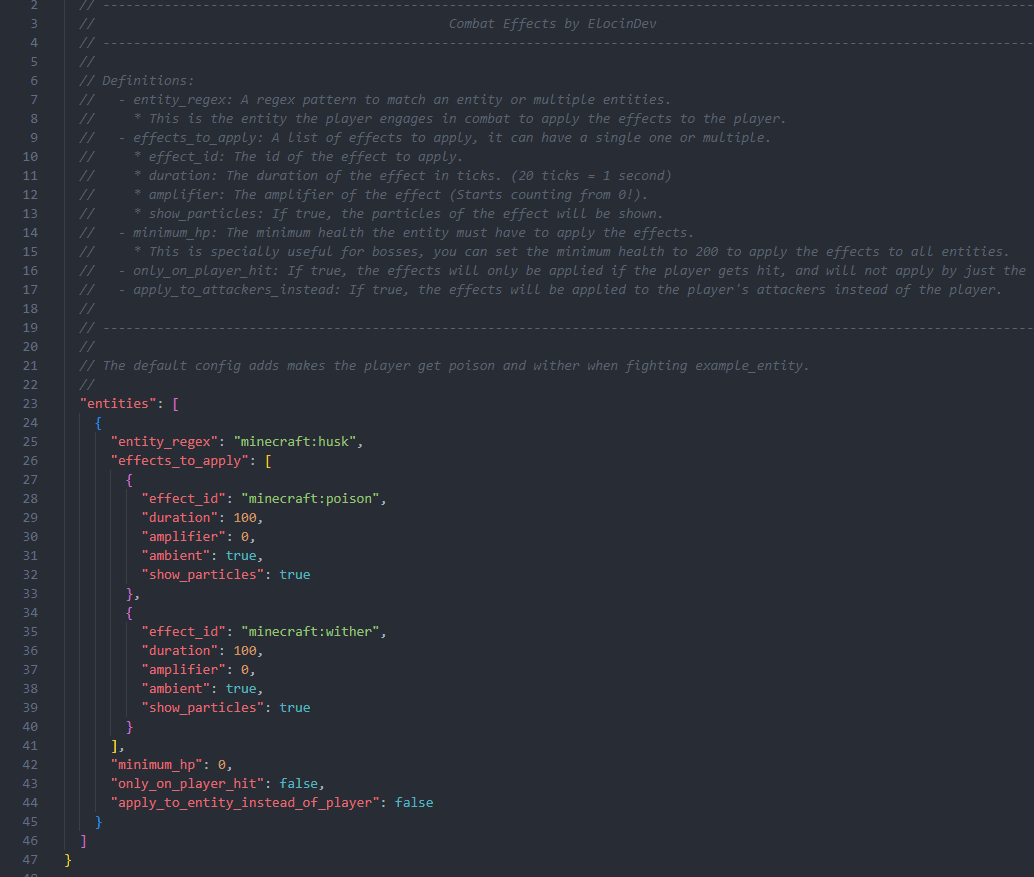
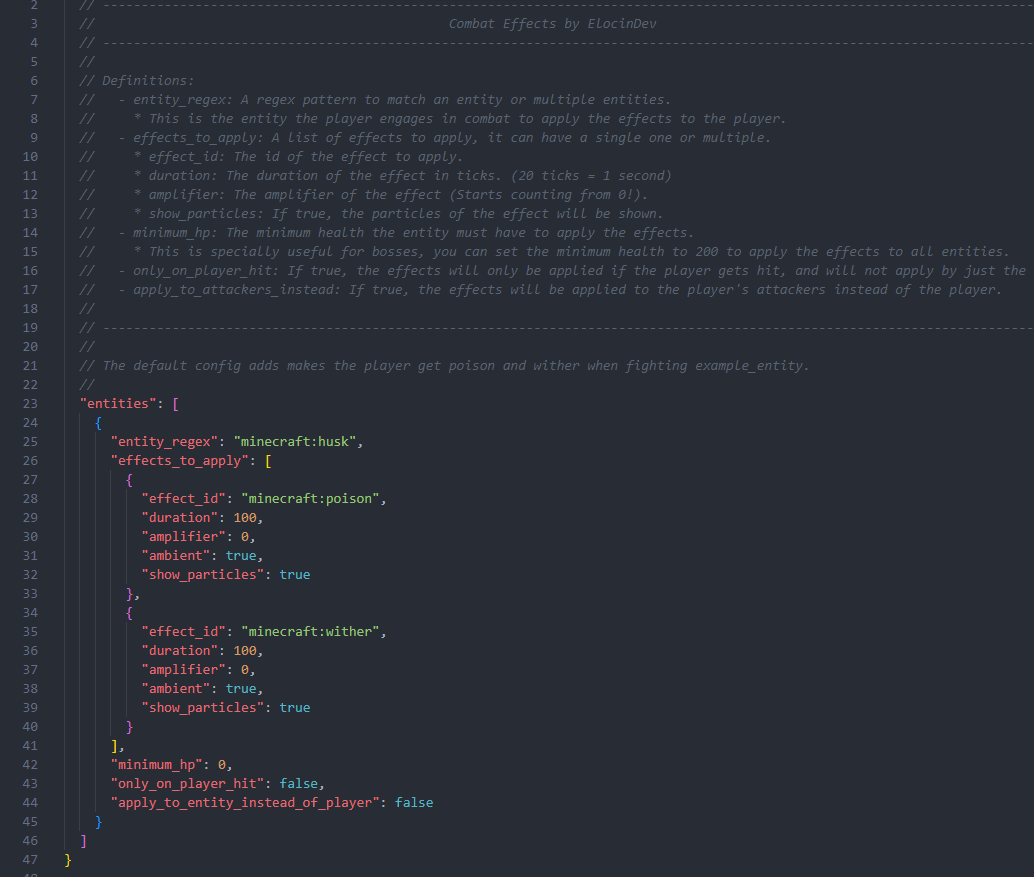
Config Preview

Combat Effects server crashes on startup – what to do?
Common causes: the loader or Minecraft version does not match the mod file, a dependency is missing, or RAM is too low. Check the log (latest.log) for “OutOfMemoryError”, “Mixin” or missing mods. At Mado, the AI crash analysis reads the log and suggests a cause. You can change the loader and version in the panel.
Which loader does Combat Effects run on?
According to Modrinth, Combat Effects supports Fabric, NeoForge, Quilt for Minecraft 1.21.1, 1.20.1.
How much RAM does a server with Combat Effects need?
As guidance, 3–4 GB for a server with this mod. This is an estimate, not a measured minimum. More mods, many players and long view distances need more. The spark profiler shows whether a mod is costing tick time.
Ready for your server with Combat Effects?
4 GB of RAM from €8.00 per month. 35% off your first month with MADO35.