
Compact F3
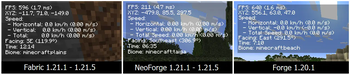
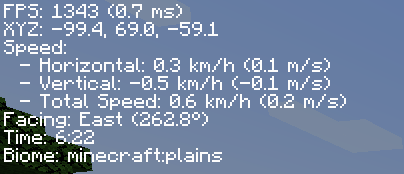
A mod that reduces the useless information from F3, can be toggalable with F8.
Screenshots
About this Mod
Description
This mod, as it's name suggests, will make the F3 menu go to shame, you can toggle the menu as you wish by toggling the F8 key to open/close the menu. It shows things such as FPS, XYZ Coordinates, Speed, Time, Biome, and more, while not causing any FPS drops since the GUI is rendered at the refresh rate of the monitor, instead of refreshing it as much as the game does. This GUI is not made to condone any malicious intent towards the player or the game servers, it only does one thing, perform.
Compability
As of Minecraft 1.21.1, this mod is developed exclusively for the Fabric and NeoForge mod loaders, as they provide a more streamlined development experience. Forge is no longer supported for Minecraft 1.21.1 and newer, as the vast majority of the modding community has transitioned to these two platforms.
Minecraft versions prior to 1.21.1 will continue to receive Forge support.


This mod is created using IntelliJ IDEA Community Edition 2024.3.5 by Jetbrains
Available Versions
How to Install Compact F3 on Your Client
Install the Mod Loader Locally
Install fabric for your local Minecraft version.
Download the Matching File
Choose the Compact F3 file for fabric and Minecraft 26.2.
Install Mod
Place the .jar file in your local .minecraft/mods folder and restart Minecraft. No server-side installation is required.
Compatibility
Mod Loaders
Minecraft Versions
26.2, 26.1.2, 26.1.1 (+21 more)
Server-side
✗ UnsupportedRecommended RAM
4 GB(min. 3 GB)Frequently Asked Questions
Does Compact F3 need to be installed on the Minecraft server?
No. Modrinth marks Compact F3 as unsupported on the server side. Install it only in your local Minecraft mods folder. Your server can remain unchanged unless the mod page lists an additional dependency.
Which version and loader does Compact F3 require?
Use a file for fabric, forge, neoforge and your exact Minecraft version. Supported versions include 26.2, 26.1.2, 26.1.1. Files for different loaders are not interchangeable.
Compact F3 is not working – what should I check?
First check the Minecraft version, loader version and required dependencies. Put the .jar file in your local .minecraft/mods folder and remove older duplicates. Because this mod is client-side, adding server RAM will not fix it.
Similar Mods






Minecraft Server for Your Group
Compact F3 stays on your client. Host a compatible world for your group.