
Create: Ironworks
An addon for the Create mod bringing new materials (Tin, Bronze, Steel) and related items.
Screenshots


About this Mod

About
Create: Ironworks expands on metal working with Create, by adding new ores and alloys: Tin, Bronze and Steel, with their respective items.
Features
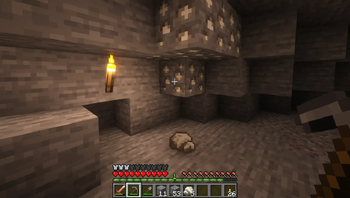
 New ores and materials around metalworking: Tin, Bronze and Steel
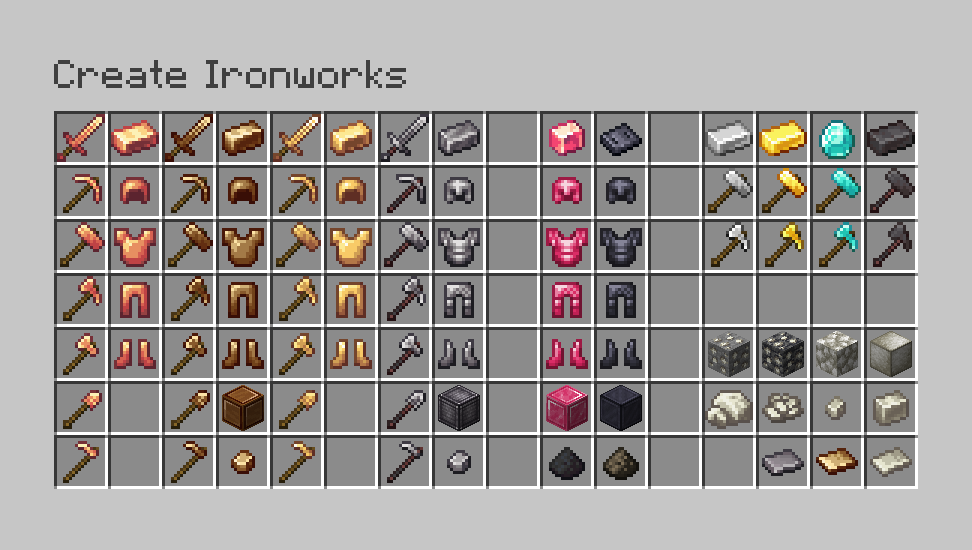
Dozens of new weapons, tools and armors based off Create materials
Additionnal alloying recipes for Brass, Bronze and Steel, using crushed materials or nuggets
You can now upgrade your armor and tools to Netherite from Steel alloy, as an alternative to Diamond
Many other features to discover!
Full item list

Armor, Tools & Weapons
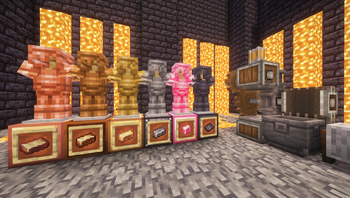
 Copper: Cheap and disposable early-game armor and tools. At least it's better than Leather...
 Bronze: One of the new alloys added by the mod. Bronze tools are not as fast but more durable than Iron tools.
 Brass: Tools and armor that are more effective than their Iron counterpart and have higher enchantability.
 Rose Quartz: An armor set with the same defense points as Diamond armor, but with a very low durability.
 Sturdy Sheet: Very high durability armor, with decent defensive capabilities (slightly under Diamond armor).
 Steel: One of the new materials added by the mod. Used to create powerful gear, almost on par with Netherite.
All new armors from the mod are trimmable.

Hammer & Paxel

The Paxel is one of the 2 new tool types added by the mod. It combines the mining properties of a Pickaxe, Axe and Shovel.

Create: Ironworks also adds the Hammer. It has the same properties as a Pickaxe, but mines in a 3*3 area and consumes durability faster.

Both of these tools have a lower mining speed compared to their counterpart of the same materials, to compensate for the functionality gains. Versions for vanilla materials are all also included.
Alloy making

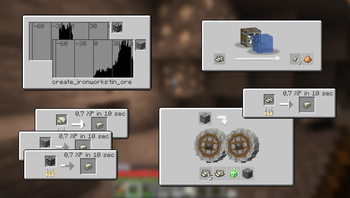
New recipes have been added for Brass: you can now craft the alloy directly from crushed materials, and even nuggets! (with adapted drop rates).

Bronze follows the same principle and can be crafted using the newly added Tin Ore, and a bit of Copper. Being a lower-tier alloy, this craft requires no heating.

Steel is the third and highest tier alloy added by the mod. It requires Iron and Coal Dust to craft (obtained by crushing Coal).
Recipes and other features
Alloys are useful for many things besides crafting tools and armor. Notably, they are substitutes to other materials in certain recipes.
➡️ Tin and Bronze recipes

Tin can replace Iron in several vanilla recipes. This allows to save some Iron for other crafts, as Create can be very Iron-intensive (especially in early game).

Bronze can be used to craft Bells, very much like in real life.
➡️ Coal Dust other uses

Coal Dust can be used along side Blaze Powder to craft Gunpowder.
➡️ Precision Mechanism

Steel can replace Iron in the Precision Mechanism recipe, increasing success rate to 100% (vs. 80% with Iron Nuggets).
➡️ Upgrading to Netherite

All Steel tools and armor pieces can be upgraded to Netherite, the same way you would with Diamond gear. This also includes the new Hammers and Paxels.
➡️ Netherite Upgrade Template

You can use Steel instead of Diamond for duplicating templates. You'll still have to find the first one though...
Compatibility
Show spoiler
- Create: Molten Metals
- Create: Dreams & Desires
- Tinker's Construct / Hephaestus
- Epic Knights
- Better Gold Equipment
- Better Smithing Upgrades
Credits
All custom textures used (if any) are either created by me or have a license that allows modification and distribution.
I make every effort to comply with project license obligations and to always credit the original owners. If you believe your name is missing from the credits or if you decide to change your project's license, please contact me.
Credits:
- Create Alloyed (MIT License) for the steel and bronze palette.
- Tech Reborn (MIT License) for the coal dust and tin textures.
Video
Dependencies
Only the base Create mod is required for this one to work.
JEI is recommended but not required.
Installation
Add the .jar mod file into your mods folder.
Alternatively, you can browse the Modrinth launcher for the mod (if it doesn't show up, try typing the autor's name). Once found, click "Install" to add it to your modpack.
Permissions
You are free to include this mod in any modpack, public or private.
Support my work
 Download my projects on CurseForge
 Download my projects on Modrinth
Donate on Paypal
Available Versions
How to Install Create: Ironworks on Your Server
Order Server
Order a Minecraft Java server with at least 4 GB RAM (6 GB recommended).
Set fabric Loader
In the panel under "Egg", select the fabric loader and matching Minecraft version (1.21.1).
Install Mod
Open the mod browser in the dashboard and search for "Create: Ironworks". Click "Install" – done! Alternatively, upload the .jar via SFTP to the /mods folder.
Compatibility
Mod Loaders
Minecraft Versions
1.21.1, 1.21, 1.20.1 (+1 more)
Server-side
✓ RequiredRecommended RAM
6 GB(min. 4 GB)Frequently Asked Questions
Create: Ironworks server crashes on startup – what to do?
Most common cause: wrong fabric version or insufficient RAM. Check the server log (latest.log) for "OutOfMemoryError" or "Mixin" errors. With Mado Hosting: ensure at least 4 GB RAM is allocated and the loader matches the mod version (1.21.1). You can switch loaders with one click in the panel.
Is Create: Ironworks compatible with fabric and forge and neoforge and quilt?
Create: Ironworks officially supports fabric, forge, neoforge, quilt for Minecraft 1.21.1, 1.21, 1.20.1. Note: Forge and Fabric mods are NOT cross-compatible – pick one loader and stick with it. The Mado dashboard automatically detects incompatible loader combinations.
Server lagging with Create: Ironworks – how to optimize performance?
Recommended RAM: 6 GB (per 5 players). Use /spark profiler to check if Create: Ironworks consumes the most tick time. Common fixes: reduce server view-distance to 8-10, install "performant" or "starlight" as supplementary mods on Forge. With Mado Hosting, your server runs on NVMe SSDs with dedicated CPU cores for minimal latency.
Similar Mods



![[TaCZ] Timeless and Classics Zero](https://cdn.modrinth.com/data/SzzJttH8/fd27766d2bb8390d284696b1dbd358f87e081439_96.webp)


Rent Modded Server
Install Create: Ironworks with just one click on your server.