
DeathLog
Keeps track of the many embarrassing times you died
About this Mod
DeathLog
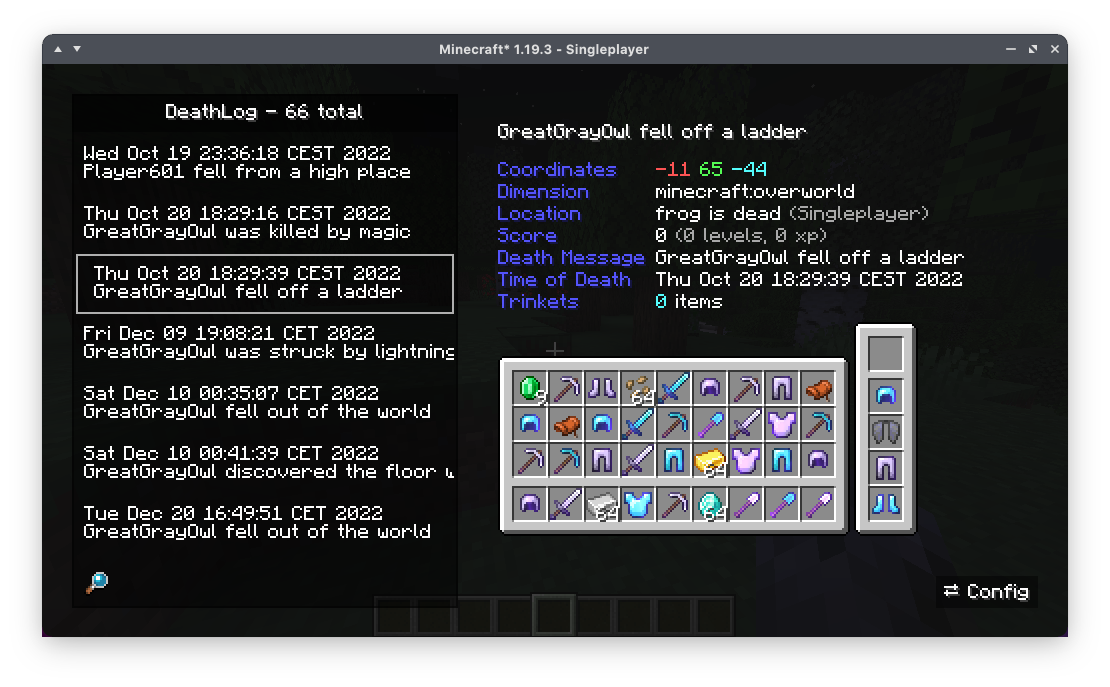
DeathLog tracks your deaths in all worlds and servers. It does this completely client-side and records important metadata like coordinates, dimension and even your entire inventory. Since version 0.2.0 onward, DeathLog can also operate server-side and track all deaths of all players on that server, with native functionality for restoring a death snapshot. DeathLog can be used on both sides without being required on the other, however managing the server's database is significantly easier with a DeathLog-enabled client.
You can access your log from the vanilla Statistics screen. The search bar accounts for
- Item Names
- Coordinates
- World or Server Names
- Death Messages
- ...
You can get your lost items back while in creative mode by simply clicking on them with your mouse wheel. Should you not have access to creative mode, it will copy an appropriate /give command
Available Versions
How to Install DeathLog on Your Server
Order Server
Order a Minecraft Java server with at least 3 GB RAM (4 GB recommended).
Set fabric Loader
In the panel under "Egg", select the fabric loader and matching Minecraft version (1.21.3).
Install Mod
Open the mod browser in the dashboard and search for "DeathLog". Click "Install" – done! Alternatively, upload the .jar via SFTP to the /mods folder.
Compatibility
Mod Loaders
Minecraft Versions
1.21.3, 1.21.2, 1.21 (+21 more)
Server-side
~ OptionalRecommended RAM
4 GB(min. 3 GB)Frequently Asked Questions
DeathLog server crashes on startup – what to do?
Most common cause: wrong fabric version or insufficient RAM. Check the server log (latest.log) for "OutOfMemoryError" or "Mixin" errors. With Mado Hosting: ensure at least 3 GB RAM is allocated and the loader matches the mod version (1.21.3). You can switch loaders with one click in the panel.
Is DeathLog compatible with fabric and quilt?
DeathLog officially supports fabric, quilt for Minecraft 1.21.3, 1.21.2, 1.21. The Mado dashboard automatically detects incompatible loader combinations.
Server lagging with DeathLog – how to optimize performance?
Recommended RAM: 4 GB (per 8 players). Use /spark profiler to check if DeathLog consumes the most tick time. Common fixes: reduce server view-distance to 8-10, install "performant" or "starlight" as supplementary mods on Forge. With Mado Hosting, your server runs on NVMe SSDs with dedicated CPU cores for minimal latency.
Similar Mods




Rent Modded Server
Install DeathLog with just one click on your server.