
Dimensional Doors
This mod adds several types of Dimensional Doors that allow access to teleportation and extra-dimensional pocket dungeons that can vary from hallways to mazes to treasure rooms to straight-up traps. Have fun exploring, but be wary of what watches.
Screenshots
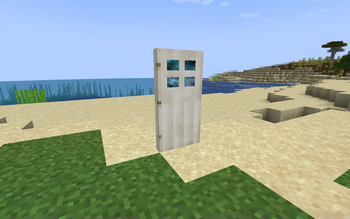
About this Mod
This mod is a Minecraft 1.12+ port of the Dimensional Doors mod originally created and maintained up to Minecraft 1.6.4 by Stevenrs11.
This mod adds several types of Dimensional Doors that allow access to teleportation and extra-dimensional pocket dungeons that can vary from hallways to mazes to treasure rooms to straight-up traps.
Have fun exploring, but be wary of death or falling into the void as you do not want to end up and perish away in the mysterious and nihilistic Limbo dimension!
For more information, join our Discord Server or take a look at the Minecraft forums.
Features
NOTE: Descriptions on items in-game may not reflect their current or intended purpose and/or functionality (yet).
Doors
Oak Dimensional Door: Easy to make, but not very useful. In dungeons, it will typically lead back to the previous pocket, but sometimes a second Oak Door in a dungeon will lead back to the dimension where the player first entered this chain of dungeons.
Iron Dimensional Door: Placing one in the world will create a new and empty dimensional pocket, a black void in which you can build whatever you want: a small house, a statue, a farm, a huge base, or even a whole city!
Quartz Dimensional Door: Similar to an iron dimensional door, except that all quartz dimensional doors will lead to the player's personal pocket.
Gold Dimensional Door: Very expensive to make but worth it. Leads to a pocket dungeon full of treasures, puzzles, and traps.
Unstable Dimensional Door: Crafted using an eye of ender instead of an ender pearl. Randomly leads to a rift or another door.
Quartz Door: Used to craft the quartz dimensional door
Gold Door: Used to craft the gold dimensional door
Other Doors: Through the door's NBT, it is possible to configure a door (of any kind) to create any type of rift when placed, such as a "dangerous door" which has a 50% chance of leading to limbo and 50% chance of leading to a treasure-filled dungeon. In future versions, such bonus doors will be rarely found in dungeon chests.
Rifts
Rifts are fractal-shaped tears in the world. They form when a dimensional door is destroyed and is no longer binding together the fabric of reality. To pass through a rift, you can either place a dimensional door on it, or right click it using the rift blade.
They also form naturally in extremely rare formations called "Rift Clusters", which lead to other very far away clusters.
Rifts will grow logarithmically over time. You can use a rift remover to close rifts that got too big, or a rift stabilizer to stop a rift's growth.
Tools and weapons
Rift signature: Creates a pair of rifts linked to each other
Stabilized rift signature: First click binds it to a location, other clicks create rifts leading to that location.
Rift removed: Used to close rifts
Rift stabilizer: Stops the growth of a rift
Rift blade: Teleports the entity you're attacking several blocks away. Right-clicking on a rift causes you to enter it, without having to use a door.
Dungeons
Dungeons are special kinds of pocket dimensions filled with treasures, puzzles, traps, and dimensional doors leading to deeper dungeons. Although it might be tempting to break walls and bypass a puzzle, be careful of monoliths that may be waiting right outside those walls to teleport you to limbo!
A dungeon can either be entered using a gateway, a rare structure that can be found throughout the world, or by using a gold dimensional door.
Fabric of reality
Fabric is the material out of which dungeons are made. It comes in several variations:
Fabric of Reality: Completely black block that absorbs all light. It can be replaced by right clicking with a block, or mined using a silk touch pickaxe. Be careful, this looks exactly like the void in dungeons!
Altered Fabric: Fabric of reality that has been altered to become white, or any other color. White altered fabric is found in personal pocket dimensions. Other colors can be crafted by combining Fabric of Reality with a dye.
Ancient Fabric: Black bedrock-like fabric that surrounds some pocket dungeons
Altered Ancient Fabric: Colored variations of Eternal Fabric. It is uncraftable since eternal fabric is unobtainable, but the white one is found in personal pockets.
Eternal Fluid: Found deep in Limbo, providing a way for players stuck in Limbo to escape
Limbo
A dark, foggy, and mysterious dimension filled with monoliths, where players who died or tried to cheat in a dungeon end up.
F.A.Q.
Q: Why am I set on fire when leaving a Pocket Dimension? (Fixed in 1.17+ versions)
A: It's a Vanilla bug. The same often happens if you use Nether Portals built on very low y-levels in the Nether, or, if you are extremely unlucky, anywhere in the Nether, to get back to the Overworld.
Q: When going to Limbo, by dying or jumping into the void, I lose all of my items. Is this intended? (Fixed in 1.17+ versions)
A: At the moment, the only way to enter Limbo is by taunting a Monolith. The only other way to enter is by dying, which, if keepInventory is turned off, will drop all your items.
This is not 100% intended behaviour and we do plan on changing this.
Intention:
- Falling into the void should not kill you, but send you straight to Limbo, making you keep your items.
- Dying in a Dungeon Pocket should send you to Limbo and make you lose your items, however a config option should be added to allow you to keep your items.
We are aware that only a select few Pockets are populated with Monoliths at the moment.
Q: How do I change gateway spawn rates in 5.3.+?
A: Gateways like all other world gen are now done via datapack. Gateways in particular placed_features.
Available Versions
How to Install Dimensional Doors on Your Server
Order Server
Order a Minecraft Java server with at least 3 GB RAM (4 GB recommended).
Set fabric Loader
In the panel under "Egg", select the fabric loader and matching Minecraft version (1.21.1).
Install Mod
Open the mod browser in the dashboard and search for "Dimensional Doors". Click "Install" – done! Alternatively, upload the .jar via SFTP to the /mods folder.
Compatibility
Mod Loaders
Minecraft Versions
1.21.1, 1.20.1, 1.19.2 (+1 more)
Server-side
✓ RequiredRecommended RAM
4 GB(min. 3 GB)Frequently Asked Questions
Dimensional Doors server crashes on startup – what to do?
Most common cause: wrong fabric version or insufficient RAM. Check the server log (latest.log) for "OutOfMemoryError" or "Mixin" errors. With Mado Hosting: ensure at least 3 GB RAM is allocated and the loader matches the mod version (1.21.1). You can switch loaders with one click in the panel.
Is Dimensional Doors compatible with fabric and forge and neoforge?
Dimensional Doors officially supports fabric, forge, neoforge for Minecraft 1.21.1, 1.20.1, 1.19.2. Note: Forge and Fabric mods are NOT cross-compatible – pick one loader and stick with it. The Mado dashboard automatically detects incompatible loader combinations.
Server lagging with Dimensional Doors – how to optimize performance?
Recommended RAM: 4 GB (per 8 players). Use /spark profiler to check if Dimensional Doors consumes the most tick time. Common fixes: reduce server view-distance to 8-10, install "performant" or "starlight" as supplementary mods on Forge. With Mado Hosting, your server runs on NVMe SSDs with dedicated CPU cores for minimal latency.
Similar Mods




Rent Modded Server
Install Dimensional Doors with just one click on your server.