
Dimension Daddy
A Fabric mod for Minecraft that lets server operators enable or disable the End and Nether dimensions at will. When a dimension is disabled, portal blocks are blocked and players attempting to enter receive an action bar message.
Screenshots
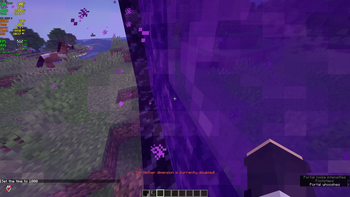
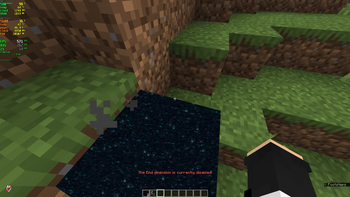
About this Mod
DimensionDaddy
A Fabric mod for Minecraft that gives server operators full control over the Overworld, Nether, and End dimensions: enable or disable access to any of them on the fly, and back up, restore, or fully reset each dimension's actual world data, not just a toggle flag.
Works on dedicated servers, singleplayer worlds, and soft-hosted servers using tools like Essential. When a dimension is disabled, the relevant portal blocks are cancelled and the player gets a direct message explaining why.
Features
- Enable or disable the Overworld, Nether, or End independently, or all three at once
- Real backups that copy actual chunk, entity, point-of-interest, and per-dimension data to disk, not just an enabled/disabled flag
- Restore any dimension back to a previous backup, or reset it entirely back to the seed's untouched, first-generation state
- A one-time Initial Backup is captured automatically the very first time the mod runs on a world, so you always have an untouched snapshot to fall back to
- A single, consistent command tree under
/DimensionDaddy, with tab completion for dimension names and backup ids - A direct in-game report the moment a restore or reset finishes applying, showing exactly what happened per dimension
- No config file editing required for day-to-day use; everything is driven through commands
Commands
Every command lives under a single root: /DimensionDaddy <action> <dimension>. The dimension argument is always one of overworld, nether, end, or all.
enable, disable, backup, restore, and reset require operator privileges. status and list are usable by anyone.
| Command | Description |
|---|---|
/DimensionDaddy enable <dim> |
Enables access to the given dimension(s) |
/DimensionDaddy disable <dim> |
Disables access to the given dimension(s) |
/DimensionDaddy status [dim] |
Shows whether the given dimension(s) are enabled; defaults to all |
/DimensionDaddy backup [dim] |
Snapshots the toggle state and on-disk world data for the given dimension(s); defaults to all |
/DimensionDaddy restore <id> [dim] |
Restores toggle state instantly, and schedules a world data restore for the given dimension(s); defaults to all |
/DimensionDaddy reset <dim> |
Enables the toggle instantly, and schedules a true reset back to the seed's untouched state for the given dimension(s) |
/DimensionDaddy list |
Lists all backups, most recent first, along with any pending scheduled resets or restores |
restore also accepts latest in place of a backup id, meaning the most recently created backup.
Disabling the Overworld blocks two return paths specifically: the Nether portal when used from inside the Nether, and the End's exit portal, which is the fountain portal that appears after defeating the Ender Dragon. Players who are already in the Overworld when it gets disabled are not affected or teleported.
How backups work
Every backup always records the enabled and disabled state of all three dimensions, and that part restores instantly. Whether a backup also contains real world data depends on how it was made.
/DimensionDaddy backup <dim>copies the requested dimension's on-disk world data into the backup. This can take a moment on large worlds since the dimension is flushed to disk first. On a small or fresh world it can finish in well under a second, which is expected behavior, not a bug.- The Initial Backup is created automatically, exactly once, the first time the mod ever runs on a world. It captures all three dimensions as they existed before the mod made any changes, and is never pruned or overwritten.
The mod does not take any other automatic backups on its own; not on server startup, and not before a restore or reset. If you want a safety net before doing something destructive, run /DimensionDaddy backup all first.
/DimensionDaddy list shows whether each backup contains world data and for which dimensions, so you always know what you are restoring before you do it.
As of Minecraft 26.1, each dimension's save data lives under dimensions/minecraft/<dimension>/ inside the world folder, rather than at the world root. The mod backs up and restores the region, entities, poi, and data subfolders within each dimension, which together cover terrain, entities, points of interest, and per-dimension state such as the world border, active raids, and the Ender Dragon fight state.
Restore and reset require a world reload
Minecraft has no supported way to swap out or delete a dimension's chunk files while that dimension is loaded and actively in use. Because of that, restore and reset apply the toggle state change immediately, but the world data portion is scheduled: it gets written to disk and applied the next time the world loads, before any dimension is opened. The command's response, and /DimensionDaddy list, will always tell you when something is pending.
What counts as a reload depends on how you are playing:
- Singleplayer: save and quit to the title screen, then reopen the world.
The moment the world finishes loading with a pending operation applied, you get a direct in-game message for each affected dimension, showing exactly how many files were deleted and copied, or the specific reason it failed if something went wrong. You do not need to check a log file to know whether it worked.
Configuration
Toggle state is stored in config/DimensionDaddy/dimensiondaddy.properties and is created automatically on first run with all three dimensions enabled.
endEnabled=true
netherEnabled=true
overworldEnabled=true
Backups live under config/DimensionDaddy/backups/<id>/, each with a backup.properties metadata file plus subfolders for whichever dimensions had world data captured. Only the 20 most recent backups are kept; the Initial Backup is exempt from that limit.
Requirements
- Minecraft 26.2
- Fabric Loader 0.19.3 or newer
- Fabric API 0.153.0+26.2 or newer
- Java 25
Installation
- Install Fabric Loader for Minecraft 26.2.
- Download Fabric API and place it in your
modsfolder. - Place the DimensionDaddy jar into the same
modsfolder. - Start the game or server.
License
MIT
Available Versions
How to Install Dimension Daddy on Your Server
Order Server
Order a Minecraft Java server with at least 3 GB RAM (4 GB recommended).
Set fabric Loader
In the panel under "Egg", select the fabric loader and matching Minecraft version (26.2).
Install Mod
Open the mod browser in the dashboard and search for "Dimension Daddy". Click "Install" – done! Alternatively, upload the .jar via SFTP to the /mods folder.
Compatibility
Mod Loaders
Minecraft Versions
26.2, 26.1.2, 1.21.11
Server-side
✓ RequiredRecommended RAM
4 GB(min. 3 GB)Frequently Asked Questions
Dimension Daddy server crashes on startup – what to do?
Most common cause: wrong fabric version or insufficient RAM. Check the server log (latest.log) for "OutOfMemoryError" or "Mixin" errors. With Mado Hosting: ensure at least 3 GB RAM is allocated and the loader matches the mod version (26.2). You can switch loaders with one click in the panel.
Is Dimension Daddy compatible with fabric?
Dimension Daddy officially supports fabric for Minecraft 26.2, 26.1.2, 1.21.11. The Mado dashboard automatically detects incompatible loader combinations.
Server lagging with Dimension Daddy – how to optimize performance?
Recommended RAM: 4 GB (per 8 players). Use /spark profiler to check if Dimension Daddy consumes the most tick time. Common fixes: reduce server view-distance to 8-10, install "performant" or "starlight" as supplementary mods on Forge. With Mado Hosting, your server runs on NVMe SSDs with dedicated CPU cores for minimal latency.
Similar Mods






Rent Modded Server
Install Dimension Daddy with just one click on your server.