
Dragon Mounts Datapack
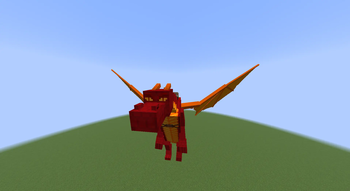
Dragon Mounts Datapack adds the Ability to Hatch Dragon Eggs into Rideable Pet Dragons!
Screenshots
About this Mod
Dragon Mounts Datapack
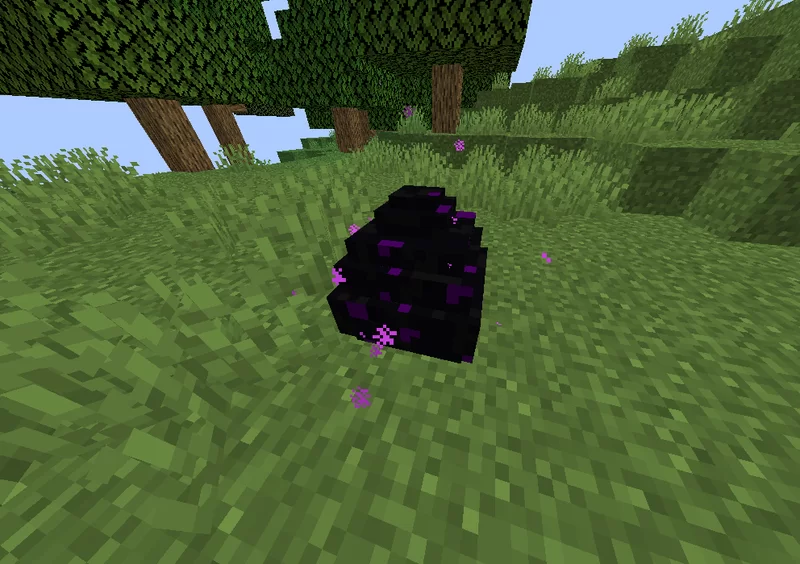
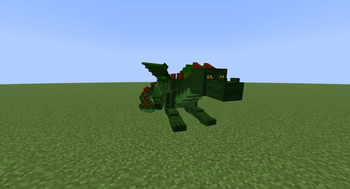
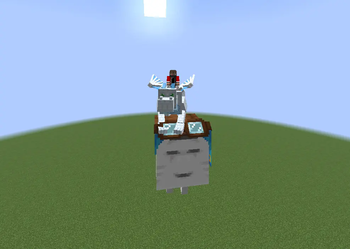
The Dragon Mounts Datapack adds the ability to hatch the Ender Dragon egg into 5 unique pet dragons. Each dragon can be grown, cared for, and eventually ridden by the player.
How to Get Started
Obtain a Dragon Egg
- Defeat the Ender Dragon, or
- Find it inside End City chests
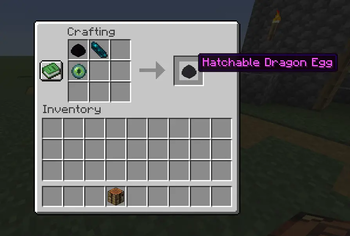
Craft a Hatchable Dragon Egg using:
- 🟣 Dragon Egg
- 👁️ Eye of Ender
- 💠 Echo Shard
Place the crafted egg down to begin the hatching process.
Dragon Variants
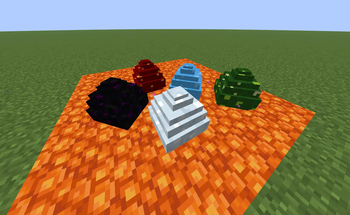
The dragon type depends on the biome where the egg is placed:
- 🌳 Forest Dragon → Place egg in a Forest biome
- 🌊 Water Dragon → Place egg in an Ocean or River biome
- ❄️ Ice Dragon → Place egg in a Snowy or Ice biome
- 🔥 Fire Dragon → Place egg in a Cave biome and surround it with lava
Hatching Process
- ⏳ After 3 in-game days, the egg hatches into a Baby Dragon (sleeping phase).
- 🍣 Feed the baby dragon fish to speed up its growth.
- ⏳ After 2 more in-game days, it matures into a Full Adult Dragon.
Once fully grown, the dragon can be ridden by the player.
Commands
To Summon a Dragon use:
/function animated_java:dragonmounts/summon {args:{variant:default}}
To Get a Dragon Egg use:/function animated_java:dragonmounts/ai/egg_phase/give_dragon_egg {variant:default}
Change
defaultvalue to any of other avaliable variants for different dragon/egg variant
Credits
Animated Java (tool used for implementing models and animations):
Animated Java Websitetextures and assets:
- 🐉 Ender Dragon – Tomanex
- 🔥 Fire Dragon – leoslake9
- ❄️ Ice Dragon – Kingdomall
- 🌳 Forest Dragon – Unakitononeko
- 🌊 Water Dragon – BarracudaATA4
Social Media
Check out my YouTube / Discord!
Support me on Ko-fi:
Sponser
💰 Get 25% Off for your first month by using my code!
Available Versions
How to Install Dragon Mounts Datapack on Your Server
Order Server
Order a Minecraft Java server with at least 3 GB RAM (4 GB recommended).
Set datapack Loader
In the panel under "Egg", select the datapack loader and matching Minecraft version (1.21.8).
Install Mod
Open the mod browser in the dashboard and search for "Dragon Mounts Datapack". Click "Install" – done! Alternatively, upload the .jar via SFTP to the /mods folder.
Compatibility
Mod Loaders
Minecraft Versions
1.21.8, 1.21.7, 1.21.6 (+8 more)
Server-side
✓ RequiredRecommended RAM
4 GB(min. 3 GB)Frequently Asked Questions
Dragon Mounts Datapack server crashes on startup – what to do?
Most common cause: wrong datapack version or insufficient RAM. Check the server log (latest.log) for "OutOfMemoryError" or "Mixin" errors. With Mado Hosting: ensure at least 3 GB RAM is allocated and the loader matches the mod version (1.21.8). You can switch loaders with one click in the panel.
Is Dragon Mounts Datapack compatible with datapack and fabric and forge and neoforge and quilt?
Dragon Mounts Datapack officially supports datapack, fabric, forge, neoforge, quilt for Minecraft 1.21.8, 1.21.7, 1.21.6. Note: Forge and Fabric mods are NOT cross-compatible – pick one loader and stick with it. The Mado dashboard automatically detects incompatible loader combinations.
Server lagging with Dragon Mounts Datapack – how to optimize performance?
Recommended RAM: 4 GB (per 8 players). Use /spark profiler to check if Dragon Mounts Datapack consumes the most tick time. Common fixes: reduce server view-distance to 8-10, install "performant" or "starlight" as supplementary mods on Forge. With Mado Hosting, your server runs on NVMe SSDs with dedicated CPU cores for minimal latency.
Similar Mods




Rent Modded Server
Install Dragon Mounts Datapack with just one click on your server.