
Dream Displays
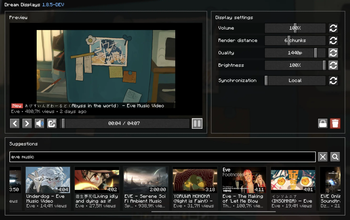
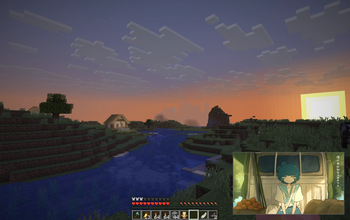
Create in-game screens to stream your favorite videos in Minecraft.
Screenshots


About this Mod


Bring real video playback to Minecraft
Watch videos, livestreams, and more directly on in-game displays — together with
your friends.
Create a display, paste a link and that's it!

Watch anything

| Source | What works | |
|---|---|---|
 |
YouTube | Videos and livestreams, ad-free, up to 4K, with multiple audio languages |
 |
Twitch | Live channels, VODs, and clips |
 |
Kick | Live channels and VODs |
 |
Vimeo | Public videos and live events |
 |
Bilibili | Videos, live channels, bungumi |
 |
Any video link | Direct video files and live streams |
   |
Share links | Google Drive, Dropbox, and Imgur direct links |
 |
Pretty much anywhere else | Not on the list? Try it anyway |
Built for multiplayer
Watch together with your friends with seamless multiplayer synchronization. Choose between local, synchronized, and
broadcast playback depending on how you want your displays to behave.
Dream Displays keeps playback synchronized across the server while keeping network usage extremely low.

Made for you
Dream Displays is built to make watching videos in Minecraft feel as natural as possible.
Your experience
|
Your server
|
Get started
Now it's your turn! Build your first display, invite your friends, and make displays a part of your world.
 ∙ Thanks to @whysumi_official for renders.
Available Versions
How to Install Dream Displays on Your Server
Order Server
Order a Minecraft Java server with at least 3 GB RAM (4 GB recommended).
Set bukkit Loader
In the panel under "Egg", select the bukkit loader and matching Minecraft version (26.3).
Install Mod
Open the mod browser in the dashboard and search for "Dream Displays". Click "Install" – done! Alternatively, upload the .jar via SFTP to the /mods folder.
Compatibility
Mod Loaders
Minecraft Versions
26.3, 26.2, 26.1.2 (+14 more)
Server-side
✓ RequiredRecommended RAM
4 GB(min. 3 GB)Frequently Asked Questions
Dream Displays server crashes on startup – what to do?
Most common cause: wrong bukkit version or insufficient RAM. Check the server log (latest.log) for "OutOfMemoryError" or "Mixin" errors. With Mado Hosting: ensure at least 3 GB RAM is allocated and the loader matches the mod version (26.3). You can switch loaders with one click in the panel.
Is Dream Displays compatible with bukkit and bungeecord and fabric and folia and neoforge and paper and purpur and quilt and spigot and velocity?
Dream Displays officially supports bukkit, bungeecord, fabric, folia, neoforge, paper, purpur, quilt, spigot, velocity for Minecraft 26.3, 26.2, 26.1.2. The Mado dashboard automatically detects incompatible loader combinations.
Server lagging with Dream Displays – how to optimize performance?
Recommended RAM: 4 GB (per 8 players). Use /spark profiler to check if Dream Displays consumes the most tick time. Common fixes: reduce server view-distance to 8-10, install "performant" or "starlight" as supplementary mods on Forge. With Mado Hosting, your server runs on NVMe SSDs with dedicated CPU cores for minimal latency.
Similar Mods






Rent Modded Server
Install Dream Displays with just one click on your server.